What Is AI Image Generator? Create Social Media Images With AI
Every Facebook post needs an image. Product announcements, blog promotions, event marketing, quote graphics, seasonal campaigns, engagement posts — they all perform better with a compelling visual. The problem is not knowing this. The problem is producing those visuals at the pace social media demands.
Hiring a designer for every post is expensive. Stock photo libraries are saturated — your audience has seen the same smiling-person-holding-a-laptop image on fifty other pages. And learning professional design tools takes months of practice to produce results that do not look amateur.
The AI Image Generator in FaceBot eliminates this bottleneck. Describe the image you want in plain language, and the tool generates a custom image ready for Facebook posts, ads, Stories, and any other social media placement. No design skills, no stock library, no template limitations.
What Does the AI Image Generator Do?#
The tool uses generative AI to create images from text descriptions (prompts). You describe what you want to see — the subject, style, mood, composition, colors — and the AI produces an original image matching your description.
This is not template-based design. The output is not a pre-made layout with swapped text. Each generated image is unique, created specifically from your prompt. Two users entering the same prompt will get different results.
Core capabilities:
- Text-to-image generation — describe your image in natural language and receive a generated result
- Style control — specify artistic styles: photorealistic, illustration, flat design, watercolor, 3D render, minimalist, and more
- Aspect ratio options — generate in square (1:1) for feed posts, vertical (9:16) for Stories, landscape (16:9) for cover images
- High resolution output — images are generated at resolutions suitable for social media posting without upscaling artifacts
- Multiple variations — generate several versions from the same prompt to choose the best one
- No usage restrictions — generated images can be used commercially on your pages and in ads
- Instant delivery — generation takes seconds, not hours
The tool is designed specifically for social media content production, not general-purpose AI art. The defaults, resolution options, and aspect ratios are optimized for the formats that matter on Facebook and other social platforms.
Why Use AI-Generated Images for Social Media?#
Speed#
A social media manager running 5 Facebook pages needs 5-10 new images per day minimum. At that volume, commissioning custom design or carefully selecting and editing stock photos for each post is unsustainable. AI generation produces usable images in seconds.
Uniqueness#
Every AI-generated image is original. Your competitors are not posting the same image. Facebook's duplicate content detection will never flag it. Your audience sees fresh visuals on every post rather than the same recycled stock photography.
Cost Efficiency#
Stock photo subscriptions run $20-300 per month. Custom graphic design services start at $50 per image. AI generation produces unlimited images within your plan at no additional per-image cost. For high-volume content operations, the savings are substantial.
Creative Flexibility#
Need an image of a golden retriever wearing a business suit in a corporate boardroom? Stock libraries do not have that. A designer would charge premium rates for a custom illustration. The AI generator produces it in seconds. The creative range is essentially unlimited — if you can describe it, the tool can generate it.
Consistency at Scale#
When you find a prompt style that works for your brand — a particular artistic style, color palette, or composition approach — you can replicate that style across dozens of posts by using similar prompt structures. This creates visual consistency without requiring a design system or brand guidelines document.
Who Should Use AI Image Generator?#
Small Business Owners#
Businesses without a dedicated designer or marketing team need visuals for every post, promotion, and announcement. The AI generator lets a single person produce professional-quality images without outsourcing. A restaurant can generate images for daily specials. A fitness studio can create motivational quote backgrounds. A retail store can produce seasonal promotional graphics.
Social Media Managers and Agencies#
Managing multiple clients means producing diverse visual content across different brand aesthetics. The AI generator eliminates creative blocks and production delays. Need a corporate-style image for a B2B client and a vibrant lifestyle image for a fashion client? Generate both in under a minute.
Content Creators and Influencers#
Between major productions — photoshoots, video content, collaborations — AI-generated images fill the content calendar with engaging visuals. They work particularly well for quote graphics, discussion starters, opinion posts, and thematic content where the visual supports the text rather than being the primary content.
E-Commerce Sellers#
Product promotion needs variety. The same product photo posted repeatedly loses engagement. AI-generated lifestyle images, background variations, and promotional graphics keep the visual presentation fresh without additional photography.
Event Marketers#
Event promotion requires a stream of visual content: save-the-dates, speaker spotlights, venue previews, countdown graphics, post-event recaps. AI generation produces all of these from descriptive prompts without requiring finished design assets.
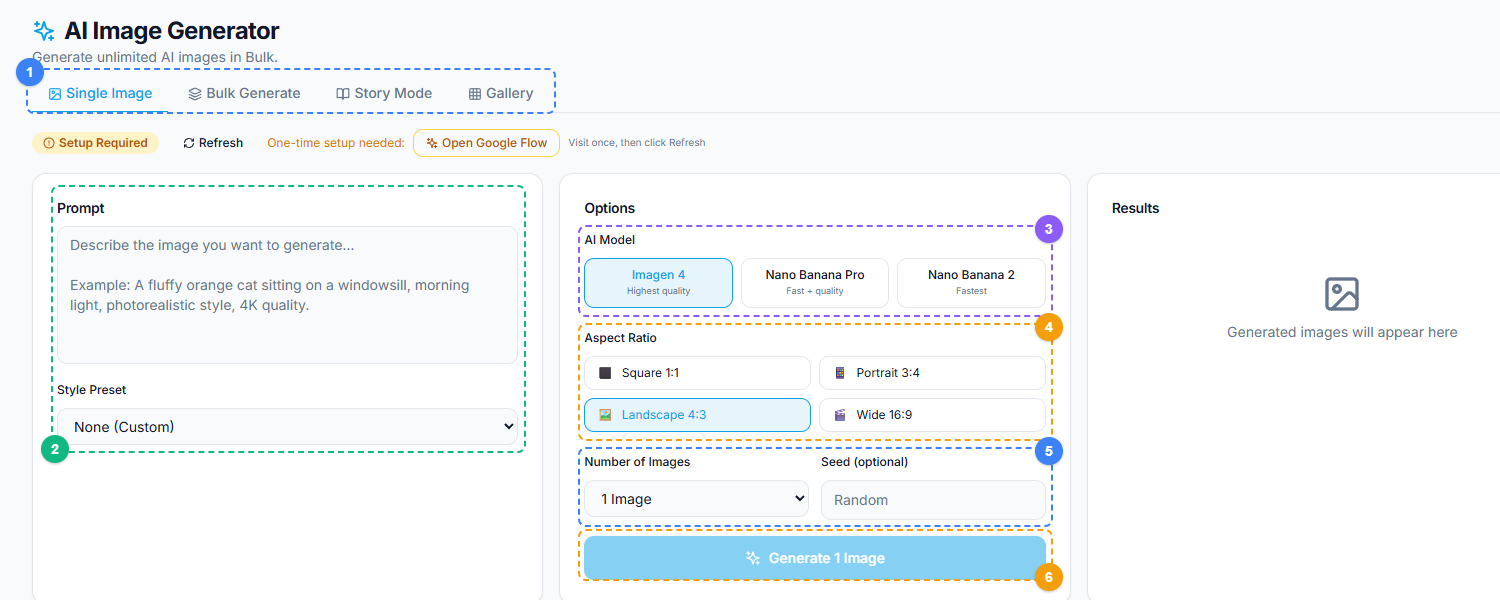
The AI Image Generator uses a three-column layout. Switch between Single Image, Bulk Generate, Story Mode, and Gallery tabs (1), write your image prompt and select a style preset in the left panel (2), choose an AI model — Imagen 4, Nano Banana Pro, or Nano Banana 2 (3), pick an aspect ratio for your output (4), set the number of images and optional seed value (5), then click Generate to create your image (6).
How to Use the AI Image Generator#
Step 1: Open the Tool#
Navigate to the AI Image Generator in the Content Creation suite. The interface is a single prompt input field with configuration options.
Step 2: Write Your Prompt#
Describe the image you want. The more specific your prompt, the closer the output matches your vision. Include:
- Subject: What is in the image (a person, product, scene, object, abstract concept)
- Style: How it should look (photorealistic, illustration, flat design, oil painting, etc.)
- Mood: The feeling it should convey (professional, energetic, calm, luxurious, playful)
- Colors: Dominant color palette (warm tones, blue and white, brand colors)
- Composition: How elements are arranged (centered, rule of thirds, close-up, wide shot)
Example prompts:
- "A photorealistic image of a modern coffee shop interior with warm lighting, wooden tables, and plants, shot from a wide angle"
- "A flat design illustration of a rocket launching from a laptop screen, vibrant colors, blue background, suitable for a tech startup announcement"
- "A minimalist product photography setup with a white skincare bottle on a marble surface, soft natural lighting, clean background"
Step 3: Select Aspect Ratio#
Choose the output dimensions:
- 1:1 (Square) — Facebook feed posts, Instagram
- 9:16 (Vertical) — Facebook Stories, Reels, mobile-first content
- 16:9 (Landscape) — Facebook cover images, link previews, YouTube thumbnails
- 4:5 (Portrait) — Facebook feed posts with maximum vertical real estate
Step 4: Generate and Select#
Click generate. Review the output. If the first result is not what you need, refine your prompt or generate additional variations. Download the image you want.
Step 5: Post or Refine#
Use the downloaded image directly in a Facebook post, or run it through additional tools — the Image to Video Converter to turn it into a video post, or Image Anti-Detection if you are posting variations across multiple pages.
Writing Effective Prompts#
The quality of AI-generated images depends almost entirely on the quality of the prompt. Here are principles that produce better results:
Be specific, not vague. "A nice picture for my business" produces generic results. "A professional photograph of a woman in a navy blazer presenting to a small team in a modern office with floor-to-ceiling windows" produces something usable.
Specify the style explicitly. The AI defaults to photorealistic if no style is mentioned. If you want illustration, flat design, watercolor, 3D render, or any other style, state it clearly in the prompt.
Include lighting descriptions. Lighting dramatically affects mood. "Soft natural lighting" reads as calm and authentic. "Dramatic studio lighting with strong shadows" reads as bold and high-end. "Golden hour sunset lighting" reads as warm and aspirational.
Mention what to exclude. If your generated images keep including unwanted elements, explicitly state what should not be in the image. "No text," "no people," or "clean background with no objects" helps the AI avoid common additions you do not want.
Iterate on successful prompts. When a prompt produces a good result, save it. Modify it incrementally for future images. Building a library of proven prompt templates is more efficient than writing new prompts from scratch every time.
🚀 Ready to try AI Image Generator?
Generate stunning images with AI instantly
Open it Now →Limitations to Know#
AI image generation is powerful but not without constraints. Being aware of these helps set appropriate expectations:
Text rendering is unreliable. AI models struggle with generating readable text within images. If your image needs specific words, numbers, or logos, add those in a design tool after generating the base image. Do not rely on the AI to render text correctly.
Brand-specific elements require post-processing. The AI cannot place your exact logo, use your exact brand font, or match your exact Pantone color with pixel-perfect accuracy. For brand-consistent content, use AI generation for the background or base visual, then overlay brand elements using a design tool.
Photorealistic faces have ethical considerations. AI-generated photorealistic faces of people who do not exist raise questions about authenticity and disclosure. For social media content, consider using illustration styles for people, or clearly labeling photorealistic AI-generated images if they could be mistaken for photographs of real individuals.
Results vary by prompt complexity. Simple subjects and compositions produce more consistent, higher-quality results. Highly complex scenes with multiple specific elements may require several generation attempts to get right.
Not a replacement for professional photography. For product photography where exact representation matters — the actual color of a physical product, the real interior of your business, your actual team — use real photographs. AI-generated images are for supplementary, conceptual, and creative content.
How to Get Started#
The AI Image Generator is available in FaceBot's Content Creation suite. Start by generating a few test images with prompts relevant to your business or content niche. Experiment with different styles, aspect ratios, and levels of prompt specificity to find what produces the best results for your use case.
For high-volume content operations, the tool integrates into a broader workflow: generate the image, optionally convert it to video with the Image to Video tool, process it through Image Anti-Detection for multi-page campaigns, or drop it into a carousel post.
Conclusion#
Creating original visual content for social media has traditionally required either design skills, stock photo subscriptions, or hiring a creative team. FaceBot's AI Image Generator removes those barriers by letting you describe what you need and receiving a ready-to-post image in seconds. For small businesses, solo creators, and marketers running multiple pages, this changes the economics of content production entirely.
The tool works best as part of a broader content pipeline: generate images, convert them to video, process them through anti-detection for multi-page use, and schedule them across your pages. FaceBot's content creation suite handles each of these steps, so you spend less time producing content and more time on the strategy behind it.
→ Try FaceBot's social media tools free
Frequently Asked Questions#
Q: Can I use AI-generated images in Facebook Ads?#
Yes. AI-generated images meet Facebook's ad creative requirements. They are standard image files (JPEG/PNG) that you can upload to Ads Manager like any other creative asset. Facebook does not currently require disclosure that an ad image was AI-generated, though advertising standards in your jurisdiction may vary.
Q: Are the generated images unique to me?#
Each generated image is unique. Even if two users enter identical prompts, the AI produces different outputs due to the stochastic nature of the generation process. You will not see your image appearing on other pages or in stock libraries.
Q: How many images can I generate?#
Generation limits depend on your plan tier. Each plan includes a daily allocation of AI generation requests. Check your plan details for specific limits. For most social media workflows, the included generation quota covers daily content needs.
Q: Can I generate images of specific real people or brands?#
The AI is designed to generate original content, not replicate specific real individuals or reproduce copyrighted brand assets. Prompts requesting specific celebrities, public figures, or trademarked brand imagery may produce generic results or be filtered. For content featuring real people, use actual photographs with proper permissions.
Q: What if the generated image does not match what I described?#
Refine your prompt with more specific details. Add descriptive adjectives, specify the style more precisely, or break complex scenes into simpler elements. AI image generation is iterative — the first attempt is a starting point. Most users find that 2-3 prompt refinements produce the desired result.