What Is the 2 Card Video Carousel? Compact Video Posts for Facebook Pages
Not every carousel needs ten cards. Sometimes you have exactly two videos that belong together -- a before and after, a problem and a solution, a product in two colors, a comparison of two approaches. In those cases, a full multi-card carousel feels excessive, and posting two separate videos splits your engagement across two posts.
The 2 Card Video Carousel is a purpose-built tool in FaceBot that creates a compact two-video carousel post for Facebook pages. It uses the same native carousel format as larger carousels but is specifically optimized for the two-card use case: faster setup, cleaner presentation, and a format that feels intentional rather than like an incomplete carousel.
Why Two Cards Specifically?#
The Power of Pairs#
Two-card content has a natural narrative structure that larger carousels lack. Human cognition is wired for binary comparisons: before/after, old/new, problem/solution, question/answer. When a user sees a two-card carousel, they instinctively want to see the second card. The completeness of the pair creates a micro-story with a beginning and an end.
This is different from a five-card carousel, where users may swipe through three cards and abandon the rest. With two cards, completion rates are significantly higher because the viewer needs only one swipe to see everything. That single swipe generates an engagement signal, and the near-guaranteed completion means both videos get watched.
Mobile-First Design#
Facebook's mobile feed is where the majority of content consumption happens. A two-card carousel sits cleanly in the mobile viewport. The first card fills the screen, and the visible edge of the second card creates a clear visual cue to swipe. There is no ambiguity about how much content remains -- users can see at a glance that one swipe completes the experience.
Lower Production Barrier#
Creating ten carousel cards requires ten pieces of polished content. Two cards requires two. This makes the 2 Card Video Carousel accessible to small businesses, solo creators, and marketers who want the engagement benefits of carousels without the production overhead of a full multi-card post.
Use Cases That Work Best with Two Videos#
Before and After#
Fitness coaches, renovation companies, cleaning services, beauty professionals, and anyone who demonstrates transformations. Card one shows the starting state. Card two shows the result. The single swipe from "before" to "after" is deeply satisfying and drives high engagement.
Problem and Solution#
Card one presents a problem the audience recognizes -- a common frustration, a broken workflow, a messy situation. Card two shows the solution in action. This format is effective for product demonstrations, software walkthroughs, and service explanations.
Product Comparison#
Show two variants of a product side by side: two colors, two sizes, two models, or your product versus a generic alternative. Each video demonstrates one variant, and the swipe lets the viewer compare directly.
Two-Part Story#
Split a narrative into a setup and a payoff. The first video creates anticipation or curiosity. The second delivers the resolution. This works well for storytelling brands, entertainment accounts, and any content that benefits from a two-beat structure.
Testimonial Pair#
Feature two different customers sharing their experiences. Two testimonials are more credible than one -- they suggest a pattern rather than a single data point -- without requiring the viewer to sit through a longer compilation video.
Quick Tutorial#
Step one in the first card, step two in the second. This works for recipes with a prep phase and a cooking phase, crafts with an assembly and a finishing step, or any two-step process.
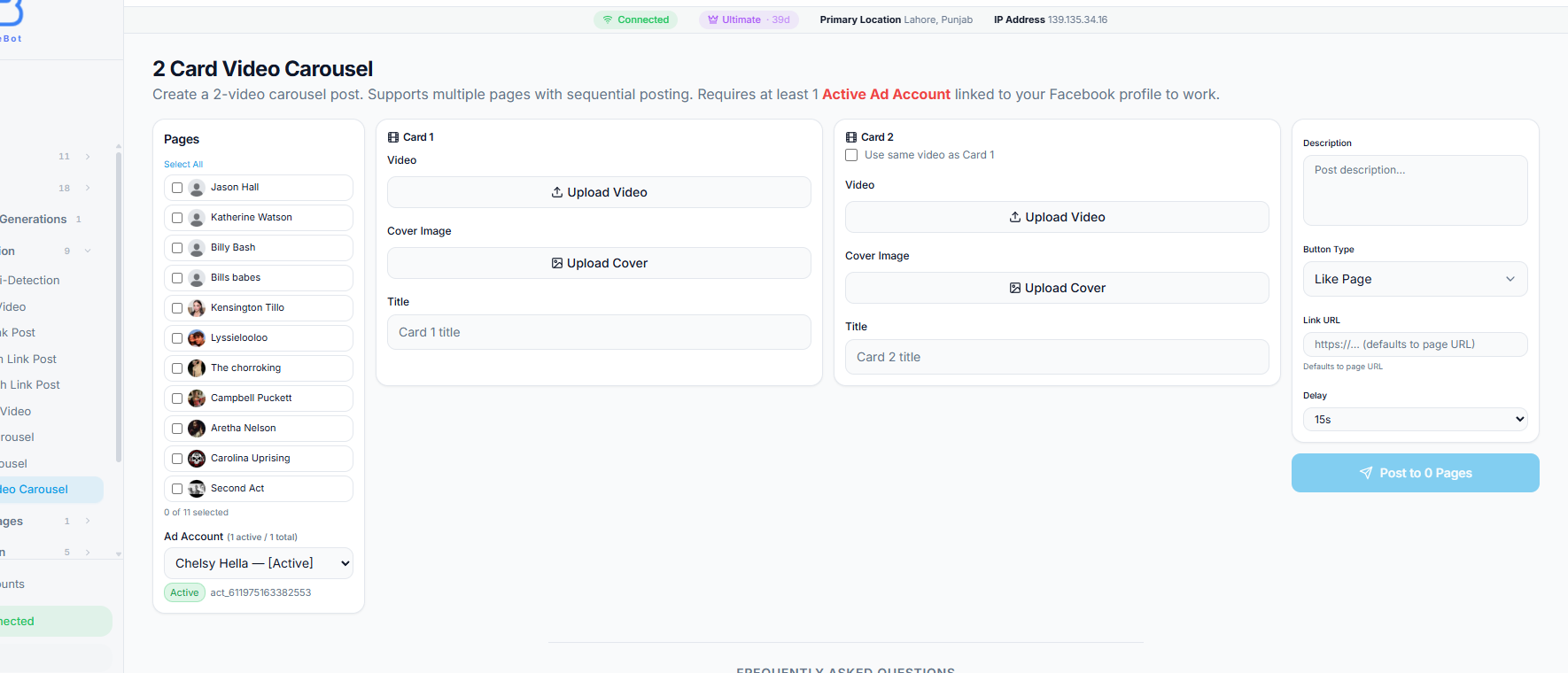
The 2 Card Video Carousel tool lays out the full workflow in a four-column view. Select one or more pages from the pages list with ad account below (1), configure Card 1 with a video file, cover image, and title (2), configure Card 2 with its own video, cover, and title or reuse Card 1's video (3), set the post description, CTA button type, link URL, and delay between pages (4), then publish to all selected pages (5).
Step-by-Step: Creating a 2 Card Video Carousel#
Step 1: Open the Tool#
Navigate to the 2 Card Video Carousel tool in FaceBot's Content Creation section. Select the Facebook page you want to post to.
Step 2: Upload Both Videos#
Upload the video for card one and the video for card two. Keep the following in mind:
- Aspect ratio: Use the same aspect ratio for both videos. Square (1:1) is the most reliable for mobile display. Mixing aspect ratios within the carousel causes inconsistent cropping.
- Duration: 15-45 seconds per video is optimal. Since you only have two cards, each video can be slightly longer than in a 5-10 card carousel, but do not exceed 60 seconds without good reason.
- Audio: Design for sound-off viewing. Add captions or text overlays so the content is comprehensible on mute.
- Quality: The two-card format puts more visual weight on each individual video. Low-quality footage is more noticeable when there are only two cards to look at.
If you are converting still images to video content for this format, the image-to-video converter can produce short video clips with zoom, pan, and transition effects.
Step 3: Configure Each Card#
For each of the two cards:
- Headline: A short label or title for this video (under 40 characters)
- Description: Optional supporting text
- Link URL: Where clicks on this card go -- each card can point to a different destination
- Call-to-Action: Select from standard options ("Shop Now," "Learn More," etc.)
Step 4: Write Post Copy#
The text above the carousel should frame the two-card content. Effective approaches for two-card carousels:
- "Swipe to see the result" (for before/after)
- "Which do you prefer? Swipe to compare" (for comparisons)
- "The problem. Then the fix." (for problem/solution)
Keep it short. Two-card carousels work best with minimal post copy because the format itself is concise.
Step 5: Publish#
Review both cards, verify the links, and publish. The post appears as a native two-card carousel in the Facebook feed.
2 Card Video Carousel vs. Other Formats#
Understanding when to use this format versus alternatives helps you choose the right tool for each situation.
vs. Single Video Post#
A single video post delivers one continuous message. The 2 Card Video Carousel delivers two distinct but related messages with a physical separation (the swipe) between them. Use the carousel when your content has a clear two-part structure. Use a single video when the content flows as one continuous piece.
vs. Full Video Carousel (3-10 Cards)#
The full Video Carousel is for showcasing multiple items: product lines, feature sets, testimonial collections, multi-step tutorials. The 2 Card version is for paired content. Using a 10-card carousel when you only have two meaningful videos results in either filler cards or an awkward two-card post that feels like you ran out of content. FaceBot's dedicated 2 Card tool is optimized for the two-card format specifically.
vs. Side-by-Side Video#
Some creators manually create side-by-side comparison videos using editing software. The 2 Card Carousel achieves the same comparison effect while giving each video the full post width and its own link. Side-by-side videos also halve the resolution of each clip, while carousel cards display each video at full resolution.
vs. Swipe Up Video Post#
The Swipe Up Video Post is a different format that adds a swipe-up call-to-action to a single video. If you need a single video with a link, use Swipe Up. If you need two videos with individual links, use the 2 Card Video Carousel.
Best Practices#
Make the Swipe Feel Inevitable#
The transition from card one to card two should feel like a natural continuation, not an arbitrary split. If the viewer does not feel compelled to swipe, you have lost the format's primary advantage. Create a visual or narrative hook at the end of video one that demands resolution on video two.
Balance the Two Cards#
Both videos should be roughly equal in quality, effort, and length. If card one is a polished 30-second clip and card two is a 5-second afterthought, the viewer feels shortchanged. Each card should justify its existence in the carousel.
Use Contrasting Content#
The format works best when the two videos show something different -- not just more of the same. Contrast is the engine that drives the swipe: before/after, quiet/loud, problem/solution, old/new. If both cards show essentially the same content, users have no reason to engage with the second card.
Keep Post Copy Minimal#
Two-card carousels have a built-in brevity. Long-form post copy above a compact carousel creates a visual mismatch. Two to three lines of text is usually sufficient to frame the content and encourage the swipe.
Limitations#
- Pages only. This format publishes to Facebook pages, not personal profiles or groups.
- Exactly two cards. This tool is designed for two videos. If you need three or more, use the standard Video Carousel tool instead.
- No image-video mixing. Both cards must be videos. For image carousels, see the carousel creation guide.
- Processing time. Facebook encodes each video after upload. With two videos, processing is faster than a full carousel but still takes a few minutes before the post goes live.
- No editing after publish. Cards cannot be modified or swapped once the carousel is published. Verify everything before hitting publish.
Frequently Asked Questions#
Can I use different aspect ratios for each card?#
Technically, Facebook will accept videos of different aspect ratios. In practice, it causes inconsistent display -- one card might have black bars while the other fills the frame. Always use the same aspect ratio for both videos, preferably 1:1 (square).
Is the 2 Card Video Carousel treated differently by the algorithm than a full carousel?#
Facebook's algorithm treats all carousel posts similarly in terms of engagement signals. The key difference is behavioral: two-card carousels have higher completion rates because users only need one swipe. This near-universal completion sends a strong engagement signal even though the total dwell time may be shorter than a 10-card carousel.
Can I schedule a 2 Card Video Carousel for later?#
Yes. FaceBot allows scheduling for all post types, including the 2 Card Video Carousel. Set your preferred publish date and time during the creation process.
What video length works best?#
For two-card carousels, 15-45 seconds per video is the sweet spot. The format is inherently compact, so lengthy videos per card undermine the format's strength. If each video needs to be over 60 seconds, consider whether a single longer video post would serve the content better.
Can I use this for Facebook Reels?#
No. Carousels and Reels are separate Facebook formats with different creation pipelines. This tool creates carousel posts in the standard feed format, not Reels.
Conclusion#
The 2 Card Video Carousel is a focused tool for a specific content pattern: paired videos that belong together. It is simpler to produce than a full multi-card carousel, more engaging than posting two separate videos, and better suited for comparison and transformation content than any single-video format.
FaceBot's dedicated tool for this format streamlines the creation process and ensures the post uses Facebook's native carousel structure for maximum feed performance.
Create a 2 Card Video Carousel now