
What Is Image Anti-Detection? Make Your Images Unique on Facebook
Facebook's content moderation systems do not just analyze text. They scan every image uploaded to the platform, comparing it against a massive database of previously seen content using perceptual hashing and machine learning classifiers. When the system identifies an image as a duplicate — or near-duplicate — of content that has already been flagged, restricted, or widely circulated, it can suppress reach, trigger review, or block the post entirely.
This creates a real problem for legitimate use cases. Affiliate marketers, e-commerce sellers, franchise operators, and social media managers frequently need to post the same product image, promotional graphic, or brand asset across multiple pages, groups, and accounts. Every repost of the same file increases the risk of Facebook's duplicate detection treating it as spam or recycled content.
Image Anti-Detection in FaceBot solves this by modifying the image at a pixel level — making it unique to Facebook's detection systems while keeping it visually identical to the human eye.
How Facebook Detects Duplicate Images#
Understanding the problem requires understanding the detection mechanism. Facebook uses several overlapping systems:
Perceptual Hashing (pHash)#
When you upload an image, Facebook generates a perceptual hash — a compact fingerprint derived from the image's visual structure. Unlike a cryptographic hash (where changing one pixel produces a completely different hash), perceptual hashing is designed to recognize images that look similar even after resizing, compression, or minor edits.
Two images with the same perceptual hash are flagged as duplicates. Images with very similar hashes are flagged as near-duplicates.
Visual Similarity Models#
Beyond hashing, Facebook employs deep learning models that understand image content semantically. These models can identify that two images show the same product, same scene, or same graphic layout — even if the pixel data is significantly different. This is why simple edits like flipping an image or adding a border stopped working years ago.
Content Fingerprinting#
For images that have been previously reported, flagged, or associated with policy violations, Facebook maintains a fingerprint database. Any new upload matching a known fingerprint gets automatic scrutiny, reduced distribution, or outright rejection.
Cross-Account Correlation#
When the same image (by hash or visual similarity) appears across multiple accounts or pages in a short time window, Facebook's spam detection systems flag the pattern. This is the mechanism that hurts legitimate multi-page operators most directly.
🚀 Image Anti-Detection
Make images unique to bypass duplicate detection
Try it Free →What Image Anti-Detection Actually Does#
The Image Anti-Detection tool applies a series of modifications to your image that are imperceptible to human viewers but sufficient to produce a unique perceptual hash and evade visual similarity matching.
The modifications include:
- Pixel-level noise injection — subtle changes to color values across the image that alter the hash without affecting visual appearance
- Metadata stripping and rewriting — EXIF data, color profiles, and embedded metadata are cleaned and regenerated
- Compression pattern alteration — the JPEG or PNG encoding is restructured so the file's binary signature is unique
- Micro-geometric adjustments — imperceptible shifts in image geometry that change how the content is interpreted by detection models
- Color space manipulation — minor adjustments to color channels that fall below the threshold of human perception but register as differences to automated systems
The result is an image that looks exactly the same to anyone viewing it — same colors, same composition, same quality — but registers as a unique, never-before-seen image to Facebook's detection systems.
Who Needs Image Anti-Detection?#
Affiliate Marketers#
Affiliate marketing on Facebook often involves promoting the same products across multiple ad sets, pages, and groups. The product images come from the merchant or affiliate network — meaning thousands of other affiliates are uploading the exact same files. Without modification, your posts compete against every other upload of the same image in Facebook's duplicate detection system.
E-Commerce Sellers#
Online sellers posting product listings across multiple Facebook Marketplace listings, selling groups, and business pages face the same issue. A product catalog with 50 items needs to appear across 10 groups — that is 500 posts. If all 500 use the same source images, Facebook's spam detection will progressively throttle or block them.
Multi-Location Businesses and Franchises#
A franchise with 30 locations might share the same promotional graphics from corporate marketing. Each location's Facebook page posting the same image triggers cross-account correlation flags. Image Anti-Detection lets each location post visually identical promotions without the duplication penalty.
Social Media Agencies#
Agencies managing multiple clients in the same industry often work with similar visual templates. Running the same style of promotional graphic across client accounts — even if the text and branding differ — can trigger visual similarity flags if the underlying image structure is too similar.
Content Republishers#
Pages that curate and share content across topic-specific pages need to avoid duplicate flags when the same image appears on multiple properties. Modifying each instance before posting maintains reach across all placements.
How to Use Image Anti-Detection in FaceBot#
The tool is designed for speed. The workflow takes seconds per image.
Step 1: Upload Your Image#
Open the Image Anti-Detection tool in the Content Creation suite. Upload the image you want to make unique. The tool accepts JPEG, PNG, and WebP formats up to 10 images at once.
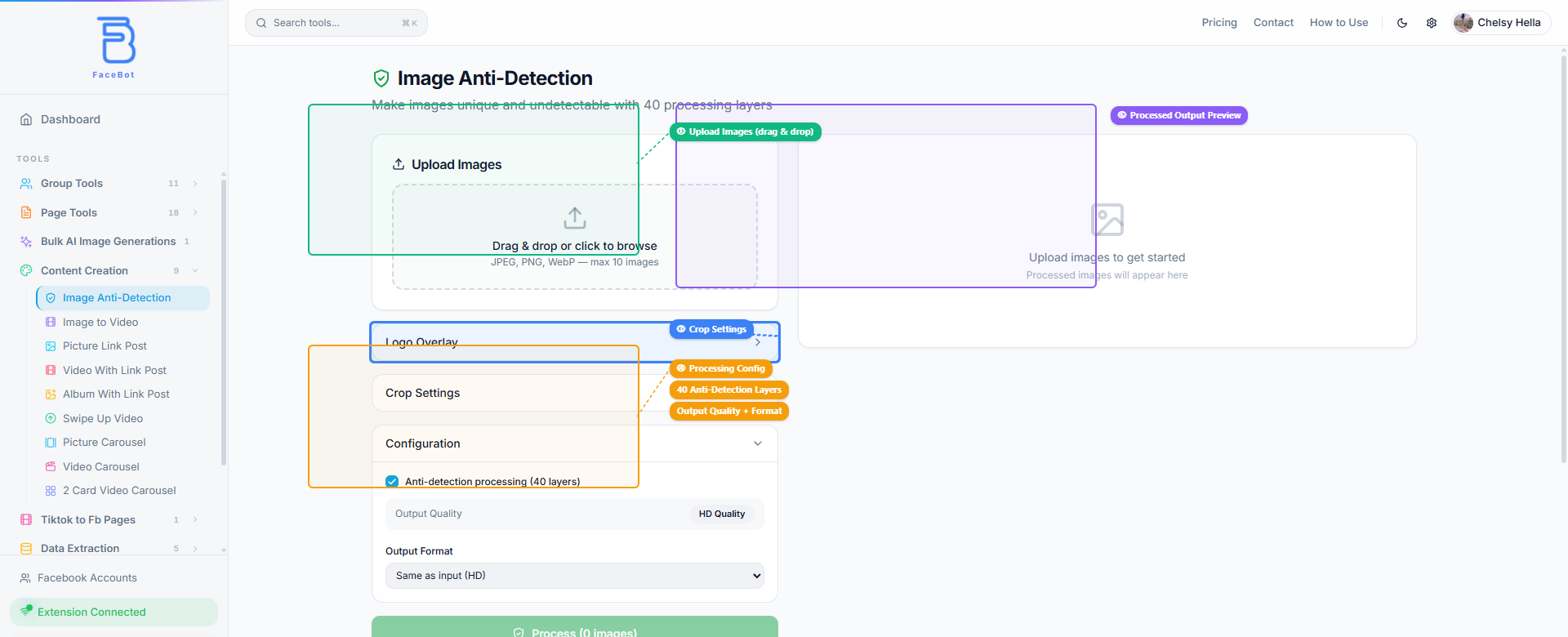
You can also configure optional settings before processing: add a logo overlay, adjust crop settings, select output quality (HD or compressed), and choose the output format.
Step 2: Process#
Click the process button. The tool applies its modification stack to your image. Processing takes a few seconds per image.
Step 3: Download the Modified Image#
Download the output image. It will appear visually identical to your original but will produce a unique hash when uploaded to Facebook.
Step 4: Post to Facebook#
Upload the modified image to Facebook as you normally would. It will be treated as a unique image by the platform's detection systems.
For batch workflows — processing dozens or hundreds of images for multi-page campaigns — repeat the process for each image. Each output is independently unique, so you can post the same source image to 50 different pages and each instance will register as distinct content.
What Image Anti-Detection Does NOT Do#
Transparency matters here. The tool has clear boundaries:
It does not bypass content policy enforcement. If your image violates Facebook's community standards — prohibited content, misleading claims, intellectual property violations — making it unique will not prevent policy enforcement. Facebook's content classifiers analyze what the image depicts, not just its hash. Policy violations are about content, not duplication.
It does not guarantee unlimited reach. Facebook's algorithm considers hundreds of signals beyond image uniqueness. Post timing, audience engagement, page history, and content relevance all affect distribution. The tool removes the duplicate-detection penalty — it does not override every other ranking factor.
It does not work retroactively. If an image has already been posted and flagged, processing it through Anti-Detection and reposting will not reverse the existing flag on the original post. It creates a clean slate for future posts using that image.
It does not make images invisible to manual review. Human moderators reviewing flagged content will see the image for what it is. The tool's modifications affect automated detection systems, not human judgment.
🚀 Ready to try Image Anti-Detection?
Make images unique to bypass duplicate detection
Try it Free →Best Practices for Image Anti-Detection#
Process before every upload, not once per image. Each time you need to post the same image to a new destination, run it through Anti-Detection again. Do not reuse a previously processed version across multiple posts — that just creates a new duplicate chain.
Combine with other content variations. For maximum effectiveness, pair Anti-Detection with actual content variations: different crop ratios, different text overlays, different background colors. Anti-Detection handles the technical fingerprint; content variation handles the visual similarity models.
Do not overpost. Anti-Detection removes the image duplication signal, but posting the same content too frequently from the same page still triggers behavioral spam flags. Maintain reasonable posting intervals regardless of image uniqueness.
Keep original files organized. Process images on a per-campaign, per-destination basis. Maintain your original unmodified source files separately so you always have the clean version for other channels and for reprocessing.
How to Get Started#
Image Anti-Detection is available in FaceBot's Content Creation suite. It is particularly valuable for any workflow where the same visual assets need to appear across multiple Facebook destinations — pages, groups, Marketplace listings, or ad sets.
If you are running multi-page campaigns, cross-posting product images, or managing promotional content for multiple locations, processing images through Anti-Detection before each upload is the simplest way to protect your reach from duplicate content suppression.
For a complete overview of content creation tools available in FaceBot, including video conversion, carousels, and AI image generation, see the complete guide to Facebook content creation.
Conclusion#
Duplicate content suppression is a real and measurable problem for anyone posting the same images across multiple pages or accounts. Facebook's visual fingerprinting system penalizes repeated uploads, reducing reach each time the same image appears. FaceBot's Image Anti-Detection tool solves this by making each copy visually unique to the algorithm while remaining identical to the human eye.
For multi-page operators, e-commerce brands, and agencies managing campaigns at scale, running images through anti-detection before uploading is a simple step that protects your organic reach. It takes seconds per image and prevents the kind of silent suppression that can quietly kill an entire campaign's performance.
→ Try FaceBot's social media tools free
Frequently Asked Questions#
Q: Does Image Anti-Detection reduce image quality?#
No. The modifications are applied at a level that is imperceptible to the human eye. The output image maintains the same visual quality, resolution, and color accuracy as the original. Side-by-side comparisons show no visible difference.
Q: Can Facebook still detect the modified image as a duplicate?#
The tool is designed to produce images that evade current perceptual hashing and visual similarity detection methods. However, detection technology evolves continuously. The tool's modification algorithms are updated to stay ahead of known detection methods, but no tool can guarantee permanent undetectability against future systems.
Q: Is using Image Anti-Detection against Facebook's terms of service?#
Facebook's terms prohibit spam, misleading content, and coordinated inauthentic behavior. They do not prohibit editing your images before uploading them. Processing an image to make it unique is functionally the same as applying a filter or making edits in Photoshop — the platform receives a unique image file. The responsibility for what you post and why remains with you.
Q: How many times can I process the same source image?#
There is no limit. Each time you process the same source image, the tool generates a unique output. You can process the same product photo 100 times and get 100 distinct images, each registering as unique content on Facebook.
Q: Does this work for video thumbnails and ad creatives too?#
The tool processes static images — JPEG, PNG, and WebP files. For video content, Facebook uses different detection mechanisms (video fingerprinting and audio matching). If you are creating video ads from images, consider processing the source images through Anti-Detection first, then converting them to video using the Image to Video Converter.