What Is Create BM Pages? Bulk Create Facebook Business Manager Pages
Creating a single Facebook Page through Business Manager takes about five minutes. You fill out the name, category, description, upload images, configure settings, and publish. Now multiply that by 20, 50, or 100 pages. Agencies onboarding new clients, affiliate marketers launching niche pages, and multi-brand businesses expanding their social presence all face the same bottleneck: Facebook provides no native way to create pages in bulk.
The Create BM Pages tool in FaceBot automates the creation of multiple Facebook Business Manager pages in a single workflow. Define your page names, categories, and details, and the tool handles the repetitive creation process so you can focus on strategy rather than form-filling.
What Does the Create BM Pages Tool Do?#
The tool connects to your Facebook Business Manager account and creates multiple pages according to the specifications you provide. Here is what it handles:
Bulk page creation. Specify multiple page names and categories, and the tool creates each page within your Business Manager. No manual repetition of the creation form.
Business Manager integration. Pages are created directly inside your Business Manager, which means they inherit your BM's settings, permissions, and organizational structure from the start. You do not need to create pages externally and then claim them.
Category assignment. Assign Facebook page categories during creation. Correct categorization matters for Facebook's recommendation system and for appearing in relevant searches.
Consistent naming. When creating pages at scale, maintaining naming consistency is easy to lose track of. The bulk creation interface lets you define and review all page names before execution, catching typos or naming conflicts upfront.
Ownership control. All pages created through the tool are immediately owned by your Business Manager, giving you full administrative control from the moment of creation.
Who Needs Bulk Page Creation?#
Marketing Agencies#
Agencies that manage social media for multiple clients frequently need to create new pages — for new clients, for client campaigns, for test pages, or for regional variations of a client's brand. Creating these one by one through Business Manager is a time sink that does not require creative skill or strategic thinking. It is pure administrative overhead that the Create BM Pages tool eliminates.
Affiliate and Niche Marketers#
Affiliate marketers often operate across multiple niches, each with its own dedicated Facebook Page. A marketer running campaigns across health supplements, outdoor gear, and tech accessories might need separate pages for each vertical, each sub-niche, and sometimes each product line. Building this page infrastructure manually is the kind of setup work that delays actual marketing.
Multi-Location Businesses#
A restaurant chain with 30 locations, a franchise with 50 outlets, a service business operating in 15 cities — each location often benefits from its own Facebook Page for local SEO, local community engagement, and location-specific promotions. The Create BM Pages tool lets the corporate team spin up all location pages in one batch.
Test and Research Operations#
Marketers who test different branding approaches, page names, or content strategies across multiple pages need fast page creation and teardown. Creating test pages manually introduces friction that discourages experimentation.
Media and Publishing Companies#
Publishers operating multiple brands, verticals, or editorial properties need separate pages for each. A media company with a news vertical, a lifestyle vertical, and a sports vertical — each possibly with sub-brands — may need dozens of pages configured under one Business Manager.
How to Use the Create BM Pages Tool#
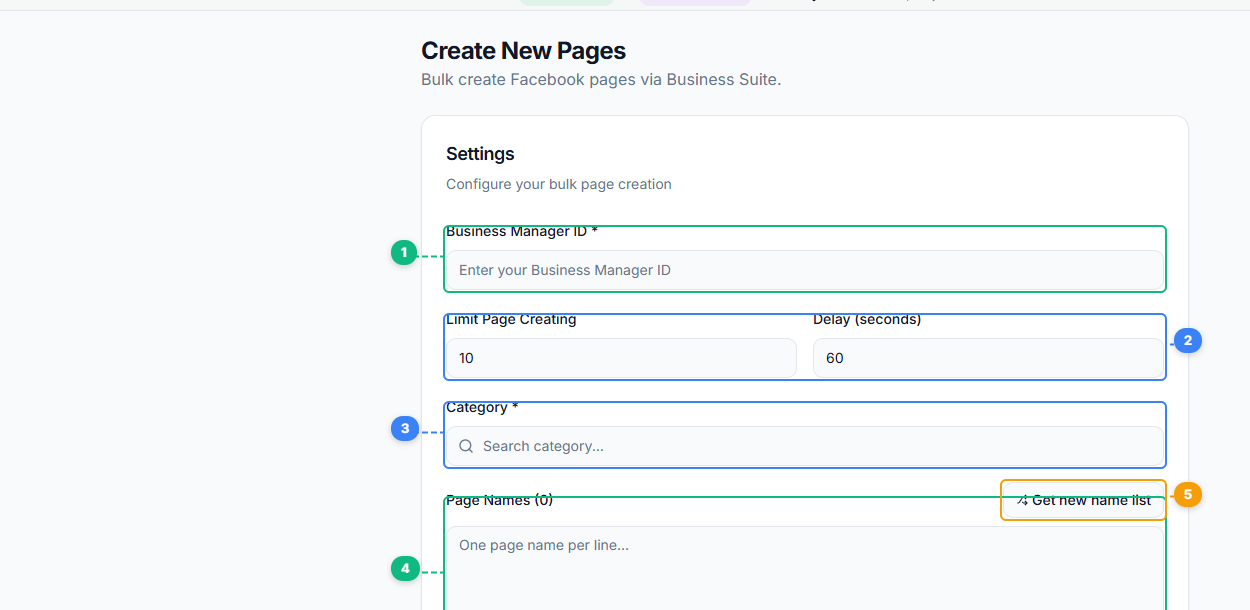
The Create New Pages tool walks you through the setup. Enter your Business Manager ID (1), set how many pages to create and the delay between each creation (2), search and select a page category (3), enter page names one per line or use the AI-powered name generator (4) to auto-generate names with the Get new name list button (5).
- Open the FaceBot dashboard and navigate to the Create BM Pages tool.
- Connect your Facebook Business Manager account if you have not already done so.
- Enter the details for each page you want to create: page name and category at minimum.
- Review the full list before executing. Check for naming errors, duplicate names, and correct category assignments.
- Execute the bulk creation.
- Verify that all pages appear in your Business Manager's page list with the correct names and categories.
After creation, you can begin populating these pages with content using tools like the Bulk Page Composer to publish across all your new pages simultaneously.
Best Practices for Bulk Page Creation#
Plan your naming convention before creating. Establish a clear naming pattern — especially for multi-location or multi-niche operations. "Brand Name - Location" or "Brand Name | Vertical" formats make pages easy to identify and manage. Changing page names later is possible but not instant, as Facebook reviews name changes.
Choose categories carefully. Facebook page categories affect search visibility and the recommendation engine. A page miscategorized at creation can underperform in discovery until the category is corrected. Take the time to select accurate categories during bulk creation rather than planning to fix them later.
Do not create more pages than you can maintain. This is the most common mistake with bulk page creation. Having 50 pages with no content or engagement is worse than having 10 well-maintained pages. Create pages in batches that match your content production capacity.
Set up page roles immediately after creation. Once pages are created, assign appropriate team members to each page with the correct roles (admin, editor, moderator). Pages sitting in Business Manager with no assigned team members are administrative orphans that get neglected.
Document your page inventory. Maintain a spreadsheet or database that maps each page to its purpose, assigned team, content schedule, and performance benchmarks. Bulk creation makes it easy to lose track of what each page is for.
Create BM Pages Within a Broader Page Management Workflow#
Page creation is step one. The real work begins after the pages exist. FaceBot provides a suite of tools for the subsequent stages:
- Content publishing: Use the Bulk Page Composer to publish content across multiple pages.
- Content discovery: Use the Viral Pages Content Finder to identify trending content in your niche.
- Cross-promotion: Use the Share to Pages tool to distribute content across your page network.
- Performance management: Use the Page Post Manager to monitor and manage posts across all your pages from one dashboard.
The Create BM Pages tool handles the infrastructure layer so that these content and management tools have pages to operate on.
Limitations#
The tool creates pages within the constraints of Facebook's Business Manager policies. Facebook imposes limits on how many pages a Business Manager can own or manage, and these limits vary by account history, verification status, and advertising spend history. New or unverified Business Manager accounts may have lower page creation limits.
Page names must comply with Facebook's naming policies — no misleading names, no trademark violations, no prohibited terms. The tool creates the pages but cannot override Facebook's content policies.
Created pages start with zero followers, zero content, and no verification badge. Building an audience still requires consistent content, engagement, and potentially paid promotion. Bulk creation accelerates the setup phase, not the growth phase.
Frequently Asked Questions#
Is there a limit to how many pages I can create at once?#
The tool itself does not impose an arbitrary limit, but Facebook's Business Manager has account-level limits on page ownership. These limits depend on your BM's age, verification status, and history. Newer accounts typically have lower limits than established, verified ones.
Can I create pages with profile pictures and cover photos already set?#
The Create BM Pages tool focuses on the creation step — establishing the page with its name and category. Profile photos, cover images, descriptions, and other customizations are configured after creation, either through Facebook's native settings or through FaceBot's management tools.
What happens if a page name is rejected by Facebook?#
If Facebook's naming policy rejects a page name during creation, that specific page will fail while others in the batch proceed normally. You will see which names were rejected and can retry with adjusted names.
Can I delete pages I created in bulk if I no longer need them?#
Yes. Pages created through the tool can be unpublished or deleted through Facebook's standard page management settings. However, Facebook page deletion has a 14-day grace period before it becomes permanent.
Do I need admin access to the Business Manager?#
Yes. You need administrative access to the Business Manager account where pages will be created. The tool operates within the permissions of your connected account.
Conclusion#
The Create BM Pages tool addresses a specific operational bottleneck: setting up page infrastructure at scale. For agencies, multi-brand businesses, and marketers who operate across many Facebook Pages, the time saved on page creation translates directly into faster campaign launches and quicker market entry.
FaceBot positions this tool as the starting point of a broader page management workflow. Create your pages in bulk, then use the full suite of page management tools to populate, manage, and grow them.