What Is Bulk Page Composer? Publish to Multiple Facebook Pages at Once
Managing one Facebook Page is straightforward. Managing five is a chore. Managing twenty or more is a full-time job — unless you have a way to compose a single post and push it to every Page at once.
That is the exact problem Bulk Page Composer solves. It is a dedicated tool inside the FaceBot page management suite that lets you write one post — text, photo, video, link, or any combination — and publish it simultaneously to every Facebook Page you manage. No copy-pasting between tabs, no third-party scheduling apps that lose formatting, no logging in and out of Business Manager accounts.
This article covers what Bulk Page Composer does, who benefits most from it, how to use it step by step, practical tips for getting the best results, and answers to the most common questions.
What Does Bulk Page Composer Do?#
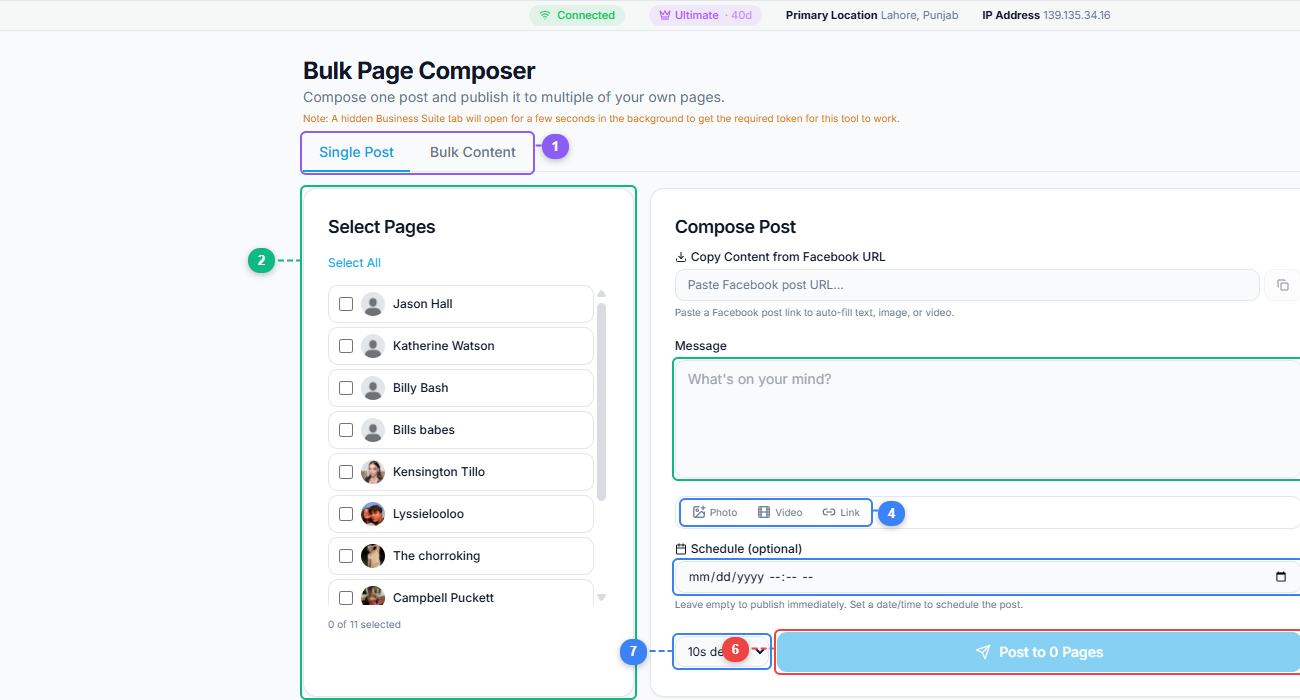
The Bulk Page Composer gives you a two-panel layout. Switch between Single Post and Bulk Content modes (1), select which pages to publish to from your full page list (2), write your message in the composer (3), attach photos, videos, or links (4), optionally schedule the post for a future date (5), set a delay between page publications (6), and hit Post to publish across all selected pages at once (7).
Bulk Page Composer is a browser-based tool that connects to the Facebook Pages you administer and lets you publish the same post — or variations of it — across all of them in a single action.
Here is what it handles:
Multi-page targeting. Select anywhere from two to hundreds of Pages. The tool pulls your full list of administered Pages and lets you check the ones you want to publish to.
Full post format support. Text posts, photo posts, video posts, link card posts, and mixed-media posts are all supported. You compose in one editor, and the tool handles the publishing format for each Page.
Immediate publishing. Posts go out in real time. Once you hit publish, the tool sends the content to every selected Page without queuing delays.
Status feedback. After publishing, the tool reports which Pages received the post successfully and flags any that failed — so you know immediately if a Page has a permissions issue or content restriction.
The tool does not alter your content. What you compose is what gets posted. There is no intermediate compression, no watermarking, and no hidden reformatting.
Who Needs Bulk Page Composer?#
The tool is built for anyone who manages multiple Facebook Pages and publishes the same or similar content across them. Here are the most common use cases:
Social Media Agencies#
Agencies managing client pages are the primary audience. When you oversee 15 restaurant pages and need to push a "Happy New Year" post to all of them with each restaurant's name, doing it manually takes an hour. Bulk Page Composer reduces that to minutes.
Multi-Location Businesses#
Franchises, retail chains, real estate agencies, and any business with separate Facebook Pages for each location face the same content duplication problem. Corporate sends a brand announcement — and someone has to post it to every location page. Bulk Page Composer eliminates that bottleneck.
Content Networks and Media Pages#
Publishers and meme networks often run clusters of themed pages. A sports media company might have separate pages for football, cricket, tennis, and general sports news. When a major event breaks, Bulk Page Composer lets them push the same coverage to every page simultaneously.
Political and Advocacy Campaigns#
Campaign teams managing pages for multiple candidates, chapters, or causes need consistent messaging. Bulk Page Composer ensures every page gets the same message at the same time — which matters when timing is politically sensitive.
Influencers with Multiple Brand Pages#
Some creators maintain separate pages for different content verticals — a cooking page, a travel page, and a personal brand page. Cross-posting relevant content keeps all pages active without tripling the workload.
How to Use Bulk Page Composer — Step by Step#
Step 1: Access the Tool#
Navigate to the FaceBot dashboard and open Bulk Page Composer from the Page Management section. The tool requires that you have admin or editor access to the Facebook Pages you want to publish to.
Step 2: Select Your Pages#
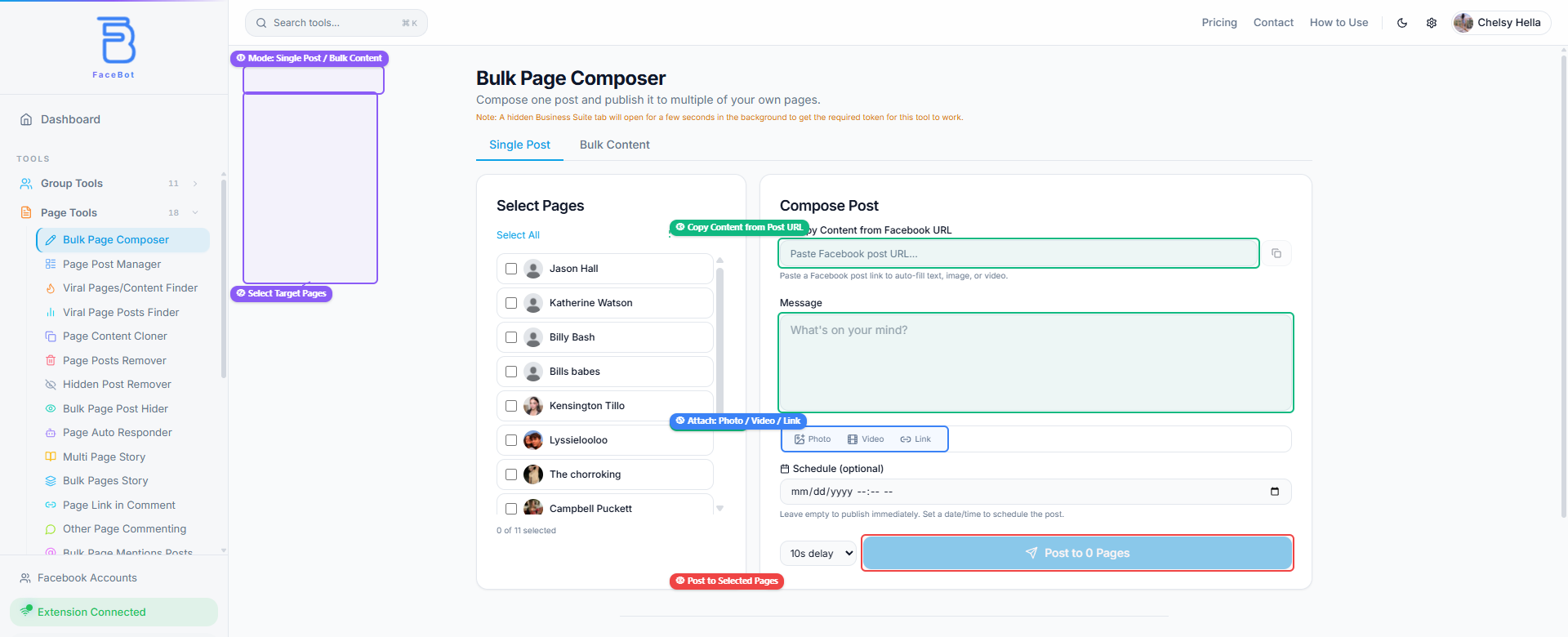
The tool displays all Facebook Pages connected to your account. Check the boxes next to every Page you want to include in this publishing batch. You can select all, deselect all, or pick individually.
Step 3: Compose Your Post#
Write your post content in the editor. You can add:
- Plain text with full formatting
- Photos (single or multiple)
- Videos
- Link URLs that generate a preview card
The composer mirrors what Facebook users see when creating a post natively, so what you write is what gets published.
Step 4: Review and Publish#
Before publishing, review the selected pages and the post content. Once you are satisfied, hit publish. The tool sends the post to each selected Page and reports back with a success or failure status for each one.
Step 5: Verify#
Spot-check two or three of the published pages to confirm the post appeared correctly. This is especially important the first time you use the tool, so you can confirm formatting, link previews, and media attachments rendered as expected.
Practical Tips for Better Results#
Vary your post text slightly across page types. If you manage pages in different niches, a one-size-fits-all caption can feel off-brand. Where possible, tailor the opening line to each page's audience even when the core content is identical.
Post at peak hours for your audience. Bulk publishing does not mean bulk timing is irrelevant. If your pages serve audiences in different time zones, consider staggering your publishing windows rather than blasting everything at the same instant.
Use Bulk Page Composer alongside the Viral Page Posts Finder. Before creating content, use the Viral Page Posts Finder to identify what is already performing well in your niche. Then compose posts that align with proven engagement patterns.
Do not post identical content to pages that share overlapping audiences. If followers see the exact same post from three different pages, it signals inauthenticity. Facebook's algorithm also devalues duplicate content across pages with overlapping follower bases.
Check publishing results immediately. The tool reports failures, but acting on them quickly — before you close the session — is easier than troubleshooting later. A failed publish usually means a permissions change or a Facebook content policy trigger.
Combine with Page Content Cloner for competitor analysis. Use FaceBot's Page Content Cloner to study competitor page strategies, then create original content inspired by what works and distribute it with Bulk Page Composer.
🚀 Ready to try Bulk Page Composer?
Publish to all your Facebook pages at once
Open it Now →Limitations to Be Aware Of#
No tool is perfect, and honesty about limitations saves you time:
- Facebook API rate limits apply. If you publish to a very large number of pages in rapid succession, Facebook may throttle your requests. The tool handles this gracefully, but extremely large batches may take longer.
- Each Page must have you as an admin or editor. The tool cannot publish to pages you do not have publishing rights on.
- Content policy varies by page category. A post that passes on a general interest page may be flagged on a health-related page. Know your pages' content categories.
- No built-in scheduling. Bulk Page Composer is designed for immediate publishing. If you need to schedule posts for a future time, combine it with Facebook's native scheduling or plan your session around your desired publish time.
Try Bulk Page Composer#
Ready to stop copy-pasting the same post across dozens of tabs? Bulk Page Composer is available now inside the FaceBot dashboard.
Frequently Asked Questions#
How many Facebook Pages can I publish to at once?#
There is no hard limit imposed by the tool itself. You can select as many Pages as you have admin or editor access to. In practice, users regularly publish to 50+ Pages in a single batch. Extremely large batches — several hundred pages — may take slightly longer due to Facebook's own rate limiting, but they will complete.
Does Bulk Page Composer work with Facebook Groups too?#
No. Bulk Page Composer is specifically designed for Facebook Pages. If you need to share content to Groups, FaceBot offers a separate Share to Groups tool designed for that purpose.
Will Facebook flag my account for posting to many pages at once?#
Bulk publishing to pages you legitimately administer is a standard practice used by agencies and multi-location businesses worldwide. Facebook expects page administrators to publish content. As long as the content is original and not violating community standards, bulk publishing does not trigger account flags.
Can I include different images for different pages in the same batch?#
The current version of Bulk Page Composer publishes the same content to all selected pages in a single batch. If you need unique images per page, run separate batches with different media attached to each one. This still saves significant time compared to manual posting.
Do I need the FaceBot browser extension to use this tool?#
Yes. FaceBot operates through a Chrome extension that connects your browser session to the dashboard. The extension handles the secure communication between the tool and Facebook, ensuring your session credentials never leave your browser.
Conclusion#
Bulk Page Composer does one thing and does it well: it turns a repetitive, time-consuming publishing task into a single action. For anyone managing more than a handful of Facebook Pages, the time savings compound quickly — what used to take an hour of tab-switching and copy-pasting now takes two minutes. Combined with other FaceBot page management tools like the Posts Remover and Viral Page Posts Finder, it forms the publishing backbone of a serious page management workflow.