What Is Bulk Page Mentions Post? Tag Multiple Pages for Cross-Page Visibility
When you mention another Facebook Page in a post, two things happen. First, the mentioned page's name becomes a clickable link in your post, directing your audience to that page. Second, and more importantly, the mentioned page receives a notification, and your post may appear in contexts associated with that page — searches, related content, and the mentioned page's activity feed.
Mentions are one of Facebook's built-in mechanisms for cross-page discovery. A post that mentions five relevant pages has five pathways to new audiences that a post without mentions does not have. The challenge is that Facebook's native composer treats mentions as a manual, one-at-a-time process: you type the @ symbol, search for a page, select it, and repeat. For posts that benefit from mentioning 10, 20, or 50 pages, this manual process is impractical.
The Bulk Page Mentions Post tool in FaceBot creates Facebook Page posts that tag multiple pages in a single action. Define your post content, select the pages to mention, and publish — all mentions are embedded in one step.
What Does the Bulk Page Mentions Post Tool Do?#
The tool creates a post on your Facebook Page that includes mentions (tags) of multiple other Facebook Pages. Here is what it provides:
Multi-page tagging. Mention as many pages as you want in a single post. Each mentioned page name becomes a clickable link and generates a notification to that page.
Post content flexibility. Write your post text, add images or links, and weave the page mentions into the content naturally. The tool handles the mention formatting so each tagged page name renders correctly.
Targeted page selection. Select which pages to mention from a list or input their Page IDs or URLs. This is where the Page ID Extractor becomes a useful companion tool — extract IDs for the pages you want to mention, then feed them into the mentions tool.
Publishing control. Post to any page you administer. Schedule or publish immediately, matching your content calendar.
Why Page Mentions Increase Reach#
Notification-Driven Discovery#
When you mention a page, that page's administrators see a notification. For business pages that actively monitor their notifications, this creates an awareness touchpoint. If your content is relevant, the mentioned page may respond in several ways:
- Like or react to your post — adding social proof visible to your audience
- Leave a comment — starting a conversation that boosts engagement signals
- Share your post — exposing your content to their entire follower base
- Follow your page — establishing an ongoing connection for future collaboration
- Reach out directly — opening the door for partnerships, cross-promotions, or joint campaigns
Each of these responses exposes your content to the mentioned page's audience.
Cross-Audience Exposure#
Mentions create association links. When a user interacts with a mentioned page, Facebook's recommendation systems may surface your post as related content. This cross-pollination effect is subtle but measurable over time, especially when you consistently mention pages in your niche.
SEO and Search Benefits#
Mentions contribute to your post's relevance signals on Facebook's internal search. A post mentioning five pages in the organic gardening niche is more likely to appear in search results for gardening-related queries than a post that discusses the same topic without mentions. The page names serve as contextual anchors that help Facebook's systems understand your post's topic and relevance.
Relationship Building#
Regularly mentioning complementary pages builds awareness of your page within your niche community. Pages that get mentioned by you are more likely to mention you back in their content, creating a reciprocal visibility network. This is especially effective in niches where pages collaborate rather than purely compete.
Practical Use Cases#
Industry Roundup Posts#
Create posts that compile insights, products, or content from multiple pages in your niche. "Top 10 organic skincare brands to follow" with each brand page mentioned. These roundup posts provide value to your audience while building relationships with the mentioned pages.
Event and Conference Coverage#
If you are attending or hosting an event, mention the pages of speakers, sponsors, vendors, and partner organizations. Each mention notifies those pages that you are talking about the event, encouraging them to engage with and share your post.
Partnership and Collaboration Announcements#
When announcing partnerships, collaborations, or joint ventures, mentioning all participating pages ensures that each partner's audience sees the announcement through their respective page's activity.
Product Comparison and Review Posts#
For review-style content — "We tested 5 project management tools" — mentioning each product's page makes your review more credible and more discoverable. It also invites the mentioned brands to engage with the review.
Community Building in Niche Markets#
In niche communities (local business networks, industry groups, hobby communities), regularly mentioning other community pages in relevant content establishes your page as a connector. This central-node positioning increases your page's perceived authority and discoverability.
Cross-Promotion Networks#
Groups of non-competing but complementary pages can use bulk mentions to create a mutual promotion network. A fitness page, a nutrition page, a yoga page, and a sports gear page can mention each other in relevant content, expanding each page's reach into related audiences.
How to Use the Bulk Page Mentions Post Tool#
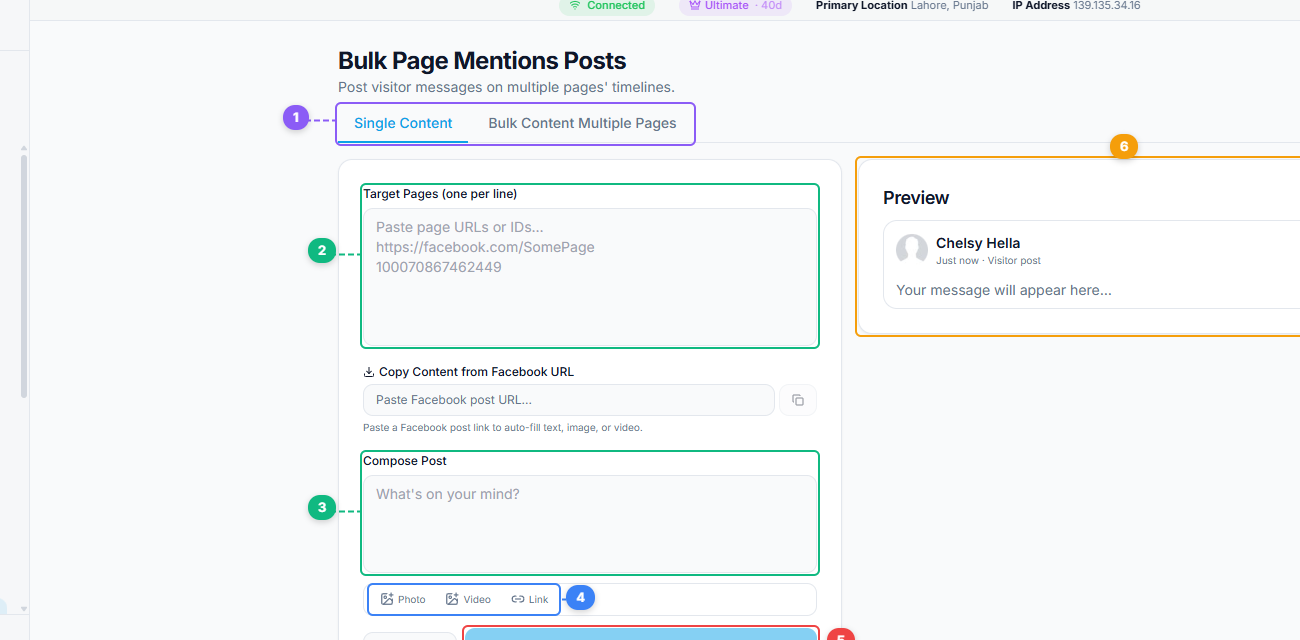
The Bulk Page Mentions Posts tool supports Single Content and Bulk Content Multiple Pages modes (1). Paste target page URLs or IDs one per line to specify where your visitor post will appear (2), compose your message in the post editor (3), attach photos, videos, or links (4), click Post to publish to all target pages (5), and preview how your post will look in the live preview panel (6).
- Open the FaceBot dashboard and navigate to the Bulk Page Mentions Post tool.
- Select the page you want to post from.
- Write your post content. Compose the text, including where you want the page mentions to appear within your message.
- Add the pages you want to mention. You can input page names, URLs, or Page IDs.
- Review the post to confirm all mentions are correctly placed and formatted.
- Publish immediately or schedule.
The tool handles the technical formatting that Facebook requires for mentions to render as clickable page links rather than plain text. You focus on the content; the tool handles the mention markup.
Tips for Effective Page Mentions#
Make mentions contextually relevant. Do not mention random pages for the sake of reach. Each mention should make sense in the context of your post. Irrelevant mentions annoy the mentioned pages and confuse your audience.
Credit and add value. The best-performing mention posts are those that genuinely credit or highlight the mentioned pages. "Great products from @PageA, @PageB, @PageC" performs better than "Buy our product @PageA @PageB @PageC" because the first adds value while the second reads as spam.
Limit mentions to a reasonable number. A post that mentions 50 pages in one sentence looks like spam. Keep mentions proportional to the content. A 200-word post with 5-10 relevant mentions is natural. A two-sentence post with 30 mentions is not.
Follow up on notifications. When mentioned pages engage with your post — commenting, sharing, reacting — respond and engage back. This turns a one-way mention into a two-way relationship that benefits both pages long-term.
Combine with content strategies. Mentions work best when paired with strong content. Use them alongside your regular posting workflow through the Bulk Page Composer for standard content, and reserve mention posts for content where cross-page visibility adds genuine value.
Limitations#
The tool mentions pages that exist on Facebook. If a page has been deleted, restricted, or set to not allow mentions, the mention will not render correctly. Not all pages allow mentions from all sources — some page administrators configure their pages to restrict who can tag them.
Excessive mention activity — tagging the same pages repeatedly in a short period, or mentioning large numbers of unrelated pages — may trigger Facebook's spam detection. Use the tool in a way that reflects genuine cross-page relevance rather than indiscriminate tagging.
The effectiveness of mentions depends partly on the mentioned pages' responsiveness. If the pages you mention never engage with your posts, the mention's value is limited to the clickable link and search relevance. The notification-driven benefits require that the mentioned pages actively monitor their activity.
Frequently Asked Questions#
Do mentioned pages get notified?#
Yes. When you mention a page in your post, that page's administrators receive a notification that they were tagged. This is one of the primary benefits — it creates a touchpoint that can lead to engagement and reciprocal mentions.
Can I mention pages I do not manage?#
Yes. Mentioning a page does not require admin access to it. Any public page can be mentioned in your posts, subject to that page's mention settings.
Will mentioning more pages always increase my reach?#
Not automatically. Mentions increase reach potential by creating additional discovery pathways, but the actual reach depends on whether the mentioned pages engage with your post and whether your content is relevant to their audiences. Quality of mentions matters more than quantity.
Can I mention personal profiles instead of pages?#
The Bulk Page Mentions Post tool is designed for page-to-page mentions. Tagging personal profiles in page posts follows different Facebook rules and is not the same mechanism. This tool focuses on the page mention workflow.
How often should I create mention posts?#
Mention posts should be a component of your content strategy, not the entirety of it. One to three mention-heavy posts per week, interspersed with regular content, is a sustainable frequency that avoids appearing spammy while maintaining cross-page visibility.
Conclusion#
The Bulk Page Mentions Post tool turns mentions from a tedious manual process into a scalable cross-promotion strategy. For pages that operate in niches where cross-page visibility matters — and that includes most niches — mentions are a free, built-in distribution mechanism that most pages underuse because the manual process is too slow.
FaceBot makes it practical to include multiple page mentions in every post that warrants them, opening up discovery channels that pages relying on Facebook's native composer simply cannot access at scale.
Try the Bulk Page Mentions Post tool