What Is Group Search and Bulk Group Finder? Discover Facebook Groups by Keyword
Facebook has millions of active groups covering every conceivable topic, industry, location, and interest. The opportunity is enormous — but only if you can find the right groups. Facebook's native search is limited, returning a short list of results that skews toward the largest, most generic groups. If you need to find fifty targeted groups in a specific niche, the built-in search will not get you there.
Group Search and Bulk Group Finder is a FaceBot tool built specifically for this problem. It searches Facebook's group directory by keyword and returns comprehensive results including group names, member counts, activity levels, and privacy settings. Instead of clicking through search results one at a time, you get a complete, sortable list you can act on immediately.
This article explains what the tool does, how to use it for effective group discovery, and how the data it returns feeds into a broader group marketing strategy.
How Group Search and Bulk Group Finder Works#
The tool extends Facebook's group search capabilities with bulk extraction and data enrichment.
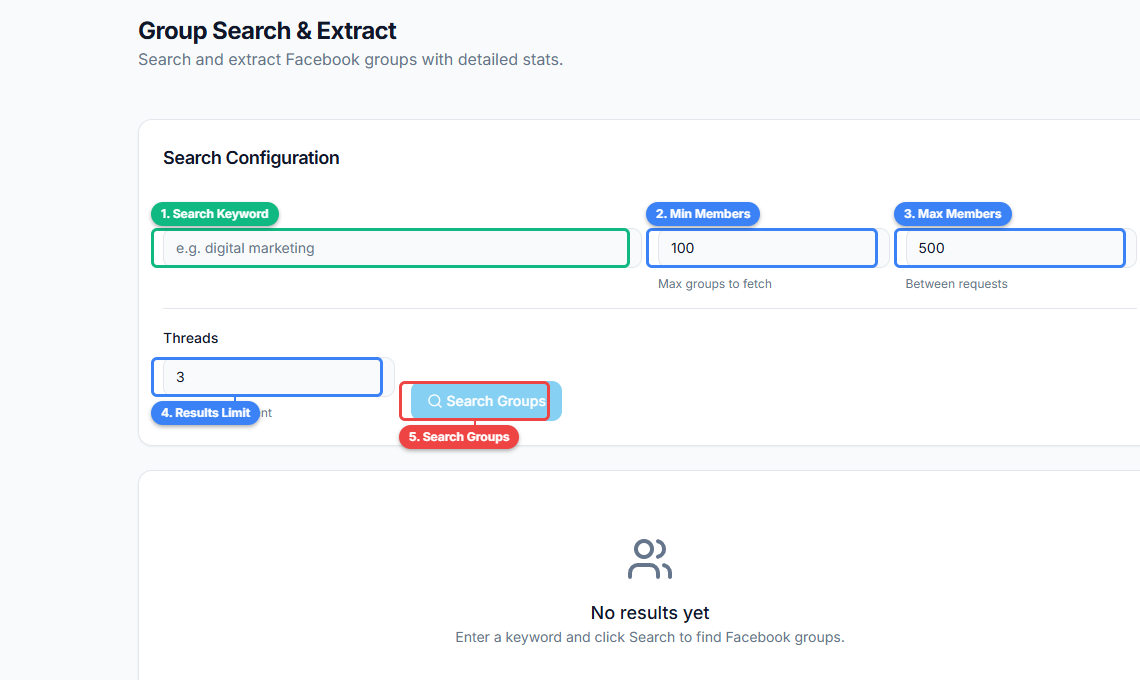
The Group Search and Extract tool provides a search interface with results table. Enter keywords to search for groups (1), click Search to query Facebook's directory (2), review results showing group name, member count, and privacy status (3), and export or act on the extracted group list (4).
Core Workflow#
- Enter your search keywords. Type one or more keywords that describe the type of groups you are looking for. For example: "dropshipping," "keto diet recipes," "real estate investors Chicago."
- Run the search. The tool queries Facebook's group directory and retrieves matching groups.
- Review the results. Each result includes the group name, URL, member count, privacy status (public or private), and activity indicators.
- Export or act on the results. You can export the list for offline analysis, or feed it directly into other FaceBot tools like Auto Group Joiner to start joining the discovered groups.
What Makes This Different from Facebook's Native Search#
Facebook's built-in group search has several limitations that this tool addresses:
- Limited results. Native search shows a handful of groups before requiring you to scroll and load more. The Bulk Group Finder retrieves a much larger result set in one operation.
- No data extraction. Facebook shows you group names and thumbnails but does not make it easy to compare member counts, activity levels, or privacy settings across results. This tool gives you structured data.
- No export. You cannot export Facebook's search results to a spreadsheet. This tool can.
- Single keyword at a time. Comparing results across multiple keywords is tedious in Facebook's interface. This tool lets you run multiple keyword searches and compile the results.
🚀 Bulk Group Search
Discover thousands of groups in any niche
Try it Free →Why Group Discovery Is the Foundation of Group Marketing#
Most people approach group marketing backwards. They join whatever groups they stumble across, post a few times, and wonder why they do not see results. The issue is not their content or their posting frequency — it is their group selection.
The Right Groups vs. Any Groups#
A marketer selling handmade jewelry who posts in a general "Buy and Sell" group with 500,000 members is competing with car dealers, furniture sellers, electronics resellers, and everyone else. The same marketer posting in a "Handmade Jewelry Lovers" group with 15,000 members is speaking directly to people who are specifically interested in what they sell.
Group discovery tools let you find those smaller, targeted communities that deliver higher conversion rates per post. The time invested in finding the right groups pays dividends across every future post, comment, and interaction.
Volume Matters Too#
While quality trumps quantity, having enough groups is still important for reach. If you are only in three groups, even great content has a limited audience. Building a portfolio of thirty to fifty well-targeted groups gives your content distribution meaningful scale. Doing that without a discovery tool means hours of manual searching.
How to Use Group Search Effectively#
Start Broad, Then Narrow#
Begin with your main industry keyword: "fitness," "real estate," "cooking." This gives you an overview of the landscape — how many groups exist, what the typical sizes are, and what sub-niches emerge. Then narrow down with more specific searches: "fitness over 40," "real estate wholesale deals," "vegan meal prep."
Use Niche Modifiers#
Generic keywords return generic groups. Adding modifiers dramatically improves targeting:
- Location: "real estate investors Miami" finds local groups where members are likely to do business with you.
- Skill level: "beginner photography" vs. "professional photography" attracts different audiences.
- Intent: "buy and sell vintage watches" targets active buyers. "Vintage watch enthusiasts" targets collectors who may or may not buy.
- Format: "Facebook live sellers" targets people who use a specific selling method.
Evaluate Results Before Acting#
Not every group in your search results deserves a join request. Use the data the tool provides to filter:
- Member count sweet spot. Groups between 5,000 and 100,000 members tend to offer the best balance of reach and engagement. Below 5,000, the audience is too small. Above 100,000, posts get buried quickly.
- Privacy status. Private groups generally have higher engagement because members opted in through a screening process. Public groups are easier to join but often have more spam.
- Activity level. A group with 50,000 members and no recent posts is effectively dead. Prioritize groups with consistent daily activity.
Build Keyword Clusters#
Rather than searching one keyword, build a cluster of related terms. For a pet supply business, your cluster might include:
- "Dog owners"
- "Pet supplies deals"
- "Dog training tips"
- "Puppy parents"
- "Dog breed [specific breed]"
Each keyword surfaces different groups with different audience compositions. The union of all results gives you a comprehensive view of your addressable group landscape.
Practical Use Cases#
Market Research#
Before launching a product, search for groups in your target market to understand the size and activity of the community. If there are dozens of active groups with tens of thousands of members, there is a market. If you struggle to find more than a few small, inactive groups, the audience may not be large enough to support your product on Facebook.
Competitor Analysis#
Search for your competitor's brand name or product names. If they are mentioned in group discussions, those groups contain your target audience. Joining those groups lets you see how competitors are positioning themselves and where gaps exist.
Local Business Marketing#
Local businesses benefit from finding groups specific to their city or region. "Austin Texas buy and sell," "Austin mom groups," "Austin small business network" — each search reveals communities of potential customers within your service area.
Content Distribution Planning#
Content marketers use group discovery to map out distribution channels before creating content. Knowing which groups exist in your niche shapes what content you create. If you find twenty active groups focused on "email marketing for small business," you know that topic has distribution potential worth the content investment.
Niche Market Entry#
When entering a new niche, group discovery tells you the lay of the land. How many groups exist? What are the biggest ones? What topics dominate the discussions? This intelligence shapes your market entry strategy before you spend money on ads or content creation.
🚀 Ready to try Bulk Group Search?
Discover thousands of groups in any niche
Try it Free →From Discovery to Action#
Group Search and Bulk Group Finder generates intelligence. The value comes from acting on it. Here is how the discovery output connects to the rest of your FaceBot workflow:
- Discover groups using Group Search and Bulk Group Finder.
- Filter the results to identify high-value targets based on member count, activity, and relevance.
- Join the selected groups using Auto Group Joiner.
- Post your content across those groups using Group Auto Poster.
- Engage with group discussions using Group Auto Commenter.
- Analyze what content performs best using Group Viral Finder.
Without step one, you are guessing which groups to join. The discovery phase ensures your entire group marketing operation is built on a foundation of data rather than assumptions.
Try Group Search and Bulk Group Finder#
Stop scrolling through Facebook's limited search results hoping to find good groups. The Bulk Group Finder gives you comprehensive, data-rich results across any keyword so you can build a targeted group portfolio in minutes. For the complete discovery-to-marketing pipeline, see the complete guide to Facebook group marketing. To extract member data from groups you have joined, check out the complete guide to Facebook data extraction.
Open Group Search and Bulk Group Finder in FaceBot
Frequently Asked Questions#
How many groups does the search return per keyword?#
The number of results depends on how many groups match your keyword. Popular niches like "fitness" or "real estate" will return hundreds of results. Very specific or local keywords might return fewer. The tool retrieves significantly more results than Facebook's native search interface shows by default.
Can I search for groups in specific languages or countries?#
You can use location-specific keywords to target groups in particular regions (e.g., "photography groups UK" or "compra venta Mexico"). The tool searches based on group names and descriptions, so including location or language terms in your keyword narrows results accordingly.
Does the tool show group activity metrics?#
Yes. The results include member counts and activity indicators that help you assess whether a group is active enough to be worth joining. This lets you skip dead or inactive groups before investing time in join requests.
Can I export the search results?#
Yes. You can export the discovered groups as a list that you can save for offline analysis or feed directly into other FaceBot tools. This makes it easy to build and maintain a curated group database over time.
Is there a limit on how many searches I can run?#
The number of searches you can run depends on your FaceBot plan tier. Each tier includes a daily usage allocation for the tool. For most users, the allocation is more than sufficient to research multiple keyword clusters across several sessions.
Conclusion#
Group discovery is the step that most people skip — and it is the step that determines whether the rest of your group marketing efforts hit the right audience or waste time on irrelevant communities. Group Search and Bulk Group Finder transforms group discovery from a manual, limited process into a data-driven research operation. Find the groups that matter, evaluate them with real data, and build your marketing strategy on solid ground.