
What Is Group Post Cleaner? Bulk Delete Posts from Facebook Groups You Manage
Every Facebook group accumulates content over time. Some of that content remains valuable -- evergreen discussions, popular resources, helpful answers that new members still reference. But a large portion of older content becomes dead weight: outdated promotions, expired event announcements, posts with broken links, conversations that devolved into arguments, low-quality content that slipped past moderation, and spam that was caught too late.
This accumulated clutter degrades the group experience. Members who scroll through a group's history encounter irrelevant or stale content. Facebook's search within a group surfaces old posts alongside current ones. And for admins who care about their group's quality, the gradual buildup of low-value content is a persistent problem with no good native solution.
Facebook lets you delete posts one at a time. Click on a post, select "Delete post," confirm. For a single post, this is fine. For cleaning up fifty, a hundred, or a thousand posts, it is impractical. There is no native bulk delete, no date-range filter, and no way to identify cleanup candidates without manually scrolling.
Group Post Cleaner is a FaceBot tool that gives group admins the ability to identify and remove posts in bulk, based on criteria you define. It turns a cleanup project that would take days of manual clicking into a structured operation you can complete in an afternoon.
Why Group Content Cleanup Matters#
Content Quality Signals#
Facebook evaluates group quality based on engagement patterns, member behavior, and content quality. Groups with high proportions of low-engagement posts, spam content, or reported posts receive less algorithmic distribution. When Facebook decides how often to show your group's content in members' main feeds, the overall content quality of the group is a factor.
Removing low-quality posts improves the signal-to-noise ratio of your group, which can positively influence how Facebook distributes your group's content.
Member Experience#
When a new member joins a group, they often browse recent posts to get a sense of the community. If the first ten posts they see include three expired promotions, two spam posts that were never removed, and a flame war, their first impression is poor. Clean content signals that the group is actively managed, which builds trust and encourages participation.
Search Quality#
Facebook's in-group search indexes all posts. When a member searches for a topic within your group, old and irrelevant posts appear alongside current ones. A group that has been running for five years might have dozens of outdated posts for any given topic. Removing the stale ones means searches return useful, current results.
Admin Credibility#
Active content management signals that the group has engaged, competent leadership. Members are more likely to follow group rules, contribute quality content, and remain active when they see that admins maintain standards. Neglected groups attract neglectful behavior.
How Group Post Cleaner Works#
Post Scanning#
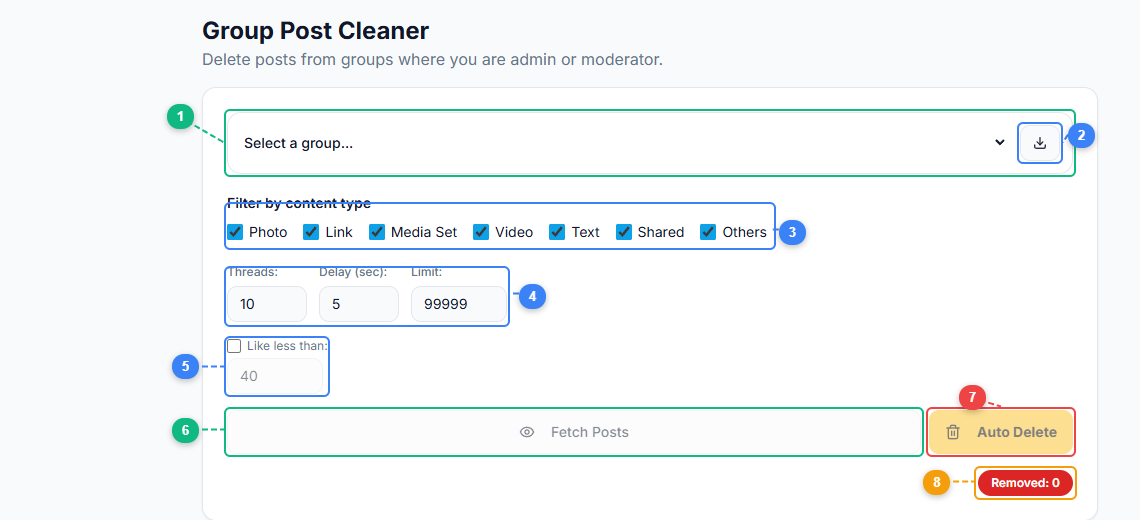
The Group Post Cleaner interface gives you full control over what gets cleaned. Select your group (1), refresh the group list (2), filter by content type — Photo, Link, Media Set, Video, Text, Shared, or Others (3), configure threading speed, delay, and post limit (4), set a "like less than" threshold to only target low-engagement posts (5), fetch matching posts for review (6), run auto-delete on the fetched results (7), and track how many posts have been removed (8).
The tool scans a group's posts and pulls them into a manageable interface with relevant metadata for each post:
- Post date. When the post was published.
- Author. Who posted it, with their membership status (still a member, removed, left the group).
- Engagement metrics. Number of reactions, comments, and shares.
- Content type. Text, image, video, link, or mixed.
- Link status. For posts containing URLs, whether the links are still active or broken.
This metadata is the foundation for identifying cleanup candidates. A post from two years ago with zero engagement and a broken link is a strong deletion candidate. A post from the same period with 200 comments and active discussion might still be valuable.
Filtering for Cleanup Candidates#
Group Post Cleaner provides filters to isolate posts that are likely candidates for removal:
Date range. Select posts older than a specific date. For many groups, anything older than 12-18 months that did not generate significant engagement is a cleanup candidate.
Zero engagement. Posts with no reactions, no comments, and no shares. These posts contributed nothing to the group and will not be missed.
Author status. Posts from members who have been removed from the group or who left. In many cases, these posts are no longer relevant because the author is gone from the community.
Broken links. Posts whose primary content is a link that no longer works. These are actively harmful -- members click through and hit a dead page.
Content keywords. Search for posts containing specific terms. Useful for targeted cleanup -- for example, removing all posts that mention a past event, a discontinued product, or an old promotion.
Flagged or reported posts. Posts that were reported by members but never acted on. If multiple members reported a post and it was never addressed, it is probably worth removing now.
Preview and Selection#
After applying filters, you see a list of matching posts. You can:
- Review each post's content, author, and metrics.
- Select individual posts for deletion.
- Select all filtered results for bulk deletion.
- Deselect specific posts you want to keep (perhaps a zero-engagement post that is actually an important pinned resource).
The preview step prevents accidental mass deletion. You see exactly what will be removed before confirming.
Bulk Deletion#
Once you have confirmed your selection, the tool deletes the posts. Deletions are paced to respect Facebook's rate limits -- the tool processes posts at a rate that does not trigger automated abuse detection. For large cleanup operations (hundreds of posts), this means the deletion process runs over a period of time rather than instantaneously.
Common Cleanup Scenarios#
The Annual Deep Clean#
Many well-managed groups benefit from an annual or semi-annual content cleanup. Once or twice a year, run Group Post Cleaner with a date filter set to remove posts older than a year that have zero or minimal engagement. This prevents the group's content library from becoming an archaeological dig of outdated discussions.
Post-Event Cleanup#
If your group hosted a live event, product launch, or campaign that generated a burst of time-sensitive posts, those posts become irrelevant after the event concludes. A targeted cleanup removes the promotional buildup without affecting the group's ongoing content.
Departed Member Cleanup#
When a problematic member is removed from a group, their past posts often remain. Some of those posts may be fine, but others might contain the behavior that led to their removal. Group Post Cleaner can filter by author to review and selectively remove a departed member's content.
Spam Backlog Clearance#
If a group went through a period of poor moderation -- perhaps between admin transitions -- spam may have accumulated. The Spam Post Remover handles ongoing spam detection, but Group Post Cleaner is better suited for clearing a historical backlog of spam that was posted weeks or months ago.
Rebranding or Pivot#
When a group changes its focus -- from general fitness to specifically weightlifting, or from a city-based group to a nationwide community -- the old content may no longer be relevant. A targeted cleanup of off-topic historical content aligns the group's content with its current identity.
Best Practices for Group Content Cleanup#
Start Conservative#
On your first cleanup pass, use strict filters (older than 2 years, zero engagement, author no longer a member). Review the results, get comfortable with the process, and then gradually expand your criteria. Aggressive first-pass deletion risks removing posts that had value you did not anticipate.
Preserve Evergreen Content#
Some old posts are genuinely valuable. A comprehensive FAQ post from three years ago, a resource list that is still relevant, or a foundational discussion that defines the group's culture should be preserved regardless of age. Before any bulk deletion, check for pinned posts and posts with high engagement -- these are almost never cleanup candidates.
Communicate with Members#
For major cleanup operations, consider posting an announcement: "We are cleaning up old, outdated content to improve the group experience. If you have a past post you want preserved, let us know." This prevents member frustration when they search for something they posted a year ago and cannot find it.
Document What You Remove#
Keep a record of cleanup operations -- the date, the filters used, the approximate number of posts removed, and the rationale. This documentation helps if a member asks why their post was deleted and provides a reference for future cleanups.
Combine with Other Group Maintenance#
Content cleanup is most effective as part of a broader group maintenance routine. Pair it with:
- Admin role auditing to ensure the right people have access. See how this fits into managing Facebook groups at scale.
- Membership review to remove inactive or problematic members.
- Rules update to reflect current group norms.
- Pinned post refresh to ensure pinned content is current.
A quarterly maintenance cycle that addresses all of these keeps a group healthy without requiring constant attention.
🚀 Ready to try Group Post Cleaner?
Clean up old or rule-breaking group posts
Open it Now →How Group Post Cleaner Differs from Spam Post Remover#
Both tools remove posts, but they serve different purposes:
Spam Post Remover focuses on detecting and removing spam from recent posts. It scans for spam patterns (repetitive content, suspicious links, new-member promotional posts) and helps you remove them quickly. It is a reactive tool for ongoing moderation.
Group Post Cleaner focuses on bulk removal of any posts based on criteria you define. It is a maintenance tool for periodic cleanup. The posts it removes are not necessarily spam -- they might be legitimate content that has simply aged out of relevance.
Use Spam Post Remover daily for spam. Use Group Post Cleaner monthly or quarterly for content maintenance.
Limitations#
- Admin or moderator access required. You can only delete posts in groups where you have the authority to do so.
- Deletions are permanent. Facebook does not have a post recycle bin for groups. Once a post is deleted, it cannot be recovered. The preview step exists specifically to prevent accidental deletion of valuable content.
- Rate-limited execution. Bulk deletions are paced to avoid triggering Facebook's rate limits. Deleting 500 posts does not happen in 500 milliseconds -- it runs over a period of minutes to stay within safe operational limits.
- Cannot delete posts from groups you do not admin. Even if you authored a post in someone else's group, you cannot use this tool to delete it unless you have admin or moderator access to that group.
- No undo. Plan your cleanup carefully. Once the deletion batch executes, there is no reversal.
Frequently Asked Questions#
Will deleted posts still appear in members' notifications?#
If a member received a notification about a post (because they were tagged, commented, or reacted), the notification may persist briefly, but clicking it will lead to a "content not available" message. The post content itself is permanently removed.
Can I delete only my own posts from a group using this tool?#
Yes. You can filter by author and select only your own posts. However, any member can delete their own individual posts through Facebook's native interface. The tool's value is in bulk operations -- deleting many posts at once across a group you manage.
Does deleting posts affect the group's member count or engagement metrics?#
Deleting posts does not remove members. Historical engagement metrics (likes, comments from deleted posts) no longer count toward the group's visible activity, but this typically has minimal impact on how Facebook evaluates the group's current health, which is based primarily on recent activity.
How long does a bulk deletion of 200 posts take?#
Processing time depends on the pacing configured to stay within Facebook's rate limits. A batch of 200 posts typically processes in 15-30 minutes. The tool runs the operation in the background, so you do not need to watch it execute.
Can I schedule automatic periodic cleanup?#
Group Post Cleaner currently operates on demand rather than on a schedule. You run it when you decide it is time for a cleanup. If you want regular content maintenance, set a calendar reminder and run the tool monthly or quarterly. Pairing it with a group marketing workflow keeps your groups consistently maintained.
Conclusion#
Content cleanup is unglamorous but essential maintenance for any Facebook group that has been active for more than a few months. The native Facebook interface makes bulk cleanup impractical, which is why most groups never do it -- and why most groups have feeds cluttered with outdated, irrelevant, and low-quality content buried alongside their best discussions.
FaceBot's Group Post Cleaner gives you the filtering, selection, and bulk deletion capabilities that Facebook does not. It turns a project you have been putting off into a structured process with clear criteria and predictable results.
Clean groups perform better, feel better for members, and reflect better on the admins who run them. The tool makes keeping them clean sustainable.
Try Group Post Cleaner to start maintaining your group's content quality.