
What Is Group Auto Poster? Schedule Posts to Multiple Facebook Groups
Posting to Facebook groups manually is one of the most time-consuming tasks in social media marketing. If you are active in ten groups, that means navigating to each group, composing a post, adjusting the content if needed, and hitting publish — ten separate times. Scale that to thirty or fifty groups and you have lost your entire morning to repetitive clicks.
Group Auto Poster is a tool inside FaceBot that eliminates this problem. It lets you compose a single post and publish it to multiple Facebook groups in one operation. You select the groups, write your content, attach media if you want, and the tool handles the rest. Whether you are promoting a product, sharing a blog article, or posting daily engagement content across niche communities, this tool turns a thirty-minute task into a two-minute one.
This article covers exactly what Group Auto Poster does, how it works, who benefits most from using it, and how to use it without getting flagged by Facebook.
How Group Auto Poster Works#
The core mechanic is straightforward. You provide the content you want to post — text, images, links, or a combination — and you select which groups should receive the post. The tool then submits that content to each selected group through the Facebook interface.
Here is the typical workflow:
- Open the Group Auto Poster tool inside the FaceBot dashboard.
- Compose your post. Write the text, add any images or links you want to include.
- Select target groups. Choose from the list of groups you are a member of. You can select all, pick specific ones, or filter by category if you have organized them.
- Configure posting settings. Set any delays between posts, choose whether to vary the content slightly across groups, and decide if you want to post immediately or schedule for a specific time.
- Execute. The tool posts to each group in sequence, respecting any delays you have configured.
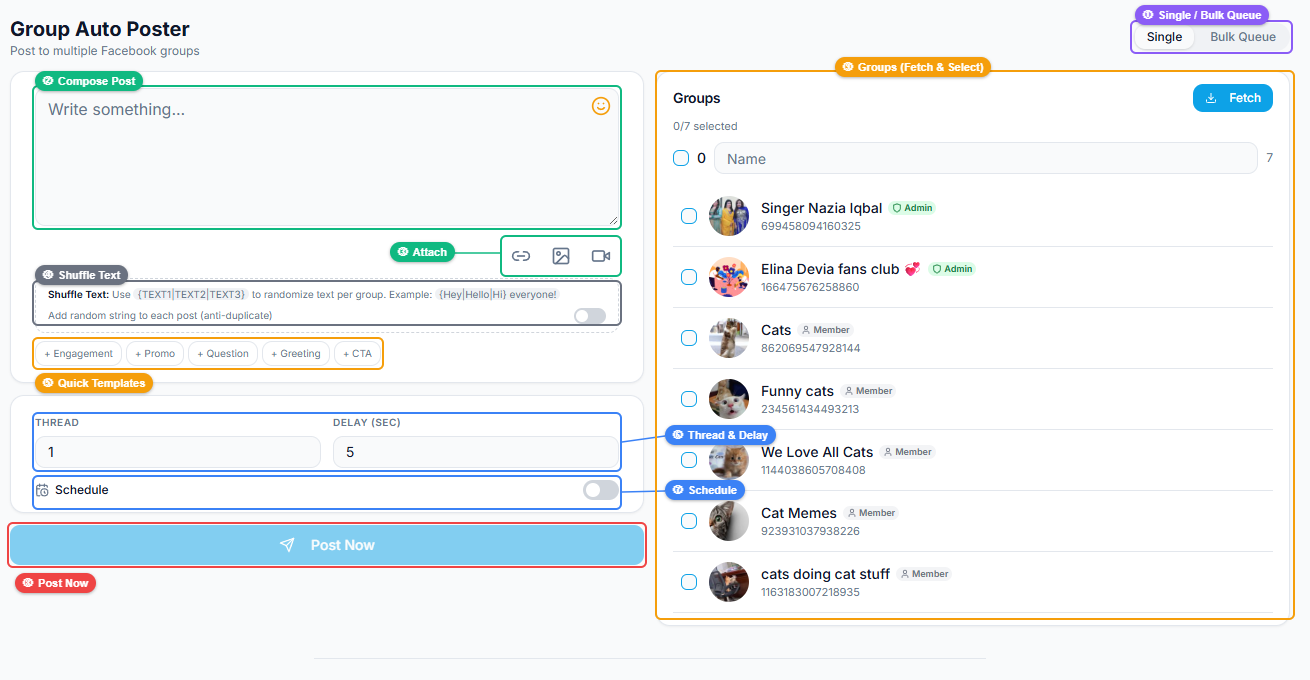
The interface has two panels: the left side contains your post composer with media attachments (link, photo, video), quick template buttons for common post types, a shuffle text toggle for anti-duplicate protection, thread and delay speed controls, and a schedule option. The right panel displays your groups with checkboxes for selection and a Fetch button to load your group list.
The tool works through your own Facebook account and your existing group memberships. It does not use fake accounts, API exploits, or third-party credentials. You are posting as yourself to groups where you are already a member.
Scheduling and Timing#
One of the most valuable features is the ability to control when your posts go out. Rather than blasting all fifty groups at 9:00 AM on a Tuesday, you can stagger posts throughout the day. This serves two purposes:
- Better engagement. Different groups have different peak activity times. A buy-and-sell group might be most active in the evening, while a professional networking group peaks in the morning.
- Reduced spam signals. Facebook monitors for identical content posted to many groups in rapid succession. Adding delays between posts makes your activity look natural.
Content Variation#
Sophisticated users take advantage of content variation. Instead of posting the exact same text to every group, you can modify the message slightly for each audience. A product promotion in a general marketplace group might emphasize price, while the same promotion in an enthusiast group might emphasize features.
🚀 Group Auto Poster
Post to 200 groups on autopilot
Try it Free →Who Benefits from Group Auto Poster#
Small Business Owners#
If you sell products or services and rely on Facebook groups for organic traffic, this tool directly impacts your revenue. Manually posting to twenty groups three times a week means sixty posting sessions per week. Automating that frees up hours you can spend on fulfilling orders, creating better content, or responding to customer inquiries.
Affiliate Marketers#
Affiliate marketers often join dozens of niche groups to share content that links back to their offers. The volume game matters here — more groups means more eyeballs. Group Auto Poster makes high-volume posting sustainable without burning out on the manual work.
Community Managers#
People who manage communities across multiple groups benefit from being able to push announcements, event reminders, or weekly content roundups to all their groups simultaneously. If you run a brand that has regional groups (City A, City B, City C), posting a company update to all of them should not require visiting each one individually.
Content Creators and Bloggers#
Every time you publish a new article, video, or podcast episode, you want to share it across your relevant groups. Group Auto Poster lets you do this in a single session instead of manually copy-pasting your link into each group throughout the day.
Best Practices for Auto-Posting to Groups#
Automation is powerful, but it needs to be used intelligently. Reckless auto-posting will get your posts removed, your account flagged, or your group membership revoked. Here are the guidelines that keep your account safe and your posts effective.
Respect Group Rules#
Every group has its own posting rules. Some allow promotional posts only on certain days. Some ban link posts entirely. Some require you to engage with other members before promoting your own content. Auto-posting does not exempt you from these rules — it just makes the posting faster. You still need to know what each group allows.
Use Appropriate Delays#
Posting to fifty groups in five seconds is a red flag. Facebook's systems detect rapid identical posting across groups and may temporarily restrict your posting ability. Set reasonable delays between posts — even thirty seconds to a minute per post makes a meaningful difference.
Vary Your Content#
Identical posts across dozens of groups look like spam. Even small variations — different opening lines, different calls to action, reordered paragraphs — signal that you are a real person tailoring content to each community rather than running a blast campaign.
Engage After Posting#
The worst pattern is posting and disappearing. If someone comments on your group post with a question, respond. If the post generates a discussion, participate. Auto-posting handles the distribution; you still need to handle the engagement.
Monitor for Removed Posts#
Some groups have active moderation that will remove posts that violate rules or look spammy. Check back periodically to see if your posts are still live. If a particular group consistently removes your content, either adjust your approach for that group or remove it from your target list.
Group Auto Poster vs. Manual Posting#
| Factor | Manual Posting | Group Auto Poster |
|---|---|---|
| Time per 20 groups | 30-45 minutes | 2-3 minutes |
| Content consistency | Prone to typos, forgotten groups | Uniform across all targets |
| Scheduling | Requires you to be online at post time | Set it and walk away |
| Delay control | Manual waiting between groups | Automatic delay spacing |
| Scale ceiling | Practical limit around 15-20 groups | Handles 50+ groups comfortably |
The comparison is not close. Manual posting only makes sense when you are active in two or three groups. Beyond that, the time cost escalates linearly while the tool keeps the effort constant.
Common Mistakes to Avoid#
Posting too frequently. Even with automation, posting the same group three times a day will annoy members and trigger moderator action. One post per group per day is a reasonable maximum for promotional content.
Ignoring post performance. Not all groups deliver equal results. Track which groups generate clicks, comments, and conversions. Drop low-performing groups from your list and replace them with new ones.
Using the same content for months. Refresh your post templates regularly. Groups where the same members see your content weekly will tune it out if the messaging never changes.
Skipping group engagement. If you only post and never comment on other people's posts, group members and admins will notice. Genuine participation protects your reputation in the group.
🚀 Ready to try Group Auto Poster?
Post to 200 groups on autopilot
Try it Free →How Group Auto Poster Fits into a Broader Strategy#
Group Auto Poster is one piece of a larger group marketing system available inside FaceBot. Used alone, it handles distribution. Combined with other tools, it becomes part of a complete workflow:
- Use Group Search and Bulk Finder to discover relevant groups in your niche.
- Use Auto Group Joiner to join those groups efficiently.
- Use Group Auto Poster to publish content across all of them.
- Use Group Viral Finder to analyze which posts perform best and refine your content strategy.
This pipeline — discover, join, post, analyze — is what separates casual group marketers from people who drive real traffic and revenue from Facebook groups.
Try Group Auto Poster#
If you are spending more than a few minutes per day manually posting to Facebook groups, you are spending too much time. Group Auto Poster handles the distribution so you can focus on creating better content and engaging with the people who respond. For a complete walkthrough of all group tools and strategies, see the complete guide to Facebook group marketing.
Open Group Auto Poster in FaceBot
Frequently Asked Questions#
Does Group Auto Poster work with all types of Facebook groups?#
It works with any group where you are an approved member. Public groups, private groups, and buy-and-sell groups are all supported. The only limitation is that you must already be a member of the group — the tool posts on your behalf using your existing membership.
Will auto-posting get my Facebook account banned?#
Facebook does not ban accounts simply for posting to multiple groups. What triggers restrictions is posting identical content to many groups in rapid succession without any engagement. Using appropriate delays between posts, varying your content, and engaging with responses keeps your activity within normal patterns.
Can I schedule posts for a specific time?#
Yes. You can set the exact date and time for your posts to go out. You can also configure staggered scheduling so posts reach different groups at different times throughout the day, which both looks more natural and catches different groups at their peak activity windows.
How many groups can I post to at once?#
There is no hard limit imposed by the tool itself. The practical limit depends on how many groups you are a member of and your Facebook account's posting limits. Most users comfortably post to 20-50 groups per session. Going beyond 50 in a single session is possible but should be done with longer delays between posts.
Can I include images and links in auto-posts?#
Yes. Group Auto Poster supports text-only posts, posts with images, posts with links, and posts combining all three. The content format options mirror what you would have when posting manually to any group.
Conclusion#
Group Auto Poster solves the most tedious part of Facebook group marketing — the repetitive act of posting the same or similar content to many groups one at a time. It preserves your time without sacrificing reach, and when combined with smart practices like content variation and post-scheduling, it does so without putting your account at risk. For anyone serious about using Facebook groups as a marketing channel, manual posting simply does not scale. This tool does.