What Is Auto Group Joiner? Find and Join Facebook Groups Automatically
Before you can post in a group, comment on group discussions, or build any kind of group-based marketing presence, you need to actually be a member. For many marketers, building a large group membership portfolio is the first bottleneck. Finding relevant groups, reviewing them, clicking "Join," and waiting for approval — repeated across dozens or hundreds of groups — is tedious work that most people abandon halfway through.
Auto Group Joiner is a FaceBot tool that automates the process of joining Facebook groups. You provide a list of groups or search criteria, and the tool submits join requests on your behalf. It handles the mechanical clicking so you can focus on the strategic question: which groups are worth being in.
This article covers how the tool works, the right way to build a group portfolio, and how to avoid common pitfalls that waste time or trigger account restrictions.
How Auto Group Joiner Works#
The tool has a simple but effective workflow.
The Basic Process#
- Prepare your group list. You can provide group URLs directly, or use the Group Search and Bulk Finder tool to discover groups by keyword and export them as a list.
- Load the list into Auto Group Joiner. The tool accepts group URLs or IDs.
- Configure pacing. Set delays between join requests to avoid triggering Facebook's rate limits.
- Execute. The tool sends join requests to each group in your list, handling the navigation and button clicks.
- Monitor results. After the run, you can see which groups were joined immediately (public groups), which are pending approval (private groups), and which failed (groups that no longer exist or have join restrictions).
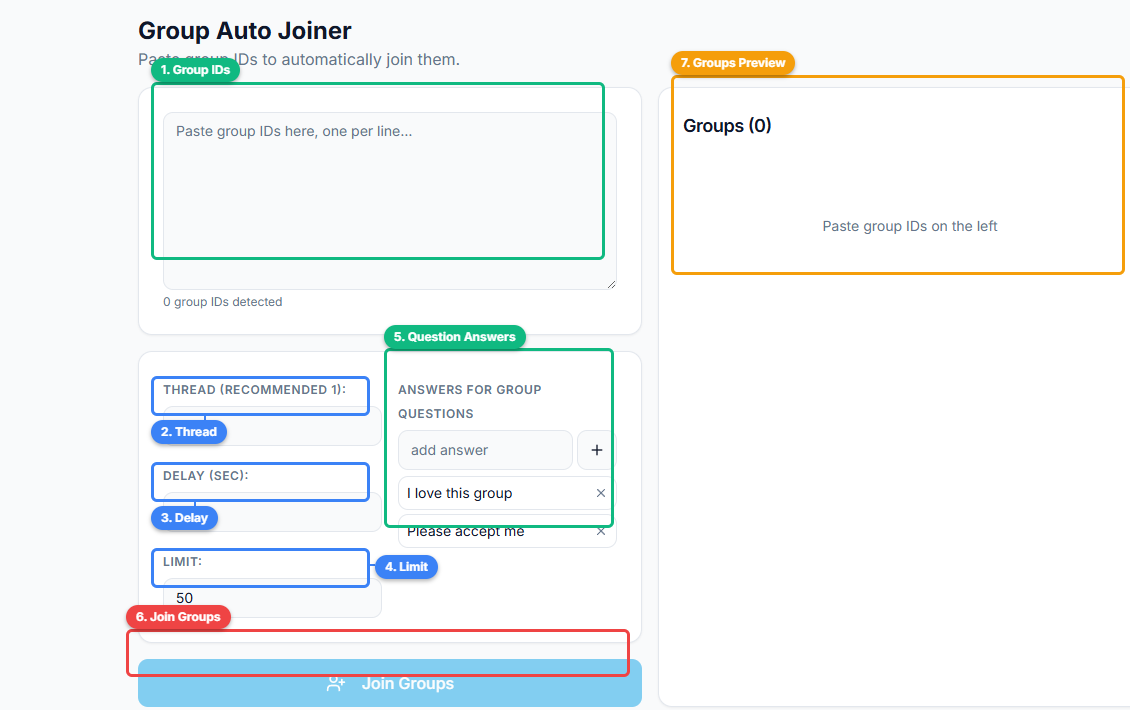
The interface has a clean layout: paste group IDs or URLs into the input area (1), configure threading (2), delay between requests (3), and a limit (4) to control pacing. The question answers section (5) lets you pre-fill responses to group screening questions. Click Join Groups (6) to start, and the groups preview panel (7) shows parsed groups before execution.
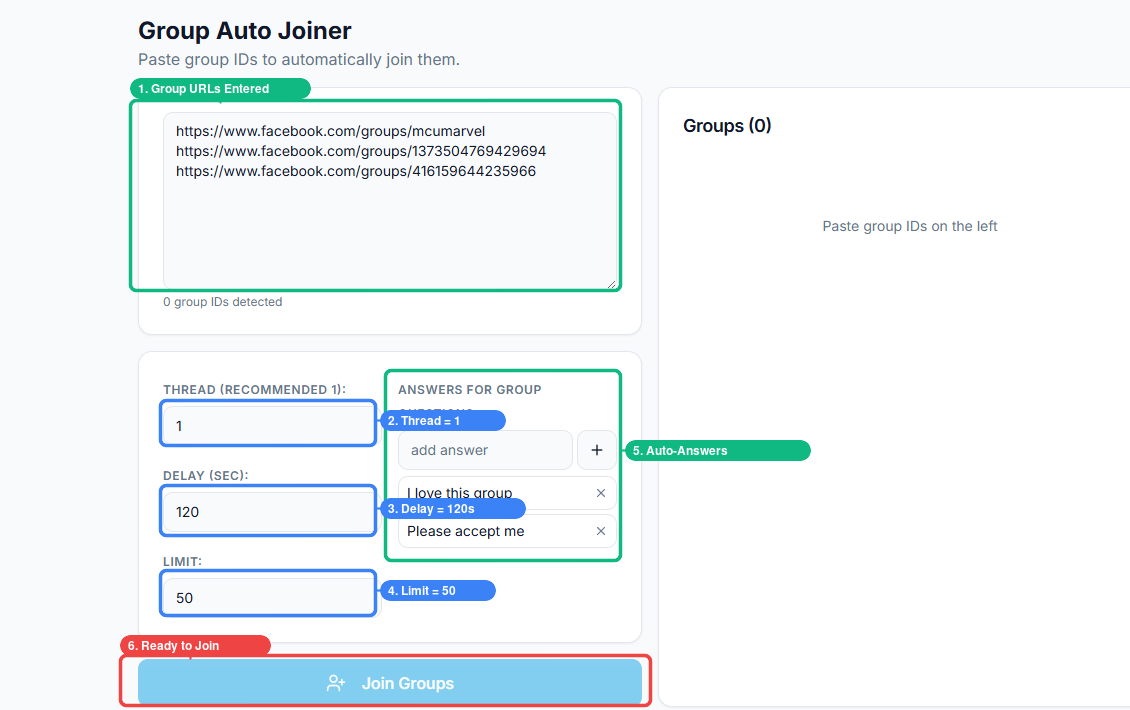
Here is the tool fully configured and ready to run. Three group URLs are entered (1), with conservative pacing — thread set to 1, delay of 120 seconds (2, 3), and a limit of 50 groups (4). Pre-filled answers (5) like "I love this group" and "Please accept me" auto-fill screening questions on private groups. One click on Join Groups (6) starts the automated joining process.
Public vs. Private Groups#
Facebook groups fall into two categories, and they behave differently when you request to join:
- Public groups approve your membership instantly. You click join, you are in. Auto Group Joiner handles these seamlessly.
- Private groups require admin approval. Your join request goes into a queue, and an admin decides whether to accept you. Some private groups also have screening questions you must answer before your request is considered.
Auto Group Joiner submits the join request for both types. For private groups with screening questions, you may need to configure answers or handle those separately. The tool gets you to the door — for private groups, an admin still has to open it.
Why Building a Group Portfolio Matters#
The value of Facebook group marketing scales with your reach, and your reach scales with the number of relevant groups you are in. Here is why building a large, targeted group portfolio is worth the effort.
Audience Access#
Each group is a built-in audience that you did not have to create, pay to advertise to, or nurture from scratch. A group with 50,000 members in your niche represents 50,000 potential eyeballs on your content. Join ten such groups and you have access to half a million people — without spending a dollar on ads.
Content Distribution Leverage#
A single piece of content — a blog post, a product announcement, a helpful tutorial — can be shared across every group in your portfolio. The content creation cost is fixed; the distribution multiplies with each group. This is the fundamental economics of group marketing, and it only works if you are a member of enough groups.
Competitive Intelligence#
Being a member of groups in your niche is not just about posting. You see what your competitors are posting, what content resonates with the audience, what questions people ask repeatedly, and what pain points remain unaddressed. This intelligence informs your marketing far beyond group posts.
Network Effects#
As you become active in multiple groups, you start seeing the same people across different communities. This creates opportunities for direct relationships, collaborations, and referrals that would not emerge from a single-group presence.
Building an Effective Group Portfolio#
Joining every group you can find is not a strategy. Joining the right groups is. Here is how to build a portfolio that delivers results.
Start with Keyword Research#
Before joining anything, define the keywords that describe your ideal customer. If you sell fitness supplements, your keywords might include "bodybuilding," "weight loss," "gym motivation," "meal prep," and "fitness over 40." Each keyword represents a cluster of groups worth exploring.
Evaluate Group Quality#
Not all groups are equal. Before adding a group to your join list, check these indicators:
- Member count. Groups under 1,000 members rarely generate meaningful traffic. Groups over 100,000 can be so noisy that your posts get buried.
- Activity level. A group with 50,000 members but only two posts per day is effectively dead. Look for groups with consistent daily activity.
- Moderation quality. Groups overrun with spam have low engagement because real members stop visiting. Groups with active moderation tend to have higher-quality interactions.
- Post type distribution. If every post is a promotional link, the group is a dumping ground, not a community. Look for groups where members ask questions, share experiences, and have genuine discussions.
Use Tiered Joining#
Rather than joining a hundred groups at once, build your portfolio in tiers:
- Tier 1 (10-15 groups): Your best, most relevant groups. These get your highest-quality content and manual engagement.
- Tier 2 (15-30 groups): Good groups that receive your regular auto-posted content and occasional manual comments.
- Tier 3 (30+ groups): Broad-reach groups for content distribution only.
Auto Group Joiner helps you build all three tiers efficiently. The FaceBot Group Search tool helps you categorize them before joining.
Best Practices for Automated Group Joining#
Pace Your Join Requests#
Facebook monitors the rate at which accounts send join requests. Sending fifty requests in five minutes is unusual behavior and may trigger a temporary restriction on group activity. Space your requests with delays of at least ten to fifteen seconds between each one. For large batches, consider splitting across multiple sessions over a few days.
Do Not Join Irrelevant Groups#
Every group you join adds noise to your Facebook feed and increases the risk that you will be flagged for spam if you post irrelevant content. Stick to groups that match your niche. Quality of membership always beats quantity.
Complete Profile Screening Questions#
Many private groups ask one to three screening questions before approving your join request. These typically ask what brought you to the group, what you hope to contribute, or whether you agree to the group rules. Taking the time to answer these properly dramatically increases your approval rate. Blank or generic answers get rejected.
Clean Your Portfolio Regularly#
Not every group you join will be worth staying in. Some groups decline in quality over time, lose their active moderation, or shift focus away from your niche. Review your group memberships quarterly and leave groups that are no longer delivering value. This keeps your posting targets relevant and your feed manageable.
Common Mistakes When Joining Groups in Bulk#
Joining and immediately posting. Many groups have unwritten expectations that new members observe for a few days before posting. Joining a group and dropping a promotional post within hours is the fastest way to get removed.
Ignoring group rules. Every group has rules, and many require you to read and acknowledge them before your first post. Automated joining does not excuse you from understanding what each group allows.
Bulk joining from a new account. Facebook treats new accounts with less trust. If your account is less than a few months old, aggressive group joining behavior is more likely to trigger restrictions. Start slowly and increase your pace as your account establishes history.
Not tracking which groups you have joined. When you join fifty groups in a session, it is easy to lose track of which ones you are actually in. Maintain a spreadsheet or use FaceBot's group management features to keep your portfolio organized.
Auto Group Joiner in Your Workflow#
Auto Group Joiner is the first step in the group marketing pipeline:
- Discover groups with Group Search and Bulk Finder.
- Join those groups with Auto Group Joiner.
- Post content to your groups with Group Auto Poster.
- Engage with group discussions using Group Auto Commenter.
- Analyze what performs best with Group Viral Finder.
Without step two, the rest of the pipeline does not exist. You cannot post to groups you are not in. Auto Group Joiner removes the manual friction of building that foundation.
Try Auto Group Joiner#
Building a portfolio of relevant Facebook groups should take hours, not weeks. Auto Group Joiner handles the repetitive work of submitting join requests so you can focus on choosing the right groups and planning your content strategy. If you are new to group marketing, start with the complete guide to Facebook group marketing to understand how group joining fits into a broader strategy.
Open Auto Group Joiner in FaceBot
Frequently Asked Questions#
How many groups can I join per day?#
Facebook does not publish a specific daily limit for group join requests. However, based on user experience, twenty to thirty join requests per day with reasonable pacing is a safe range. Exceeding fifty in a single day, especially from a younger account, increases the risk of temporary restrictions on group activity.
Will I get banned for using Auto Group Joiner?#
Facebook restricts accounts for behavior that appears spammy or automated at an extreme scale. Joining a reasonable number of groups per day with proper pacing does not typically trigger bans. The risk increases if you combine aggressive joining with immediate bulk posting in those groups.
Does it work for private groups that have screening questions?#
Auto Group Joiner submits the join request for private groups. If the group requires screening questions, you may need to answer those manually or configure default answers. The tool handles the request submission; admin approval and question responses may require your input depending on the group's settings.
Can I provide a list of specific group URLs to join?#
Yes. You can paste a list of group URLs directly into the tool. This is useful when you have already researched and identified specific groups you want to join, rather than relying on keyword-based discovery.
How do I know which join requests were approved?#
After running a session, the tool provides a summary showing which groups were joined immediately (public groups), which are pending admin approval (private groups), and which failed. You can check back on pending requests to see their approval status over the following days.
Conclusion#
Every group marketing strategy starts with membership. You cannot post, comment, or build a presence in groups you have not joined. Auto Group Joiner eliminates the tedious, repetitive process of submitting join requests one by one, letting you build a targeted group portfolio in a fraction of the time it would take manually. Combined with smart group selection and proper pacing, it is the fastest way to lay the foundation for scalable Facebook group marketing.