What Is Facebook Private DP Downloader? View Hidden Profile Pictures in 2026
Every Facebook profile picture you see in your browser is a compressed thumbnail — 160x160 pixels on the profile page, shrinking to 50x50 in comment threads. Facebook serves these tiny versions by default to reduce bandwidth, but the original full-resolution image is stored at up to 2048x2048 pixels. You just cannot reach it through normal browsing. That is where a Facebook profile picture downloader comes in. FaceBot's Facebook Private DP Downloader identifies the original file and retrieves it directly — giving you the uncompressed, uncropped image in seconds, without requiring you to log into Facebook or install anything.
What Is Facebook Private DP Downloader?#
Facebook Private DP Downloader is a browser-based tool that retrieves the original full-resolution profile picture that Facebook stores but doesn't normally show you.
The word "private" in the name does not mean the tool breaks into locked profiles. It refers to accessing the full-resolution version of the image — the one Facebook's interface never shows you. On Facebook, every profile picture is technically public regardless of a user's privacy settings. Facebook's own platform documentation confirms this: profile pictures cannot be set to "Friends Only" or "Only Me." The tool uses this publicly accessible URL structure to surface what has always been there — just at full size.
Key capabilities:
- Retrieves the original full-size profile picture — up to 2048x2048 pixels, sometimes higher for Facebook Pages
- Works on profiles with privacy restrictions — because the profile picture is always public on Facebook, regardless of account privacy settings
- Displays the uncompressed, uncropped original — no quality loss from re-encoding
- Download as JPEG or PNG — choose the format that fits your workflow
- No Facebook login required — paste a URL and get the image; no credentials stored
- Works on personal profiles, Pages, and group accounts — any public Facebook presence with a profile picture
Why Would You Need a Facebook Profile Picture Downloader?#
There are more practical reasons to download a full-size Facebook profile picture than most people expect.
-
Verify identity — Reverse image searching a 160px thumbnail returns poor results. A full-resolution image is what you need to run through Google Images or TinEye to confirm whether a profile is using stolen photos. Fraud investigators and platform moderators rely on this daily.
-
Design and branding — Designers working with clients frequently need to pull a high-resolution logo or brand photo from a Facebook Page. The 160px version is unusable for print or large-format digital work. The original upload — often 2048x2048 — is production-ready.
-
Contact recognition — Sales and business development teams matching LinkedIn contacts to Facebook profiles need a clear image to compare. A blurry thumbnail creates ambiguity; the full-size original does not.
-
Journalism and research — Journalists documenting public figures or verifying sources for a story need archival-quality images. Screenshots degrade quality. Downloading the original preserves it for the record.
-
Personal use — Saving your own old profile pictures after a refresh, or keeping a high-quality photo a friend posted, are entirely ordinary use cases. You are not breaking any rule by saving a publicly available image.
-
Catfish detection — Full-size images are dramatically easier to reverse-search than Facebook's default 160px thumbnails. If you suspect a profile is using someone else's photo, the DP Downloader gives you the image quality you need to confirm it.
How Facebook Profile Pictures Actually Work (Technical Background)#
Understanding why a dedicated tool is necessary means understanding how Facebook stores and serves profile pictures.
Multiple resolutions stored at upload. When you upload a profile picture, Facebook does not store a single copy. It generates and caches multiple versions at the same time — optimized for different surfaces across the platform:
| Surface | Resolution |
|---|---|
| Comments and chat heads | 50x50 px |
| Friend lists and search results | 100x100 px |
| Profile page (standard) | 160x160 px |
| Mobile profile pages | 320x320 px |
| Original upload | Up to 2048x2048 px (personal) / higher for Pages |
What your browser actually loads. When you visit a Facebook profile, your browser is served the 160x160 version by default. Facebook controls which size is displayed — it always defaults to the smallest appropriate thumbnail for performance reasons.
The original is always there. The full-resolution original is not deleted. It is stored on Facebook's servers alongside every thumbnail variant. Facebook's interface simply never surfaces a link to it through the standard profile page — it defaults to the smallest appropriate thumbnail.
How DP Downloader accesses it. The tool takes the profile URL you provide and requests the original-resolution file directly. This is not hacking — it accesses image URLs that Facebook intentionally makes publicly available. It simply does the lookup work that your browser would never do on its own.
This technical foundation is what separates a proper facebook dp downloader from tools that just right-click and save whatever the browser happened to load.
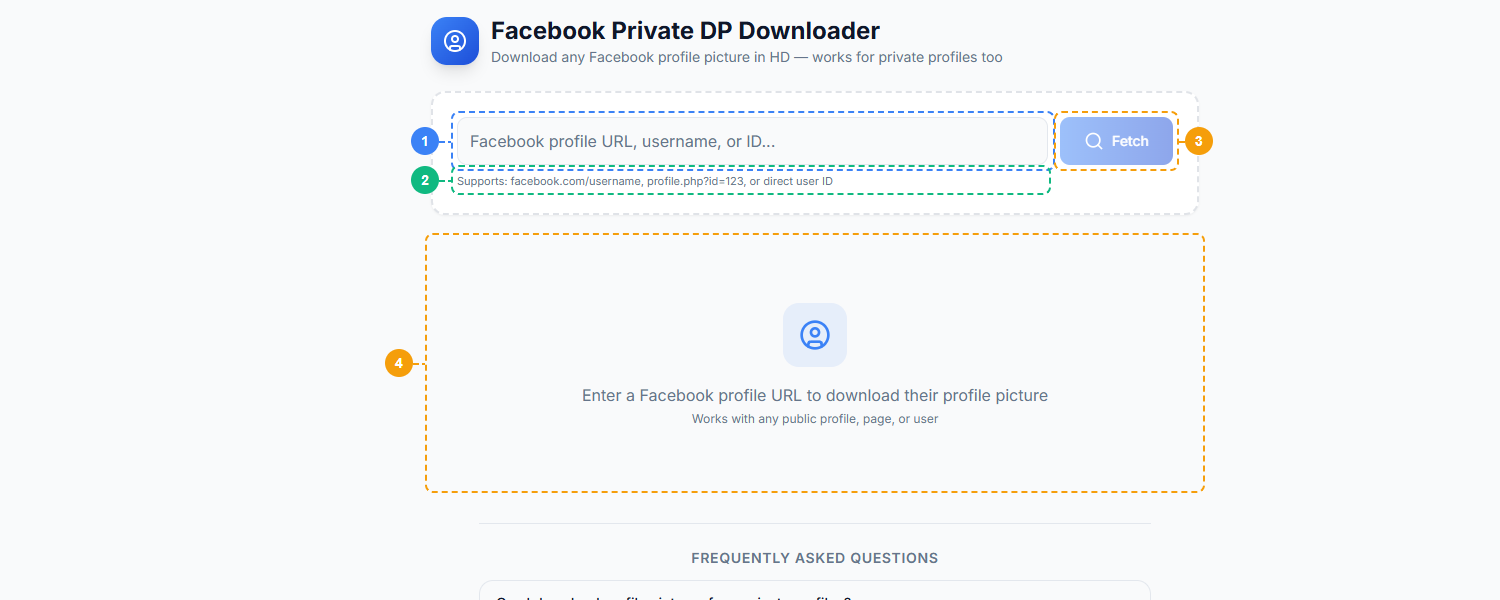
The Facebook Private DP Downloader provides a simple single-purpose interface. Enter a Facebook profile URL, username, or numeric user ID (1), review the supported input formats shown below the field (2), click Fetch to retrieve the full-resolution profile picture (3), and view the result with the original image preview and download option (4).
How Facebook Private DP Downloader Works#
Getting the full-size image takes four steps and under 30 seconds.
Step 1: Copy the Facebook Profile URL#
Navigate to any Facebook profile, Page, or group. Copy the URL from your browser's address bar. This will look like one of these formats:
facebook.com/username— for named profiles and Pagesfacebook.com/profile.php?id=123456789— for numeric ID profilesfacebook.com/groups/groupname— for group profile pictures
Any of these formats work. You do not need to navigate to the profile picture itself — just copy the main profile URL.
Step 2: Paste into DP Downloader#
Open the tool at FaceBot. Paste the copied URL into the input field and click the button to fetch the image. The tool handles the resolution process automatically — no configuration required.
Step 3: View Full-Size Picture#
The tool fetches the original-resolution image and displays it in your browser. You will see the actual dimensions and file size of the original — typically somewhere between 720x720 and 2048x2048 pixels for personal profiles, potentially larger for Pages that uploaded high-resolution brand assets.
Try Facebook DP Downloader Free → /securebot/tools/downloaders/facebook-dp
Step 4: Download#
Right-click the displayed image and save it, or use the Download button in the tool interface. Choose between JPEG and PNG depending on your use case — JPEG for photos and profile pictures, PNG if you need lossless quality for logos or graphics.
Facebook DP Downloader vs. Manual Methods#
There are several manual workarounds people attempt when they want a higher-resolution profile picture. Here is how they compare to using a dedicated downloader:
| Method | Resolution | Ease | Works on Privacy-Restricted Profiles | Time |
|---|---|---|---|---|
| DP Downloader | Full original (up to 2048px) | Paste URL, one click | Yes — DP is always public | ~3 seconds |
| Right-click profile picture | 160x160 thumbnail | Easy | No — sometimes blocked | 2 seconds |
| View page source | Varies (320–960px) | Technical, tedious | Sometimes | 5–10 minutes |
| Browser Inspect Element | Varies | Requires DevTools knowledge | Sometimes | 3–5 minutes |
| Screenshot | Screen resolution, lossy | Easy | Yes | 5 seconds |
The right-click approach gives you whatever thumbnail Facebook decided to load — almost always 160x160. The page source and DevTools methods can sometimes surface a slightly higher resolution (up to 960px in some cases), but they require technical comfort, produce inconsistent results across different profile configurations, and still fall short of the original upload resolution. Screenshots are the worst option — lossy compression, limited to your screen's pixel density, and no ability to zoom beyond what you can see.
The DP Downloader eliminates the guesswork and gives you the best available version every time.
Who Should Use Facebook DP Downloader?#
HR and recruitment professionals. Verifying that a candidate's profile picture matches across platforms is standard due diligence. A full-resolution image makes reverse searching reliable. It also helps confirm that the person you interviewed matches the LinkedIn profile you sourced — blurry thumbnails do not cut it for identity confirmation.
Designers and agencies. Client onboarding regularly involves pulling brand assets from social profiles. Facebook Pages often have the highest-resolution version of a brand's logo on their profile picture — uploaded at full quality, then served as a 160px icon. The DP Downloader retrieves that original and saves you the hassle of requesting source files from a client who may not know where they are.
Journalists and researchers. Documenting public figures, verifying sources, archiving evidence — all of these tasks require high-quality images. A screenshot is not an archival document. The original full-resolution file, with its actual dimensions and metadata, is. This tool is a standard part of open-source intelligence (OSINT) workflows for this reason.
Everyday users. Sometimes the use case is simple: a friend posted a great profile picture, you want to save it, and the thumbnail on your screen is too small to be useful. Or you are updating your own profile and want to retrieve a high-quality version of a photo you uploaded years ago and no longer have locally. Both are completely ordinary uses with no ethical complexity.
How to Get Started#
The tool requires no account, no installation, and no payment to try. Navigate to the tool, paste any Facebook profile URL, and see the original image in seconds.
View Any Facebook Profile Picture in Full Size → /securebot/tools/downloaders/facebook-dp
For a broader look at what FaceBot's downloader suite can handle — from videos to bulk image archives — read the complete guide to downloading social media content. If you work with other platforms, the Instagram Downloader and Bulk Image Downloader cover adjacent workflows.
Frequently Asked Questions#
Q: Is it legal to download someone's Facebook profile picture?#
Yes. Profile pictures on Facebook are public by default — Facebook's own platform policy explicitly states that profile pictures cannot be restricted to Friends Only or Only Me. They are visible to anyone, regardless of whether they have a Facebook account. Downloading a publicly available image for personal or professional use is legal in most jurisdictions. As with any content, you should not use someone's photo for commercial purposes or misrepresentation.
Q: Does the person get notified when I download their profile picture?#
No. Facebook does not notify users when someone views or downloads their profile picture. The download is invisible to the profile owner.
Q: Can I download profile pictures from private or locked profiles?#
Yes. This is a common point of confusion. Even if a Facebook account is set to maximum privacy — locked profile, friends-only posts, restricted visibility — the profile picture itself remains publicly visible. Facebook does not allow profile pictures to be hidden from the public. The DP Downloader works on any profile because the profile picture is always publicly accessible.
Q: What resolution will I get?#
You will get the original upload resolution. For personal profiles, this is typically between 720x720 and 2048x2048 pixels, depending on what the user originally uploaded. Facebook Pages that upload high-resolution brand assets may have originals larger than 2048px. The tool displays the exact dimensions before you download so you know what you are getting.
Q: Does this work on Facebook Pages and Groups?#
Yes. Facebook Pages and Group profile pictures are stored the same way as personal profiles. Paste the Page URL or Group URL and the tool retrieves the original profile picture for that entity — useful for designers pulling client logos and researchers documenting organizations.
Q: How is this different from screenshotting the profile picture?#
Resolution is the entire difference. A screenshot of a Facebook profile picture captures the 160x160 pixel thumbnail your browser loaded — and then re-compresses it through your operating system's screenshot codec. The result is a blurry, lossy 160px image. The DP Downloader retrieves the original file — up to 2048x2048 pixels, uncompressed, at the quality level the user originally uploaded. That is roughly 163 times more pixels per image.
Conclusion#
Facebook's thumbnail system is not a bug — it is an intentional design decision that optimizes bandwidth at the cost of image quality for viewers. The original full-resolution profile picture has always existed on Facebook's servers. A facebook profile picture downloader simply knows how to ask for it correctly.
FaceBot's Facebook Private DP Downloader handles the resolution automatically — paste any profile URL, personal account, Page, or group, and get the original image in seconds. No login, no extension, no quality compromise.
Explore the full downloader suite — including the Facebook Video Downloader and Instagram Downloader — or read the complete guide to downloading social media content for a platform-by-platform breakdown of what FaceBot can retrieve.
Download Any Facebook Profile Picture in Full Resolution → /securebot/tools/downloaders/facebook-dp