What Is Facebook Video Downloader? Save FB Reels & Videos in 2026
Facebook generates billions of video views every single day — from short-form Reels and Watch videos to full-length Live streams and 24-hour Stories. But Facebook makes downloading almost impossible by design. There is no "Download" button on other people's videos, and even your own content gets compressed when you use the platform's native "Save Video" option. A Facebook Video Downloader cuts through this limitation — letting you save any public Facebook video in HD quality, on any device, in seconds. No extensions to install, no account required, and no quality sacrifice. For a broader look at downloading across every platform, see our complete guide to downloading social media content.
What Is Facebook Video Downloader?#
A Facebook Video Downloader is a browser-based tool that extracts the original video file from any public Facebook post and lets you save it directly to your device. Unlike Facebook's own "Save" feature — which merely bookmarks the post inside your account — a downloader gives you an actual MP4 file you own and can use anywhere.
Here is what makes a proper Facebook Video Downloader stand out:
- Works on public Facebook content — Reels, Watch videos, Feed posts, Page videos, and Group videos
- HD quality preservation — up to 1080p, matching the original upload quality
- Zero installation — runs entirely in your browser with no app or Chrome extension needed
- No login or Facebook account required — paste a URL and download
- In-browser processing for privacy — the video URL is resolved without storing your data on a third-party server
- Completely free — no paywalls, no credit card, no usage limits
This is the tool Page managers, content creators, and everyday users rely on when they need a video file, not just a bookmark.
Why Download Facebook Videos in 2026?#
With over 3 billion active users and Facebook Watch serving more than 1.25 billion people each month, the platform is one of the largest video libraries on the internet. Yet the content is locked inside Facebook's ecosystem. Here are six legitimate reasons people use a Facebook Video Downloader every day:
-
Repurpose Reels to other platforms. A Reel that performed well on Facebook can be reposted to Instagram, TikTok, or YouTube Shorts — but only if you have the original MP4 file without Facebook's watermark or re-compression artifacts.
-
Save viral content before it disappears. Facebook posts get deleted, accounts get suspended, and Pages get unpublished. If a video matters to you, downloading it is the only reliable way to keep it.
-
Archive your own Page content. Facebook's Creator Studio and Business Suite do not offer a clean bulk export of your videos. Downloading them individually (or in bulk) is the only way to build a proper content library.
-
Download training and educational videos for offline viewing. Many coaches, educators, and community managers post tutorial content inside Facebook Groups. Offline access means you can learn without burning mobile data.
-
Back up Facebook Live recordings. After a Live stream ends, Facebook saves it as a video post — but those posts can disappear if the account is removed. Downloading the recording preserves the content permanently.
-
Research competitor video strategies. Social media marketers study what is working for competing Pages. Downloading competitor videos lets you analyze production quality, pacing, and hook structure without repeatedly scrubbing through a Facebook tab.
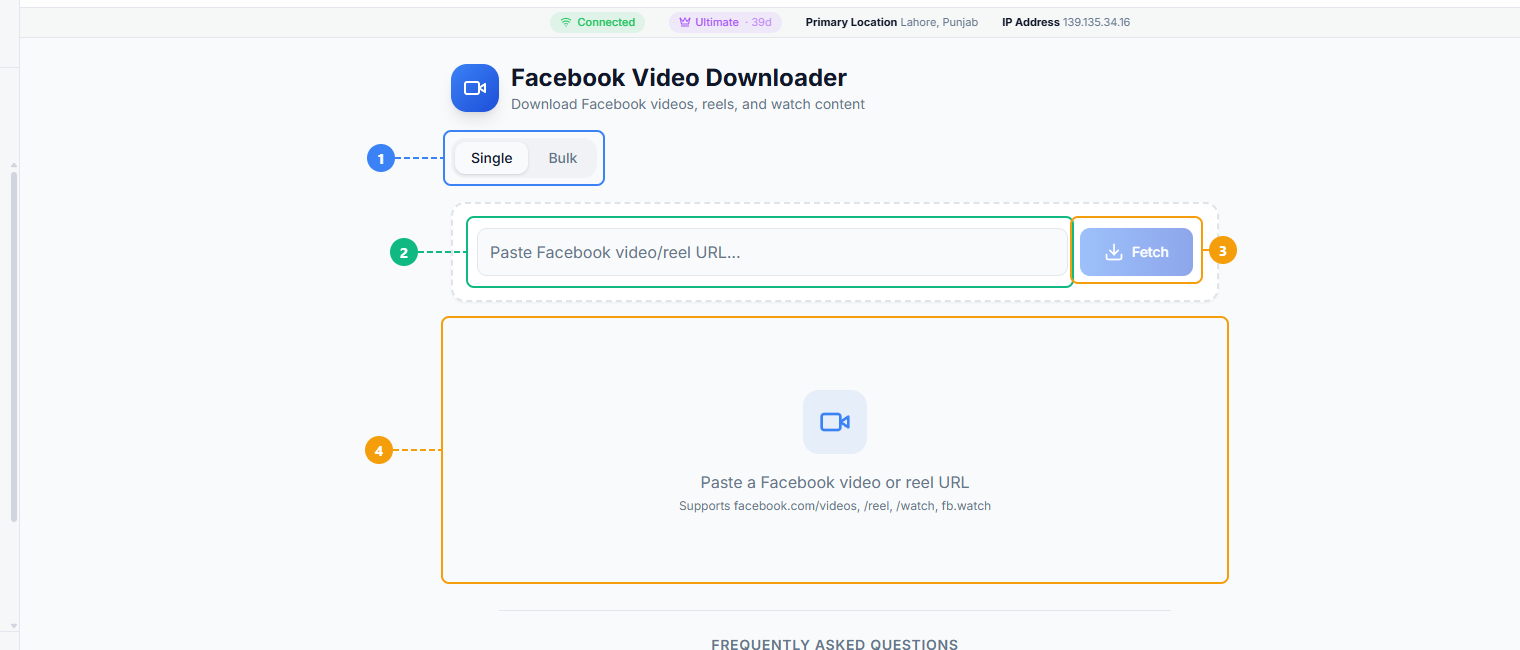
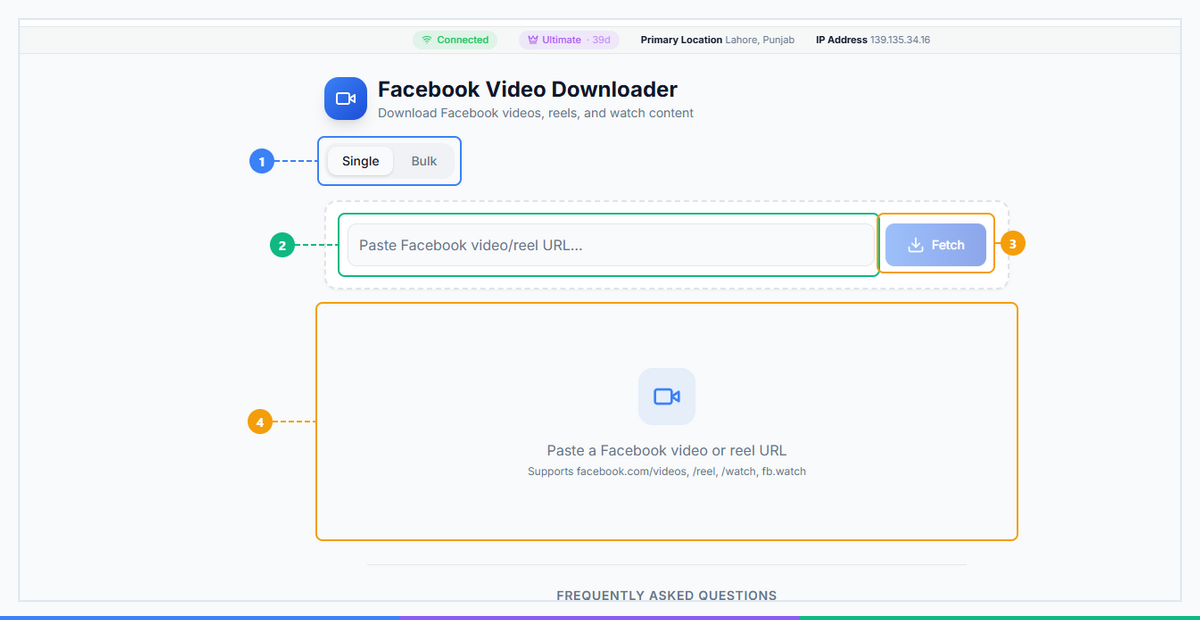
The Facebook Video Downloader provides a straightforward interface. Switch between Single and Bulk download modes (1), paste a Facebook video or reel URL (2), click Fetch to retrieve the video (3), and view the download results with quality options (4).
How Facebook Video Downloader Works (3 Easy Steps)#
Getting a video file from Facebook takes under a minute once you know the steps. Here is the complete process for every device.
Step 1 — Copy the Facebook Video Link#
On desktop:
- Navigate to the Facebook video you want to download
- Click the three-dot menu (⋯) in the top-right corner of the post
- Select Copy link from the dropdown
- Alternatively: right-click directly on the video player and choose Copy video URL
On the Facebook mobile app (iOS and Android):
- Tap the three-dot menu (⋯) on the post
- Tap Copy link
- Or: tap Share → Copy Link
The URL you need looks like:
https://www.facebook.com/reel/1234567890 or https://www.facebook.com/watch/?v=1234567890
Step 2 — Paste the URL into the Facebook Video Downloader#
Open FaceBot's Facebook Video Downloader and paste the copied link into the input field. Click Download or Process to let the tool extract the available video qualities.
Step 3 — Choose Your Quality and Save#
The tool will show you the available download options — typically HD (1080p or 720p) and SD (480p or lower). Click your preferred quality. The file saves as an MP4 to your device's default download folder.
Device-specific notes:
| Device | Browser | Save Behavior |
|---|---|---|
| iPhone / iPad | Safari | Tap and hold the download button → "Download Linked File" → find in Files app |
| Android | Chrome | Tap Download → file saves to your Downloads folder automatically |
| Desktop (Mac/Win) | Any | File saves to your Downloads folder as an MP4 |
Tip: On iPhone, you may need to tap the download link, then tap the share icon in the top-right corner of Safari and select "Save to Files" if the download does not start automatically.
Ready to save your first Facebook video? Use FaceBot's Free Facebook Video Downloader → No login. No extension. HD quality in seconds.
What Types of Facebook Videos Can You Download?#
The tool handles virtually every type of public Facebook video content. Here is a full breakdown:
| Video Type | Supported? | Max Quality | Notes |
|---|---|---|---|
| Feed Videos | Yes | Up to 1080p | Public posts only |
| Facebook Reels | Yes | Up to 1080p | Same short-form format as TikTok-style videos |
| Facebook Watch | Yes | Up to 1080p | Works for longer Watch tab content |
| FB Live (recorded) | Yes | Original quality | Must be the saved/archived version after stream ends |
| Group Videos | Yes | Up to 1080p | Group must be public, or you must be a member |
| Page Videos | Yes | Up to 1080p | Public Pages only |
| Profile Intro Videos | Yes | Up to 1080p | The looping intro video on personal profiles |
| Stories | Via Story Downloader | Original | Use the dedicated Facebook Story Downloader |
Important: The tool can only download public content. Private posts, videos shared with "Friends only," and content inside private Groups that you are not a member of are not accessible — this is by design and respects Facebook's privacy controls.
Who Should Use Facebook Video Downloader?#
This tool is useful across a wide range of use cases. Here are the four groups that get the most value from it:
Page Managers and Business Owners If you manage a Facebook Page and have been posting video content for months or years, you likely do not have local copies of everything you have published. The Facebook Video Downloader lets you rebuild your content archive one video at a time — or use the Bulk Video Downloader to pull an entire Page's video library in one session. For context on what the best Facebook video downloaders offer in 2026, see our full comparison.
Social Media Marketers Competitive analysis is a core part of any social media strategy. Downloading top-performing competitor videos allows you to study them frame-by-frame, transcribe scripts, analyze thumbnail choices, and measure video length against engagement — without keeping dozens of browser tabs open.
Content Creators Creators who produce content across multiple platforms often shoot once and distribute everywhere. A Facebook Reel that performed well is an asset you should own as an MP4. Download it, remove any platform-specific elements, and repost it natively to TikTok, Instagram, YouTube Shorts, or LinkedIn.
Regular Facebook Users Not every use case is professional. Sometimes a family member posts a video of an event you attended, or a friend shares something meaningful that you want to keep. A Facebook Video Downloader lets you save those moments to your camera roll without needing to screen-record and lose quality.
Facebook Video Downloader vs. Alternatives#
There are several ways people try to download Facebook videos in 2026. Here is how they compare:
| Method | Quality | Ease of Use | Privacy | Cost | Reliability |
|---|---|---|---|---|---|
| Facebook's built-in "Save" | Bookmark only — no file | Very easy | High | Free | Always works (but no file) |
| Screen recording | Lossy, no audio sync | Medium | High | Free | Poor quality |
| Chrome extensions | Variable | Low (install required) | Low | Free/Paid | Break frequently after FB updates |
| Ad-heavy online sites | Variable | Medium | Low (ads, trackers) | Free | Unreliable |
| FaceBot Facebook Video Downloader | Up to 1080p HD | Very easy | High (in-browser) | Free | Consistently updated |
The core problem with most alternatives is reliability. Facebook regularly changes how it serves video URLs, which breaks third-party tools. FaceBot's downloader is maintained as part of an actively developed platform, so it keeps working when others go down.
Pro Tips for Getting the Most Out of Facebook Video Downloader#
1. Use the dedicated Story Downloader for Stories. Facebook Stories disappear after 24 hours and their URLs behave differently from regular video posts. The Facebook Story Downloader handles them correctly.
2. Use the DP Downloader for profile pictures. Profile pictures and cover photos are not video files but are just as difficult to save at full resolution. The Facebook DP Downloader grabs them in original quality.
3. For bulk video archiving, use the Bulk Downloader. If you need to download an entire Page's video library rather than individual posts, the Bulk Video Downloader is built exactly for that use case. You can also download Facebook videos directly to your phone — see our step-by-step guide for mobile-specific tips.
4. Confirm the video is public before downloading. If the downloader returns an error, the most common reason is that the video is set to "Friends only" or a private audience. Check the post's privacy setting (the globe icon means public; a person icon means restricted).
5. Facebook Live recordings must be saved by the poster first. Live streams are only available for download after the broadcaster ends the stream and Facebook processes it into a saved video post. If a Live is still in progress, wait until it appears as a regular video post on the Page or profile.
Save your Facebook videos now — before they disappear. Open Facebook Video Downloader → Free. HD quality. Works on iPhone, Android, and desktop.
Frequently Asked Questions#
Is Facebook Video Downloader free to use?#
Yes, FaceBot's Facebook Video Downloader is completely free. There are no download limits, no subscription required, and no credit card needed. You can download as many public Facebook videos as you need without hitting a paywall. The tool is supported by the broader FaceBot platform, which offers additional social media tools for power users.
Can I download private Facebook videos?#
No — and this is intentional. The Facebook Video Downloader can only process public videos. Videos set to "Friends only," "Only me," or shared within private Groups that you are not a member of cannot be accessed by any third-party tool without Facebook's authentication. This is not a limitation of the tool; it is a reflection of Facebook's privacy model that we deliberately respect.
Does Facebook Video Downloader work on iPhone and Android?#
Yes. The tool is fully browser-based, which means it works on any device with a web browser — iPhone, Android, iPad, Mac, Windows, or Linux. On iPhone using Safari, you may need to tap and hold the download link and select "Download Linked File," then find the file in your Files app. On Android using Chrome, the file downloads automatically to your Downloads folder.
Can I download Facebook Reels with this tool?#
Yes. Facebook Reels are supported and download at up to 1080p quality, the same as the original upload. Reels URLs typically look like facebook.com/reel/XXXXXXXXX. Copy the link using the Share → Copy Link option in the Reels player, paste it into the downloader, and select your preferred quality. The resulting MP4 file can be posted natively to any other platform.
Can I download Facebook Live videos?#
Yes, but only after the Live stream has ended and been saved as a video post. Facebook processes Live recordings into regular video posts once the stream concludes. Once the recording appears on the broadcaster's timeline or Page as a standard video, you can copy its link and download it using the same three-step process described above. Live streams that are still in progress cannot be downloaded.
Is downloading Facebook videos legal?#
Downloading Facebook videos for personal, offline viewing of public content is generally considered acceptable use in most jurisdictions. However, redistributing, re-uploading, or monetizing someone else's video without their permission may infringe on copyright law and Facebook's Terms of Service. Always download content you have the rights to use, or content that is explicitly licensed for reuse. When in doubt, contact the original creator and ask for permission before sharing or repurposing their video.
Conclusion#
Facebook makes downloading videos harder than it should be — but a dedicated Facebook Video Downloader removes that friction entirely. Whether you are a Page manager building a content archive, a creator repurposing Reels, or simply someone who wants to keep a meaningful video, the tool handles it in three steps with no install and no login required.
For a broader look at downloading content across every platform, start with our complete guide to downloading social media content. If you also work with ephemeral content, the Facebook Story Downloader covers Stories before they expire. And for a full side-by-side breakdown of every option available in 2026, see our roundup of the best Facebook video downloaders.