Hashtag Posts Analyzer: Find Trending Content and Groups by Hashtag on Facebook
Hashtags on Facebook have always been an afterthought compared to Instagram or Twitter. Most marketers either ignore them entirely or sprinkle a few onto posts without any strategy. But Facebook's hashtag system actually indexes a massive amount of content -- posts, group discussions, pages, and public updates -- all searchable if you have the right tool.
The problem is that Facebook's native hashtag search is shallow. Click a hashtag and you get a loosely sorted feed that mixes irrelevant posts with useful ones, with no way to filter, sort, or extract the data. For anyone doing serious content research or group discovery, the native experience is inadequate.
FaceBot's Hashtag Posts Analyzer goes significantly deeper. It searches Facebook's hashtag index, retrieves matching posts, identifies the groups where those posts were shared, and gives you structured data about content performance -- turning Facebook's neglected hashtag system into a genuine research tool.
What the Hashtag Posts Analyzer Actually Does#
At its core, the tool takes a hashtag as input and returns two things: posts that use that hashtag, and the groups where those posts appear. This dual output is what makes it more than a simple search tool.
Post Discovery#
When you enter a hashtag, the analyzer queries Facebook's hashtag index and retrieves posts matching that term. For each post, you get metadata including engagement signals, the author context, and the source (personal profile, page, or group).
This lets you answer questions like:
- What kind of content gets engagement around this hashtag?
- Who are the most active posters using this hashtag?
- Are posts with this hashtag primarily in groups, on pages, or on personal timelines?
Group Discovery#
This is where the tool becomes genuinely powerful. Many of the posts returned by a hashtag search originate in Facebook groups. The analyzer identifies these groups and surfaces them as a separate dataset.
If you search for #dropshipping, you do not just get posts about dropshipping -- you get a list of active groups where people are discussing dropshipping right now. That is a fundamentally different and more valuable output than a simple content search.
Trend Analysis#
By running the same hashtag search periodically, you can track how content volume and group activity change over time. A hashtag that returns 50 group posts this week and 200 next week signals a rising trend. One that drops from 500 to 100 suggests declining interest.
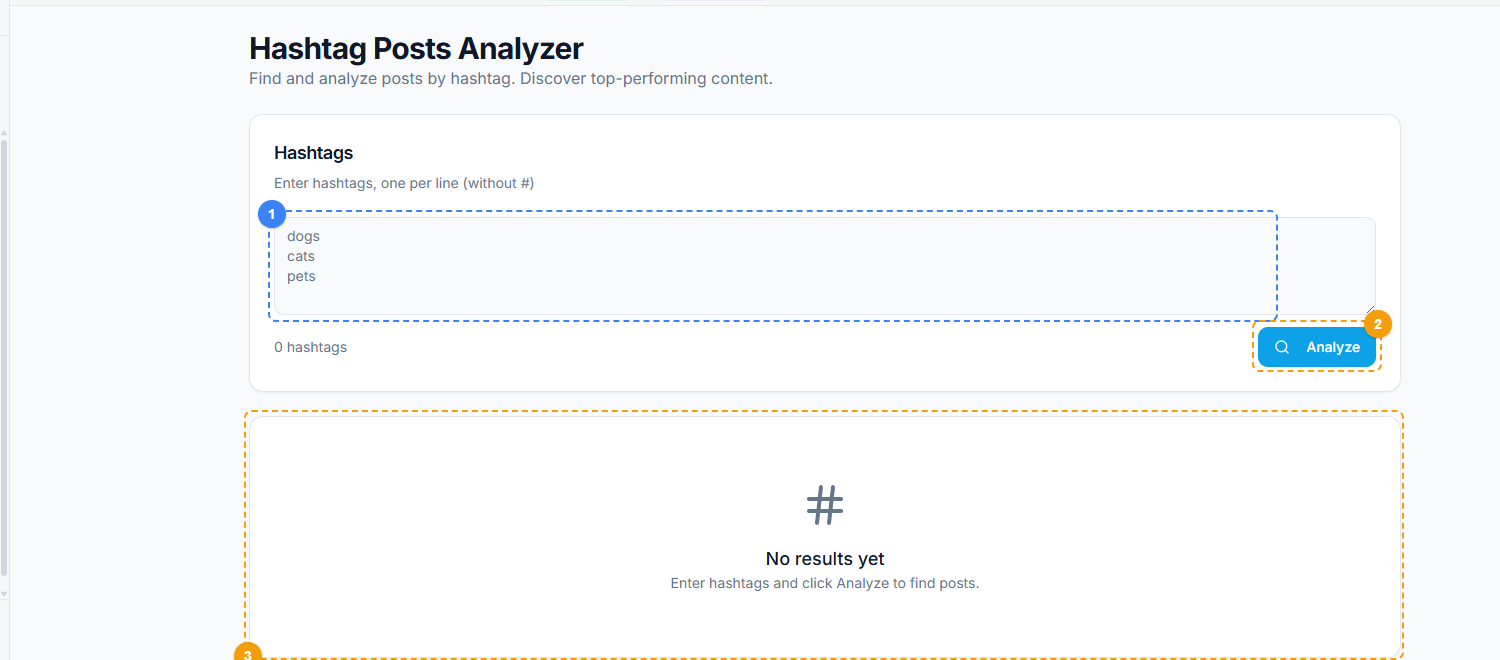
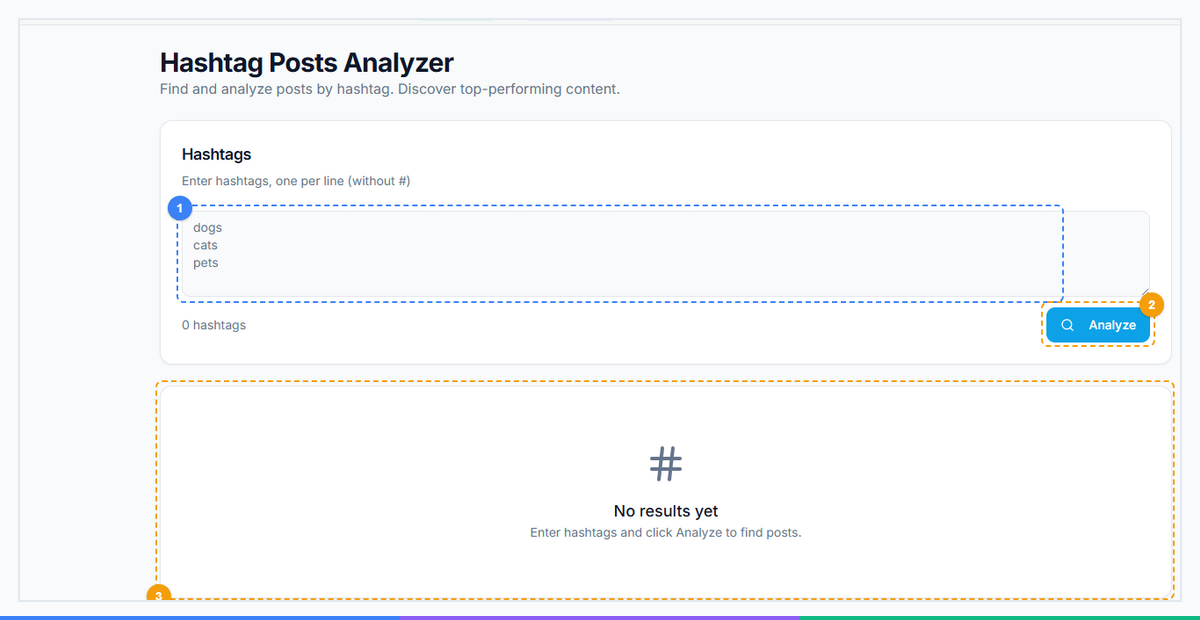
The Hashtag Posts Analyzer provides a streamlined research interface. Enter one or more hashtags into the text area — one per line, without the # symbol (1), click Analyze to search Facebook's hashtag index (2), and view the discovered posts and groups in the results panel below (3).
How to Use the Tool#
Step 1: Choose Your Hashtag#
Start with a hashtag relevant to your niche. Be specific -- #marketing will return an overwhelming volume of generic content, while #emailmarketingautomation will surface more targeted results.
Good starting points:
- Industry terms: #saasmarketing, #realestateinvesting, #keto
- Product categories: #handmadejewelry, #vinylrecords, #mechanicalkeyboard
- Pain points: #freelancerstruggles, #smallbusinesstips
- Trending topics: #ai2026, #remotework, #sidehustle
Step 2: Run the Analysis#
Enter your hashtag into the Hashtag Posts Analyzer. The tool searches Facebook's index and begins collecting matching posts and their associated groups. Processing time depends on the volume of content associated with the hashtag.
Step 3: Review Post Results#
Examine the posts returned. Look for patterns:
- Which post formats perform best (text, image, video, link)?
- What tone resonates (educational, emotional, humorous, controversial)?
- What time of day or day of week do high-engagement posts appear?
- Are certain subtopics within the hashtag getting disproportionate attention?
Step 4: Analyze Group Results#
Review the groups where hashtag posts appeared. This is often the most valuable output. For each group, note:
- Group size and apparent activity level
- Whether the group is public or private
- The group's stated topic and rules
- Whether the group allows promotional content
Step 5: Export and Act#
Download your results for offline analysis. Use the group list to inform your community strategy -- join relevant groups, study their top content, and plan your engagement approach.
Real-World Use Cases#
Content Strategy Development#
A fitness coach wants to know what type of content resonates in the home workout space. She searches #homeworkout and discovers that video posts showing 10-minute routines in small apartments get 3-5x more engagement than lengthy text posts with workout plans. She also finds 12 active groups focused specifically on apartment-friendly exercise, several of which she was unaware of.
Niche Market Validation#
An entrepreneur considering launching a subscription box for mechanical keyboard enthusiasts searches #mechanicalkeyboard. The analyzer returns hundreds of recent posts across dozens of active groups, confirming strong community engagement. She now has a list of communities to research further and potential channels for launch promotion.
Competitive Content Analysis#
A SaaS company wants to understand how competitors position themselves in Facebook communities. Searching hashtags that competitors use in their content (#projectmanagement, #teamcollaboration) reveals which groups they are active in, what content they post, and how the community responds.
Affiliate and Partnership Prospecting#
An affiliate marketer searches product-related hashtags to find groups with active buying discussions. #bestlaptop2026 surfaces groups where people actively seek purchase recommendations -- ideal contexts for affiliate content that genuinely helps the audience.
Local Business Marketing#
A restaurant owner searches #dallaseats and discovers 8 local food groups with combined membership of over 200,000. Several of these groups explicitly welcome restaurant recommendations, providing a direct channel to local food enthusiasts.
Why Hashtag Research Matters on Facebook#
Most marketers overlook Facebook hashtags because they associate hashtag strategy with Instagram and Twitter. This is a strategic mistake for three reasons:
1. Lower competition. Because most marketers ignore Facebook hashtags, there is less noise. A hashtag that is saturated on Instagram may surface highly relevant, lower-competition content on Facebook.
2. Group discovery. Instagram hashtags lead to individual posts. Facebook hashtags lead to groups -- which are communities of engaged people, not just content feeds. A group is a persistent audience; a hashtag feed is ephemeral.
3. Content intelligence. Facebook posts associated with hashtags tend to be longer and more substantive than Instagram posts. Analyzing them gives you deeper insight into what your audience actually cares about, what questions they ask, and what solutions they seek.
The Hashtag Posts Analyzer in FaceBot makes this underexplored channel accessible and actionable, rather than requiring hours of manual scrolling through Facebook's limited native hashtag interface.
Tips for Getting the Most Out of Hashtag Analysis#
Start broad, then narrow. Begin with a general hashtag in your niche, review the results, then search for more specific variations that emerged from the initial analysis.
Search competitor brand hashtags. If your competitor encourages customers to use a branded hashtag, searching it reveals their community, content strategy, and customer sentiment.
Combine with other FaceBot tools. Once you find groups through hashtag analysis, use Extract UID from Group to pull member IDs for audience research, or Groups Extractor V2 to expand your group discovery.
Track hashtags over time. Run the same search weekly or monthly to spot trends. A hashtag that consistently grows in volume and group activity signals an opportunity worth investing in.
Look at what is missing. Sometimes the most valuable insight from a hashtag search is what is NOT there. If you search a hashtag and find few results, that could mean low competition -- or low demand. Cross-reference with search volume data from other platforms to determine which.
Try Hashtag Posts Analyzer#
Ready to uncover trending content and discover active Facebook groups in your niche?
Hashtag Posts Analyzer -- Start Searching
Works through the FaceBot browser extension with your existing Facebook account. No API setup required.
Frequently Asked Questions#
Does this work with any hashtag on Facebook?#
Yes, the tool searches Facebook's public hashtag index and works with any hashtag that has associated content. The volume and quality of results depends on how widely the hashtag is used. Very niche hashtags may return fewer results, while broad hashtags will return a large volume that you can filter and analyze.
Can I see engagement metrics for the posts found?#
The tool surfaces posts with their associated metadata, which includes engagement signals. The exact metrics available depend on the post's privacy settings and how Facebook exposes them through its interface. Public posts generally show more complete engagement data than posts in private groups.
How is this different from just searching a hashtag on Facebook?#
Facebook's native hashtag search returns a loosely sorted feed that mixes content types and relevance levels, with no export capability. The Hashtag Posts Analyzer structures the results, separates posts from groups, and lets you download the data for offline analysis. It also retrieves a deeper set of results than Facebook's default feed typically shows.
Can I use this to find groups in a specific language or region?#
The tool returns results from Facebook's global hashtag index. If you search a hashtag in a specific language (e.g., #recetasfaciles for Spanish cooking recipes), the results will naturally skew toward that language and its associated regions. You can also combine hashtags with location terms (#fitnesslondon) to target specific areas.
How often should I run hashtag analysis?#
For active content strategies, running analysis weekly or biweekly on your core hashtags is ideal. This lets you track trends, discover new groups as they form, and catch shifts in content performance. For one-time research projects like market validation, a single thorough analysis may be sufficient.
Conclusion#
Facebook hashtags are a hidden research goldmine that most marketers walk right past. The Hashtag Posts Analyzer transforms this overlooked feature into a structured research tool -- revealing not just what content exists around a topic, but where the active communities are and how they engage.
Whether you are validating a market, planning a content strategy, discovering niche groups, or analyzing competitor activity, hashtag analysis on Facebook provides a unique angle that you cannot get from Instagram or Twitter hashtag tools. The data is there; FaceBot's Hashtag Posts Analyzer simply makes it accessible.