Extract UID from Group: How to Pull Member User IDs from Any Facebook Group
Facebook groups are one of the richest audience pools on the internet. A single niche group can contain thousands of people who have self-selected into a topic -- fitness, real estate investing, SaaS founders, local parenting communities, or anything in between. That makes group members an extraordinarily valuable dataset for marketers, researchers, and business owners.
The problem is that Facebook provides no native way to export a list of group members, let alone their user IDs. You can scroll through the member list manually, but that gives you names and profile pictures -- not structured data you can actually work with.
FaceBot's Extract UID from Group tool solves this by pulling member user IDs (UIDs) from any Facebook group you have access to, delivering them as a clean, structured list ready for analysis or downstream use.
What Is a Facebook UID and Why Does It Matter?#
Every Facebook user account has a unique numeric identifier called a UID (User ID). While most people interact with Facebook through vanity URLs or display names, the UID is the permanent, unchanging reference that Facebook's own systems use internally.
UIDs matter for several practical reasons:
- Consistency -- Display names change, but UIDs do not. A user who changes their name from "John Smith" to "J. Smith Marketing" still has the same UID.
- API compatibility -- Many Facebook marketing tools, custom audience builders, and CRM integrations work with UIDs rather than names or profile URLs.
- Deduplication -- When you are working across multiple groups, UIDs let you identify overlap. The same person appearing in three different groups shows up as one UID, not three different name strings.
- Audience building -- UIDs can feed into lookalike audience strategies, competitor analysis, and targeted outreach campaigns.
Without UIDs, you are left with display names that are ambiguous, change frequently, and cannot be reliably matched across datasets.
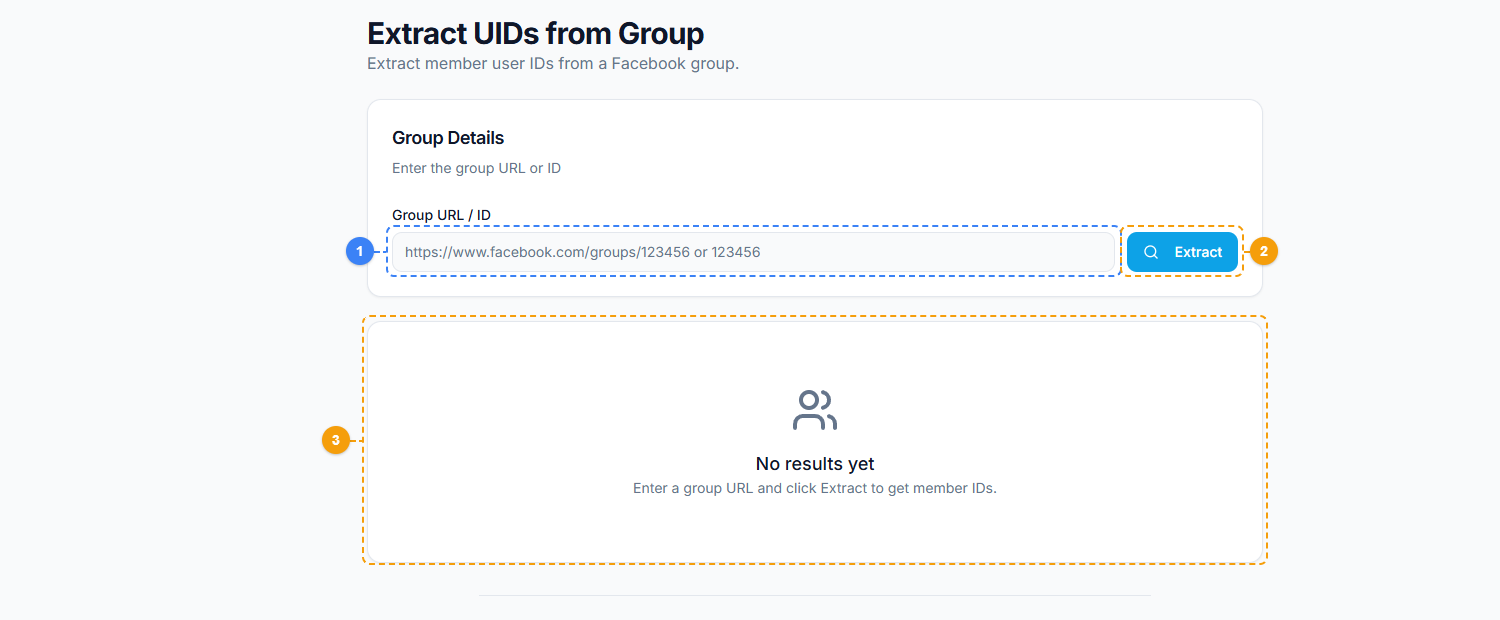
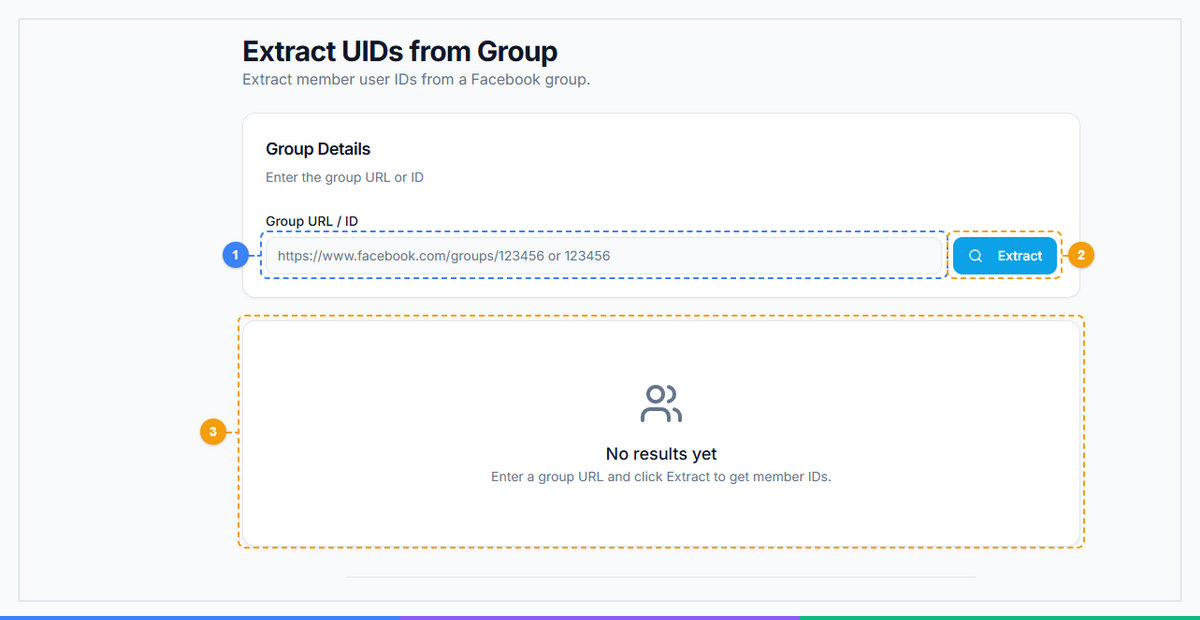
The Extract UIDs from Group tool provides a focused single-purpose interface. Enter a Facebook group URL or numeric group ID (1), click Extract to begin pulling member user IDs (2), and view the extracted UIDs in the results area with export options (3).
How Extract UID from Group Works#
The tool operates through FaceBot's browser extension, which means it uses your authenticated Facebook session to access group data the same way your browser does when you scroll through a member list. There is no scraping of data you would not already be able to see.
Step-by-Step Process#
-
Enter the group URL or group ID. Paste the Facebook group link directly into the tool. The tool automatically resolves the group ID from the URL.
-
Configure extraction parameters. You can choose how many members to extract. For large groups with tens of thousands of members, you may want to set a limit or extract in batches.
-
Run the extraction. The tool pages through the group's member list and collects UIDs. The process runs in your browser session, so extraction speed depends on your connection and Facebook's response times.
-
Download results. Once complete, the extracted UIDs are available as a downloadable list. You can export them as CSV or plain text for use in other tools.
What You Get#
The output is a list of numeric UIDs corresponding to members of the target group. Depending on the group's privacy settings and your membership status, you may also get associated display names where available.
Important Limitations#
- You must be able to view the group's member list. For public groups, this is straightforward. For private groups, you need to be a member. For groups with hidden member lists, extraction is not possible -- the tool cannot access data that Facebook does not expose to your account.
- Facebook rate limits apply. Extracting from very large groups (100,000+ members) may require multiple sessions to avoid hitting Facebook's throttling thresholds.
- Data freshness. The UIDs reflect the member list at the time of extraction. Members who join or leave after extraction will not be reflected until you run it again.
Practical Use Cases#
Audience Research for Ad Campaigns#
If you sell project management software and want to understand your potential audience, extract UIDs from five or six relevant Facebook groups -- "SaaS Founders," "Startup Operations," "Remote Team Management." Cross-reference the lists to find people who appear in multiple groups. These high-overlap individuals are your most engaged potential customers.
Competitive Analysis#
Your competitor runs a Facebook community with 15,000 members. Extracting UIDs from that group gives you a snapshot of their audience. You can analyze the overlap with your own community, identify audience segments you are missing, and tailor your content strategy accordingly.
Influencer and Partnership Discovery#
Large group member lists often include influencers, thought leaders, and potential business partners. By extracting UIDs and cross-referencing with public profile data, you can identify high-value individuals who are active in your niche.
Academic and Market Research#
Researchers studying online communities can use UID extraction to build sampling frames, track community growth over time, and analyze membership overlap across related groups.
Event and Product Launch Targeting#
Launching a product that is relevant to a specific community? Extract UIDs from the most relevant groups to build a targeted awareness campaign. This is significantly more efficient than broad demographic targeting.
Ethical Use and Responsible Data Handling#
Extracting UIDs from Facebook groups is a powerful capability, and it comes with responsibility. Here are the guidelines you should follow:
- Respect privacy settings. Only extract data from groups where you are a legitimate member or where the data is publicly visible. Do not join groups under false pretenses solely to extract member data.
- Comply with platform terms. Facebook's terms of service have specific provisions about automated data collection. Understand the current terms and use extraction tools accordingly.
- Handle data securely. UIDs are personal data under most privacy regulations (GDPR, CCPA, etc.). Store them securely, limit access, and do not share raw UID lists publicly.
- Use data for legitimate purposes. Audience research, ad targeting, and market analysis are legitimate uses. Harassment, doxxing, or spam campaigns are not.
- Delete data you no longer need. Do not hoard UID lists indefinitely. Set retention policies and purge old extractions.
FaceBot provides the extraction capability, but responsible use is your obligation. If you are unsure whether a particular use case is appropriate, consult with a legal professional familiar with data protection regulations in your jurisdiction.
How Automated Extraction Compares to Manual Methods#
The alternative to using a dedicated tool is manual extraction -- scrolling through a group's member list and recording names and profile URLs by hand. Here is how the two approaches compare:
| Factor | Manual Extraction | FaceBot Extract UID |
|---|---|---|
| Speed | ~50 members/hour | Thousands per session |
| Data format | Unstructured names | Clean numeric UIDs |
| Deduplication | Error-prone | Automatic |
| Scalability | Impractical above 200 members | Handles groups of any size |
| Consistency | Human error | Deterministic output |
| Export options | Copy-paste | CSV, text export |
For any group larger than a few hundred members, manual extraction is not a realistic option. Even for smaller groups, structured UID output is more useful than a hand-typed list of display names.
Try Extract UID from Group#
Ready to start building audience datasets from Facebook groups? FaceBot's Extract UID from Group tool is available now.
Extract UID from Group -- Start Extracting
Works through the FaceBot browser extension with your existing Facebook session. No API keys or developer accounts required. For a full overview of all data extraction capabilities, see the complete guide to Facebook data extraction. If you also need to discover groups before extracting member data, the complete guide to Facebook group marketing covers the full pipeline.
Frequently Asked Questions#
Can I extract UIDs from any Facebook group?#
You can extract UIDs from any group where you can view the member list. For public groups, anyone can access the member list. For private groups, you need to be an approved member. Groups that hide their member list entirely cannot be extracted from, as that data is not exposed to any member.
How many UIDs can I extract in one session?#
The practical limit depends on the group size and Facebook's rate limiting. Most users can extract several thousand UIDs per session without issues. For very large groups (50,000+ members), it is more reliable to extract in batches across multiple sessions to avoid triggering Facebook's throttling.
Are the extracted UIDs permanent?#
Yes. Facebook UIDs are permanent numeric identifiers tied to an account. They do not change when a user updates their name, profile URL, or other account details. A UID only becomes invalid if the associated account is deleted or permanently disabled by Facebook.
Is extracting UIDs from Facebook groups legal?#
The legality depends on your jurisdiction, the purpose of extraction, and how you handle the data. In general, extracting publicly available data for legitimate business purposes (market research, ad targeting) is broadly accepted, but you must comply with applicable data protection laws like GDPR or CCPA. If you are operating in a regulated industry or handling data at scale, consult with a legal professional.
Can I use extracted UIDs to create Facebook custom audiences?#
UIDs alone are not directly uploadable as a Facebook Custom Audience -- Facebook's Custom Audiences feature uses hashed identifiers (email, phone, etc.) rather than raw UIDs. However, UIDs are valuable for cross-referencing with other datasets, building lookalike audience strategies, and identifying high-value audience segments that inform your targeting approach.
Conclusion#
Facebook group member UIDs are one of the most underused datasets in social media marketing. They give you a structured, permanent, deduplicated view of exactly who is in a community -- far more useful than scrolling through names on a screen.
FaceBot's Extract UID from Group tool makes this data accessible in minutes rather than hours, with clean output ready for analysis or integration into your existing workflows. Whether you are building ad audiences, researching competitors, or mapping niche communities, UID extraction is the foundation of effective Facebook audience intelligence.