What Is Extract GID from Shared? Pull Group IDs from Shared Post URLs
When a Facebook post goes viral, it gets shared into dozens or hundreds of groups. Each of those groups represents a community that found the content relevant enough to share. For marketers, this is valuable intelligence: the groups that share content in your niche are exactly the groups where your audience congregates.
The problem is that Facebook does not expose a list of "groups this post was shared to." You can see that a post has been shared 500 times, but you cannot click a button to see which groups received those shares. The group IDs are embedded in the shared post URLs, but manually extracting them from dozens of URLs is tedious and error-prone.
FaceBot's Extract GID from Shared tool automates this process. You provide shared post URLs, and the tool extracts the Facebook Group ID (GID) from each one. The result is a clean list of group IDs that you can use for audience research, group discovery, and marketing campaign targeting.
What Is a Facebook Group ID (GID)?#
Every Facebook group has a unique numeric identifier called a GID (Group ID). While users interact with groups through their names or vanity URLs, the GID is the permanent, machine-readable reference that Facebook's systems use internally.
GIDs are important for several reasons:
- Consistency. Group names change frequently. A group called "Digital Marketing Tips" might rename to "Digital Marketing Pro Community" tomorrow. The GID stays the same.
- Uniqueness. Multiple groups can have similar or identical names. The GID is the only way to uniquely identify a specific group.
- Tool compatibility. Most Facebook marketing tools, automation platforms, and data analysis workflows require GIDs as input rather than group names or URLs.
- Cross-referencing. When you collect groups from multiple sources (search, shared posts, competitor analysis), GIDs let you deduplicate and identify which groups appear repeatedly.
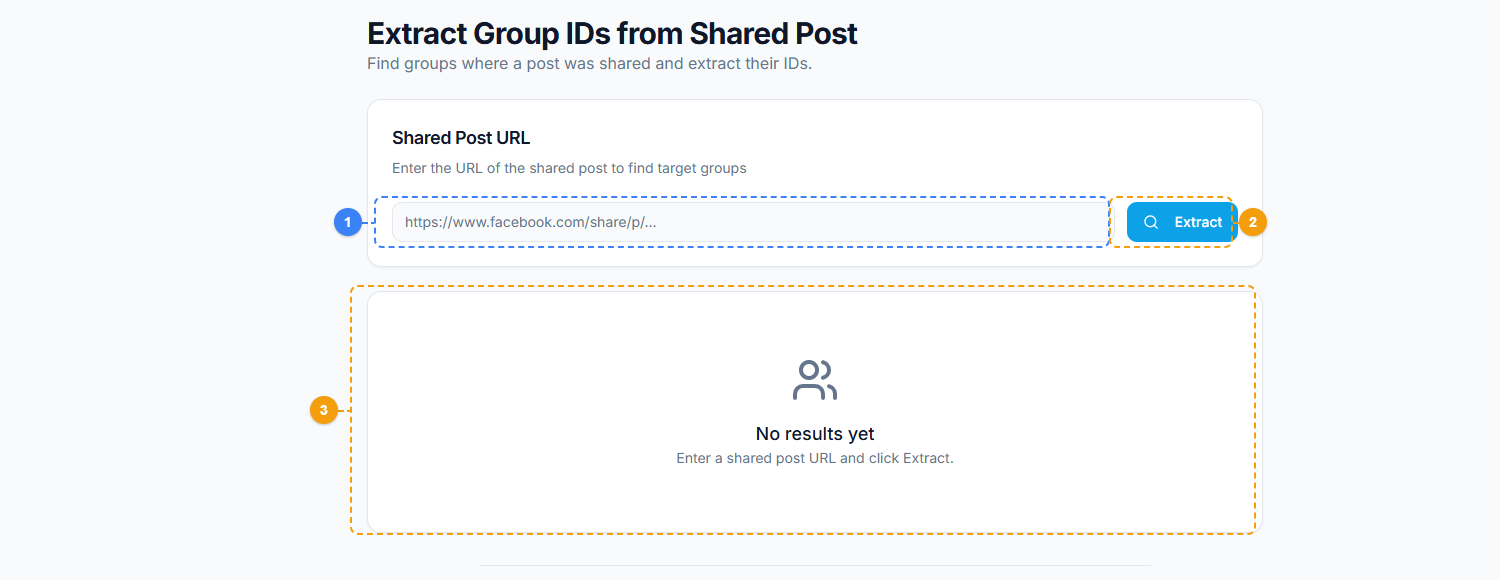
The Extract GID from Shared tool provides a focused extraction interface. Paste one or more shared post URLs into the input area (1), click Extract to parse group IDs from each URL (2), and view the extracted GIDs in the results panel with export options (3).
🚀 Extract GID
Extract group IDs from shared post URLs
Try it Free →How the Tool Works#
Input: Shared Post URLs#
When a post is shared to a Facebook group, the resulting URL contains the group ID. The URL structure looks something like:
https://www.facebook.com/groups/123456789/posts/987654321
The 123456789 segment is the GID. The tool parses these URLs and extracts the group ID from each one.
You can input URLs in several ways:
- Paste a list of URLs directly into the tool
- Provide a post URL and let the tool identify shared versions that contain group IDs
- Bulk input from a text file or spreadsheet column
Processing#
The tool validates each URL, extracts the GID, and deduplicates the results. If the same group appears in multiple shared URLs, it shows up once in the output with a count of how many times it appeared.
Output: Clean GID List#
The result is a structured list of group IDs, optionally with group names and share counts. You can export this as CSV or plain text for use in other tools and workflows.
Practical Use Cases#
Building a Group List from Viral Content#
This is the primary use case. Find a post in your niche that went viral -- a popular article share, a trending discussion, a product review that got hundreds of shares. Use this tool to extract the GIDs of every group it was shared to. You now have a curated list of groups that are actively engaged with content in your niche.
This approach is more targeted than generic group search because it identifies groups based on actual behavior (sharing relevant content) rather than just keyword matching in group names or descriptions.
Competitor Content Analysis#
When a competitor's post gets significant shares, extracting the GIDs tells you exactly which communities are engaging with their content. This reveals:
- Groups you should be participating in but are not
- Communities that are receptive to your type of content
- The overlap (or lack of overlap) between your group presence and your competitor's
Niche Discovery#
Sometimes the most valuable groups are not the ones with obvious names. A post about vegan protein powder might get shared to a group called "Meal Prep for Busy Parents" -- a group you would never find by searching for "vegan" or "protein." Viral content cross-pollinates across unexpected communities, and GID extraction captures those connections.
Campaign Targeting#
If you are running a group-based marketing campaign -- posting content, engaging in discussions, or building relationships in relevant groups -- the GID list from viral content gives you a data-driven starting point. Instead of guessing which groups to join, you target groups that have already demonstrated interest in your content type.
For a broader understanding of group discovery methods, the complete guide to finding Facebook groups for marketing covers multiple approaches including search-based and content-based discovery.
Step-by-Step Usage#
Step 1: Find Viral Content in Your Niche#
Identify posts that have been widely shared. Good sources:
- Posts from competitors that have high share counts
- Popular articles or videos in your industry
- Trending content that overlaps with your target audience's interests
- Posts from your own page that received unexpectedly high shares
Step 2: Collect Shared Post URLs#
Gather the URLs of the shared versions of these posts. Each shared-to-group URL will contain the group ID. You may collect these from:
- Facebook's "shares" dialog (where available)
- Search results that show the post appearing in different groups
- Notifications if your own content was shared
Step 3: Input URLs into the Tool#
Open the Extract GID from Shared tool in FaceBot's Data Extraction section. Paste your collected URLs. The tool accepts single URLs or bulk lists.
Step 4: Run Extraction#
The tool processes each URL, extracts the GID, validates it, and compiles the results. Duplicate GIDs from multiple shares to the same group are deduplicated automatically.
Step 5: Export and Use#
Download the GID list. Common next steps:
- Join the groups for manual engagement and relationship building
- Feed GIDs into other FaceBot tools like the UID extraction tool for deeper audience analysis
- Cross-reference with existing group lists to identify new groups you were not previously aware of
- Track which groups share content most frequently by running extraction on multiple viral posts and comparing overlap
🚀 Ready to try Extract GID?
Extract group IDs from shared post URLs
Try it Free →Best Practices#
Start with High-Share Posts#
The more shares a post has, the more groups you will discover. Focus on posts with 100+ shares for meaningful group lists. Posts with fewer than 20 shares may not provide enough data to be useful.
Extract from Multiple Posts#
Do not rely on a single viral post. Different posts get shared to different groups based on topic angle, timing, and the sharer's group memberships. Running extraction on 5-10 relevant posts gives you a much more comprehensive group list than a single extraction.
Deduplicate Across Extractions#
If you run the tool on multiple posts, some groups will appear in multiple extractions. The groups that show up repeatedly are your highest-value targets -- they are consistently engaged with content in your niche, not just one-time shares.
Verify Groups Before Engaging#
A GID tells you the group exists and shared relevant content. It does not tell you whether the group allows promotional content, has active moderation, or matches your specific audience. Always visit the group and review its rules before joining or posting.
Limitations#
- Shared post URLs required. The tool extracts GIDs from URLs that contain group identifiers. If you only have the original post URL without any shared versions, there are no GIDs to extract.
- Not all shares go to groups. Users share posts to their personal timelines, in Messenger conversations, and on pages -- not just to groups. This tool focuses specifically on group shares.
- Privacy settings apply. If a group is private and the shared post is not visible to your account, the URL may not resolve. The tool can still extract the GID from the URL structure, but you may not be able to access the group itself without membership.
- Facebook rate limits. Bulk extraction of large URL lists may be throttled by Facebook. Process in batches if you are working with hundreds of URLs.
Frequently Asked Questions#
What is the difference between a GID and a UID?#
A GID (Group ID) identifies a Facebook group. A UID (User ID) identifies a Facebook user account. They are separate identifier types. This tool extracts GIDs. For extracting user IDs from group member lists, see the UID extraction tool.
Can I get the group name along with the GID?#
Yes. The tool resolves GIDs to group names where possible, giving you both the numeric ID and the human-readable group name in the output. Some private groups may only return the GID without a name, depending on visibility settings.
How many URLs can I process at once?#
FaceBot supports bulk processing. You can paste dozens or hundreds of URLs in a single extraction run. For very large lists (1,000+ URLs), processing in batches of a few hundred at a time is recommended to avoid timeouts.
Can I extract GIDs from posts on my own page?#
Yes. If your page's content was shared to groups, the shared post URLs contain group IDs just like any other shared content. This is a useful way to discover which communities are engaging with your own content organically.
Does this tool work for posts shared to public and private groups?#
The GID can be extracted from the URL regardless of whether the group is public or private. However, accessing the group itself (viewing members, posts, or joining) depends on the group's privacy settings and your own account status.
Conclusion#
Extract GID from Shared is a data extraction tool for one specific but valuable purpose: turning shared post URLs into a list of Facebook Group IDs. It bridges the gap between seeing that content was shared and knowing exactly which communities shared it.
For marketers, researchers, and anyone building a group-based strategy, this tool provides a content-driven approach to group discovery that is more targeted than keyword search and more scalable than manual observation.
Extract Group IDs from shared posts now