
What Is Pages Share to Groups? Share Page Posts to Multiple Facebook Groups
Facebook Groups are where engaged communities live. While page posts reach a fraction of your followers through organic distribution, group posts appear in every member's feed — group content has fundamentally different (and usually higher) visibility than page content. The challenge for page managers is bridging these two ecosystems: getting your page's content in front of group audiences.
Sharing a page post to a group is straightforward when you do it once. But sharing a single post to 20 groups? Or sharing multiple posts to multiple groups? Manually, this means navigating to each group, clicking the share button, selecting the group, and repeating. For marketers who use group distribution as a core strategy, this manual process consumes hours every week.
The Pages Share to Groups tool in FaceBot automates this distribution. Select your page posts and the target groups, and the tool shares your content across all selected groups simultaneously.
What Does the Pages Share to Groups Tool Do?#
The tool takes posts from your Facebook Pages and shares them to Facebook Groups you are a member of. Here is what it handles:
Multi-group distribution. Share a page post to multiple groups in a single action. Select 5, 20, or 50 groups and the tool distributes your content across all of them.
Post selection. Choose which page posts to share. You can select recent posts, top-performing posts, or specific posts that are relevant to the groups you are targeting.
Group targeting. Select which groups to share to from your group membership list. Target groups that are topically relevant to the post's content for maximum engagement and minimum negative feedback.
Pacing control. Distribute shares over time rather than posting to all groups simultaneously. Natural pacing reduces the risk of being flagged for spam by Facebook's automated systems.
Page identity. Shares come from your page, maintaining brand attribution. Group members who engage with the shared content can click through to your page.
Why Group Distribution Matters for Page Growth#
Groups Have Higher Organic Reach#
Facebook's algorithm shows page posts to roughly 2-6% of a page's followers. Group posts appear in every group member's feed by default (unless they have turned off notifications for that group). This fundamental difference in distribution makes groups one of the most effective channels for organic reach in 2026.
Groups Contain Pre-Qualified Audiences#
Group members have actively joined a group about a specific topic. They are self-declared interested parties. A fitness page sharing a workout video to a fitness group is reaching an audience that has already demonstrated interest in fitness content. This pre-qualification means group-shared content tends to generate higher engagement rates than the same content in a page's feed.
Group Engagement Feeds Page Growth#
When group members engage with a shared page post — reacting, commenting, clicking through — they become aware of your page. The most engaged group viewers often follow the page, becoming part of your direct audience. Group distribution is one of the most effective organic page growth tactics available.
Content Gets Extended Life#
A page post in your feed has a lifespan of a few hours before it gets buried by newer content. The same post shared to groups gets additional exposure in each group's feed, effectively multiplying the post's useful lifespan. A post that would have been seen by 500 people on your page might reach 5,000 across 20 well-chosen groups.
Practical Use Cases#
Content Marketing Amplification#
You published a valuable blog article and shared it on your page. Now share that page post to relevant groups where the article's topic is discussed. A marketing agency page sharing a "10 SEO Strategies" article to digital marketing groups reaches thousands of marketers who would never have seen the page post.
Product Launches#
When launching a new product, share the announcement post to groups where your target customers gather. A new plant-based protein powder can be shared to fitness groups, vegan lifestyle groups, and nutrition discussion groups — each one a pocket of pre-qualified potential customers.
Event Promotion#
Promoting an event to group audiences dramatically increases registration rates. Share your event post to groups related to the event's topic, industry, and geographic area. A local business event can be shared to local community groups, local business owner groups, and industry-specific groups.
Driving Video Views#
Video content shared to groups accumulates views faster because of groups' higher visibility. If your page published a video that you want to gain traction, distributing it across relevant groups provides the initial view volume that triggers Facebook's broader recommendation system.
Building Authority in a Niche#
Consistently sharing valuable page content to niche groups establishes your page as a go-to resource. Over time, group members associate your page with quality content in that topic area, which builds the kind of authority that paid advertising cannot replicate.
How to Use Pages Share to Groups#
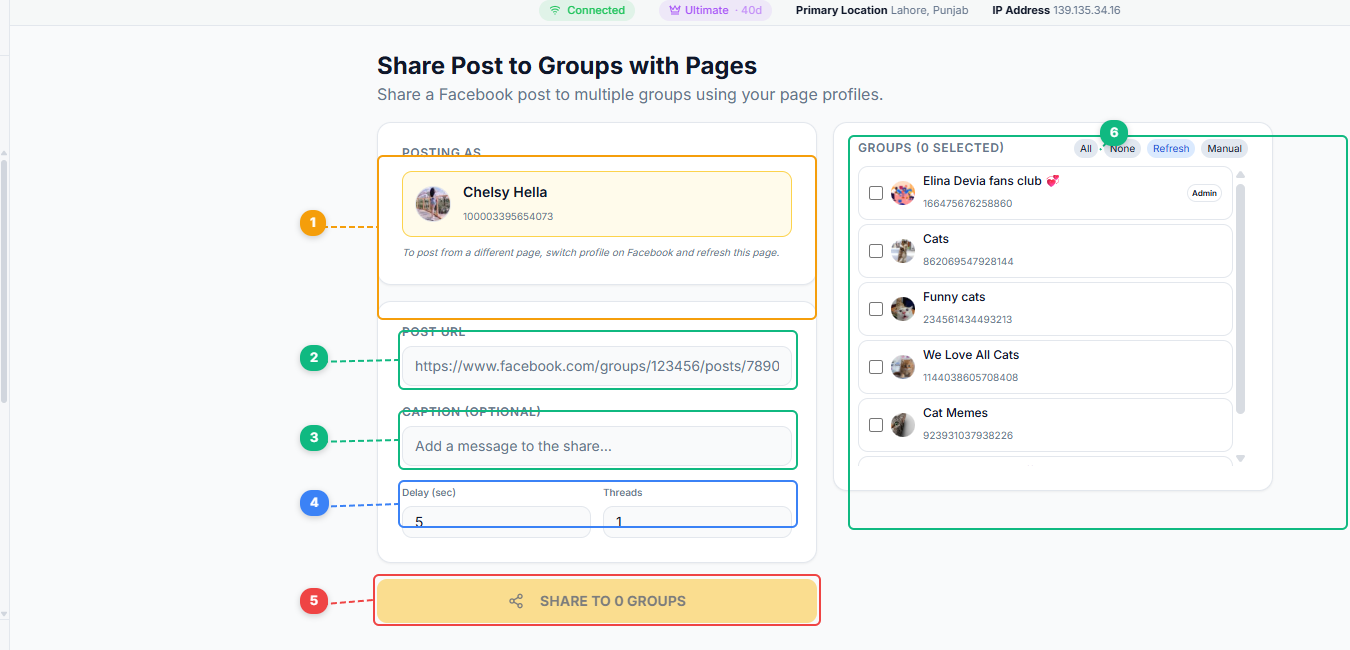
The Pages Share to Groups tool has a two-panel layout. Your current posting identity shows which page profile will share the content (1), paste the post URL you want to distribute (2), add an optional caption message (3), configure delay and thread count to control pacing (4), click Share to execute distribution (5), and select target groups with All/None/Refresh/Manual toggles in the groups panel (6).
- Open the FaceBot dashboard and navigate to the Pages Share to Groups tool.
- Select the page post (or posts) you want to distribute.
- Select the target groups from your group membership list.
- Configure pacing — how quickly the shares are distributed across groups.
- Execute the distribution.
- Monitor engagement on the shared posts across groups.
For best results, pair this tool with the Viral Pages Content Finder to identify which of your posts has the highest engagement potential before distributing it to groups. Sharing your top-performing content maximizes the impact of each group share.
Tips for Effective Group Distribution#
Match content to groups. Share content that is genuinely relevant to each group's topic. A gardening post shared to a gardening group provides value. The same gardening post shared to a car enthusiast group is spam. Relevance is not optional — it is the difference between engagement and removal.
Add context when sharing. Do not just share the post silently. Add a comment that explains why the post is relevant to the group. "Just published this breakdown of organic composting methods — thought this group would find it useful" is better than a bare share.
Respect group rules. Many groups have rules about self-promotion, posting frequency, and content types. Read and follow these rules. Getting banned from a high-value group because you ignored their self-promotion limit is a net loss.
Do not over-share. Sharing the same post to 100 groups in an hour looks like spam — because it is. Be selective. Target 10-20 highly relevant groups per post, and pace the shares over several hours or across different days.
Track which groups generate the most engagement. Over time, you will discover that certain groups consistently drive more clicks, comments, and page follows than others. Focus your distribution on these high-value groups and deprioritize groups that generate no engagement.
Combine with group marketing strategy. Group sharing is one component of a broader Facebook group marketing approach. Build genuine relationships within groups alongside your content distribution.
🚀 Ready to try Share to Groups?
Share page content across dozens of groups
Open it Now →How This Differs From Other Sharing Tools#
FaceBot offers several sharing tools that target different distribution channels:
- Pages Share to Groups (this tool) shares page posts to groups using your page identity.
- Profiles to Groups shares content to groups using personal profile identities, which can appear more organic.
- Share to Pages distributes content across multiple pages you manage.
Each tool targets a different distribution pathway. The choice depends on whether you want to reach group audiences (this tool), group audiences with a personal touch (Profiles to Groups), or cross-page audiences (Share to Pages).
Limitations#
You can only share to groups where you (or the page) are a member. The tool does not grant access to private groups you have not joined. Group administrators can remove shared posts and block pages from posting, which is beyond any tool's control.
Facebook's spam detection systems monitor sharing patterns. Sharing the same post to dozens of groups within minutes may trigger temporary restrictions on your sharing ability. Use the pacing controls to distribute shares naturally.
Some groups have admin-approval settings where all posts require moderator approval before appearing. Shares to these groups may be delayed or rejected depending on the group's moderation policies.
The effectiveness of group sharing depends heavily on the quality of your content and the relevance to the target groups. The tool handles the distribution logistics, but the content's value determines the engagement outcome.
Frequently Asked Questions#
Can I share to groups I am not a member of?#
No. Facebook requires group membership (either personal or page) for posting. You can only share to groups where you have an active membership.
Will group admins see that I used a tool to share?#
No. The shared post appears in the group the same way any manually shared post would appear. There is no indicator that distinguishes tool-assisted shares from manual shares.
How many groups can I share to per post?#
There is no hard limit in the tool, but practical limits exist. Facebook's own rate limiting and spam detection systems constrain how many shares you can execute in a short period. Sharing to 10-30 groups per post session, paced over hours, is a sustainable approach.
Can I share posts from pages I do not manage?#
No. The tool shares posts from pages you administer. To share other pages' content to groups, you would use a different workflow.
Will the shared post link back to my page?#
Yes. Shared page posts in groups include attribution to your page. Group members who click on the share see the original page post, and your page name is visible as the source.
Conclusion#
The Pages Share to Groups tool bridges the gap between your page content and Facebook's most engaged communities. Groups offer organic reach that pages cannot match on their own, and distributing your best content to relevant groups multiplies its audience without paid promotion.
FaceBot makes group distribution a scalable operation. Select your posts, target your groups, and let the tool handle the repetitive sharing process. The key to success is relevance — match your content to your groups, add context, and maintain the kind of genuine participation that keeps group administrators welcoming your contributions.
Try the Pages Share to Groups tool