
What Is Bulk Page Post Hider? Hide Multiple Facebook Page Posts Instantly
Deleting a Facebook Page post is permanent. Once it is gone, you lose the engagement data, the comment history, the shares, and any social proof that post accumulated. Sometimes that is the right call — but often, you do not want to destroy a post. You just want it off your timeline.
Facebook allows page administrators to hide individual posts. A hidden post disappears from your public timeline but continues to exist. It retains all its data, remains accessible via direct link, and can be unhidden at any time. The problem is that Facebook provides no way to hide posts in bulk. If you need to hide 50 posts — during a rebrand, a content audit, or a seasonal cleanup — you are clicking through menus 50 separate times.
The Bulk Page Post Hider in FaceBot solves this. Select the posts you want to hide, execute the action, and they all disappear from your public timeline simultaneously. No deletion. No data loss. Full reversibility.
What Does the Bulk Page Post Hider Do?#
The tool loads posts from your Facebook Page and lets you hide multiple posts at once. Here is what it offers:
Bulk selection. Check multiple posts in a single view and hide them all with one action. No repetitive clicking through individual post menus.
Post preview. See each post's content, date, engagement metrics, and type before deciding whether to hide it. You are making an informed decision on every post.
Non-destructive action. Hiding is fundamentally different from deleting. Hidden posts still exist — they just do not appear on your page's public timeline. You can unhide them later if needed.
Filtering options. Sort and filter your post list by date, engagement, or type to quickly locate the posts you want to hide. This is critical when working with pages that have thousands of posts.
Page selection. Choose which page to work with if you manage multiple Facebook Pages from one account.
Hiding vs. Deleting: Why It Matters#
This is the core distinction that makes the Bulk Page Post Hider valuable compared to the Page Posts Remover, which handles permanent deletion.
When to Hide#
- Seasonal content. Holiday promotions, summer sales, or event-specific posts that you want to remove from view now but may want to resurface later.
- Content under review. A post triggered a complaint or raised a compliance question. Hide it while you investigate rather than deleting evidence.
- Rebrand transitions. Old branding content that you might want to reference later for internal purposes but should not be publicly visible.
- A/B testing visibility. Hide underperforming post variants while keeping the data for later analysis.
- Temporary sensitivity. A post about a topic that has become controversial. Rather than taking the permanent step of deletion, hiding lets you wait for context to evolve.
When to Delete Instead#
- Posts with incorrect information that could cause harm if rediscovered.
- Content that violates updated terms of service or legal requirements.
- Duplicate or spam posts with no value to preserve.
- Posts that contain outdated offers where the data has zero future utility.
The general rule: if there is any chance you will want the post or its data back, hide it. If the post is a liability even when hidden, delete it.
Practical Use Cases#
Quarterly Content Audits#
Many page managers run quarterly reviews of their content. The Bulk Page Post Hider lets you quickly move through your post history and hide everything that no longer serves your current messaging without losing the historical record. You can filter by date to focus on a specific quarter, then select and hide posts that have aged out of relevance.
Agency Client Onboarding#
When a marketing agency takes over a client's Facebook Page, one of the first priorities is presenting a consistent brand image. The new agency can hide all pre-existing content that does not align with the new strategy — without irreversibly deleting the previous agency's work. This is a professional courtesy that also protects the agency legally if the client later asks to see what was removed.
Product Line Discontinuation#
A product is being retired, but you ran dozens of posts promoting it. Deleting all of them erases your marketing record. Hiding them removes the confusion for visitors while keeping the content accessible if you ever bring the product back or need the engagement data for reporting.
Crisis Management#
When a post or topic becomes suddenly problematic — a spokesperson says something controversial, a product is recalled, a partner brand faces backlash — you need to clear your timeline fast. The bulk hider lets you select and hide all related posts in seconds rather than manually hunting through your feed under time pressure.
Page Merges#
If you are consolidating two Facebook Pages into one, you may want to hide redundant content from the absorbed page's timeline. The merged page still carries the old posts technically, but hiding them presents a clean timeline going forward.
How to Use the Bulk Page Post Hider#
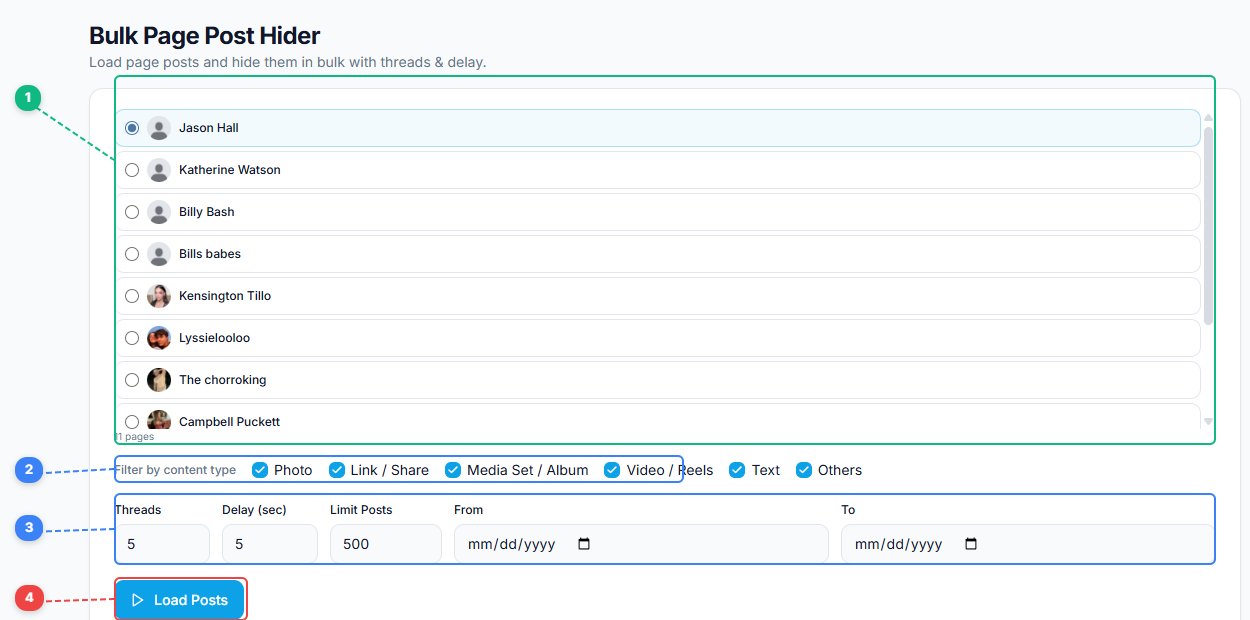
The Bulk Page Post Hider gives you a streamlined workflow. Select which page to work with from your full page list (1), filter posts by content type — Photo, Link/Share, Media Set/Album, Video/Reels, Text, or Others (2), configure threading, delay, post limits, and date range to control the scan (3), then click Load Posts (4) to pull in all matching posts for review and bulk hiding.
- Open the FaceBot dashboard and navigate to the Bulk Page Post Hider tool.
- Select the Facebook Page you want to work with.
- The tool loads your page's posts. Use filters to narrow down by date range, post type, or engagement level.
- Select the posts you want to hide. Review each one using the post preview.
- Execute the bulk hide action.
- Verify that the selected posts no longer appear on your public page timeline.
The process takes seconds for dozens of posts — a task that would take 30 minutes or more doing manually through Facebook's interface.
Tips for Effective Post Hiding#
Create a record before hiding. Before running a bulk hide, export or screenshot the list of posts you are about to hide. This creates a reference in case you need to find and unhide specific posts later.
Use date-range filtering strategically. If you are hiding posts from a specific campaign or time period, the date filter prevents you from accidentally hiding recent content that should stay visible.
Combine with content cloning. If you are hiding old content because you plan to replace it with updated versions, consider using the Page Content Cloner to repurpose the best-performing old posts before hiding the originals.
Remember that hidden posts are still accessible. Anyone with a direct link to a hidden post can still see it. Hiding removes it from your timeline, not from Facebook entirely. If a post needs to be truly inaccessible, deletion is the right choice.
Review hidden posts periodically. Posts you hid six months ago might be worth unhiding now — seasonal content cycles, for example. Do not treat hidden posts as permanently archived.
What About Finding Posts You Already Hid?#
If you have hidden posts through Facebook's native interface or through previous bulk hide operations, you may need to locate and manage those hidden posts. The Hidden Post Remover companion tool lets you find posts that are currently hidden and either permanently delete them or unhide them. The two tools work together: the Bulk Page Post Hider puts posts into hidden status, and the Hidden Post Remover lets you manage posts that are already there.
Limitations#
The Bulk Page Post Hider works on pages you administer. You cannot hide posts on pages you do not manage. The tool's speed depends on the number of posts being processed — hiding 500 posts takes longer than hiding 50, though both are dramatically faster than doing it manually.
Facebook's API may impose rate limits on hide actions. FaceBot handles this by pacing requests appropriately, but extremely large operations (thousands of posts) may take a few minutes to complete.
Hidden posts retain their original engagement data, but hiding a post stops it from accumulating new engagement since it is no longer visible in the feed or on the page timeline.
Frequently Asked Questions#
Can I unhide posts that were hidden in bulk?#
Yes. Hiding is fully reversible. You can unhide individual posts through Facebook's Activity Log or use FaceBot's post management tools to locate and restore hidden posts.
Do hidden posts still count toward my page's post total?#
Yes. Hidden posts continue to exist on your page — they are just not visible on the public timeline. They count toward any internal metrics or post totals.
Will hiding posts affect my page's engagement metrics or reach?#
Hiding does not retroactively change your engagement data. The post's historical likes, comments, and shares remain intact. However, a hidden post will not generate new engagement since it is no longer visible in feeds.
Can people who shared my post still see it after I hide it?#
Yes. Shares of your post are independent copies on other people's timelines or pages. Hiding your original does not affect the shared copies.
Is there a limit to how many posts I can hide at once?#
FaceBot does not impose an artificial limit. The practical constraint is Facebook's API rate limiting, which the tool handles automatically by pacing requests. You can hide hundreds of posts in a single session.
Conclusion#
The Bulk Page Post Hider fills a straightforward gap: Facebook lets you hide posts one at a time, and managing a page at scale requires doing it in bulk. The tool keeps the operation non-destructive — your data, engagement history, and content are preserved while your public timeline shows only what you want visitors to see.
For page managers who need the flexibility of hiding over the finality of deleting, this is the tool that makes it practical at any scale. FaceBot makes the process fast enough that content audits stop being something you defer.
Try the Bulk Page Post Hider tool