What Is Twitter/X Downloader? Save Tweets & Videos Instantly in 2026
Twitter (now X) hosts millions of video clips, GIFs, and Spaces recordings every single day — from breaking news footage to viral sports moments to irreplaceable meme history. But despite all of that content, X provides no native download button for videos. Right-clicking a tweet shows no "Save Video As" option — the video just streams in your browser and there's no direct file to grab. A twitter video downloader solves this problem by extracting the actual MP4 file and delivering it as a clean download to your device. Here's everything you need to know. For a broader look at saving content across every platform, see our complete guide to downloading social media content.
What Is Twitter/X Downloader?#
Twitter/X Downloader is a browser-based tool that extracts and saves video content directly from posts on X (formerly Twitter). You paste a tweet URL, the tool identifies the best quality available, and you get a standard MP4 file you can store locally — no technical knowledge needed.
Key capabilities at a glance:
- Works on both platforms: Accepts URLs from both
twitter.comandx.com— no reformatting needed. - Video tweet support: Any tweet that displays an inline video player is supported.
- GIF support: Twitter GIFs are technically MP4 files served through the same video pipeline. The downloader saves them as MP4, which actually produces sharper results than the GIF format itself.
- HD quality preservation: The tool retrieves the highest resolution Twitter serves for the tweet, typically 720p or 1080p.
- No account required: You don't need to be signed in to X, and you don't need to install a browser extension or desktop app.
- Instant processing: Most tweets are processed in under five seconds.
Why Download Twitter/X Videos in 2026?#
X's content is volatile. Accounts get suspended, tweets get deleted, and viral moments disappear without warning. Here are six legitimate reasons people use a twitter video downloader every day:
-
Save news clips before they vanish. Eyewitness footage, government statements, and breaking news videos are frequently deleted — either by the poster or through content moderation. Downloading immediately preserves the record.
-
Archive viral moments. Internet culture moves fast. That video that's everywhere today may be gone in 48 hours. Local storage is permanent.
-
Save GIFs as proper video files. Downloading a Twitter GIF as an MP4 gives you a crisp, loopable video file instead of the heavily compressed GIF format that degrades quality significantly.
-
Preserve sports highlights. Rights holders routinely issue takedowns on clip accounts. Download before the window closes.
-
Document evidence. Researchers, journalists, and legal teams frequently need to preserve tweets as documentation. A downloaded MP4 with timestamp metadata is far more defensible than a screenshot.
-
Repurpose content. Marketers and content creators save reference clips, competitor content, and trend-setting videos for internal review, mood boards, and creative briefs.
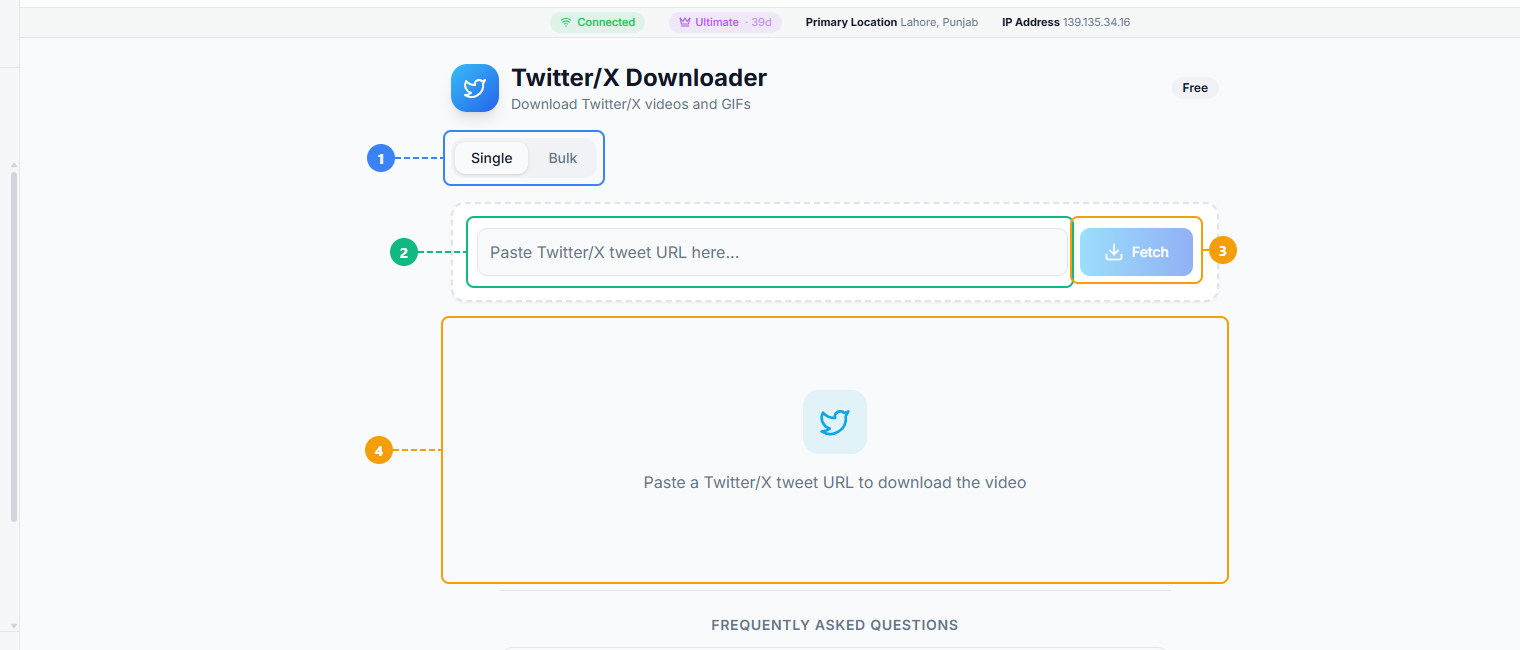
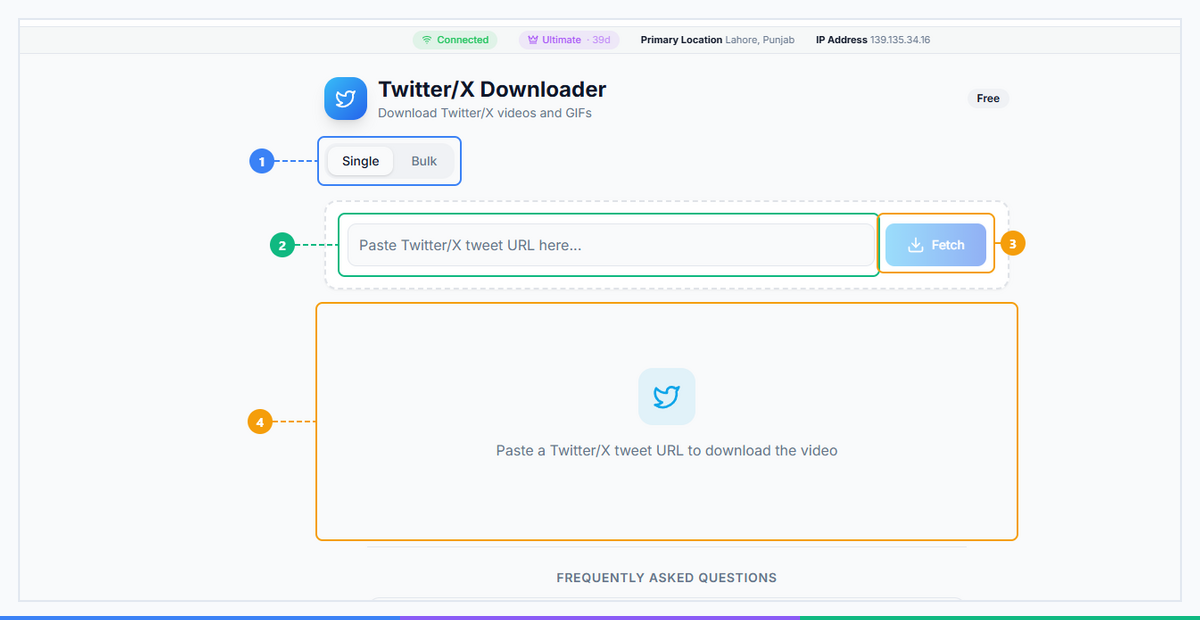
The Twitter/X Downloader provides a clean two-step interface. Switch between Single and Bulk download modes (1), paste a tweet URL from twitter.com or x.com (2), click Fetch to extract the video (3), and view the download results with quality options and MP4 download links (4).
How Twitter/X Downloader Works (3 Steps)#
The process takes less than 30 seconds from finding the tweet to having the file on your device.
Step 1: Copy the Tweet URL#
On mobile: Open the tweet in the X app, tap the share icon (the arrow at the bottom right), then tap Copy Link. This copies the full URL to your clipboard.
On desktop: Navigate to the tweet in your browser. Copy the URL from the address bar. Both formats work:
https://x.com/username/status/1234567890https://twitter.com/username/status/1234567890
The tool accepts either format automatically — no need to convert between them.
Step 2: Paste and Process#
Open the Twitter/X Downloader tool and paste the URL into the input field. Click Download or Process. The tool contacts X's servers, identifies all available quality levels for that tweet's video, and presents them to you.
Processing typically takes 3–7 seconds. If a tweet contains no video (images-only or text-only tweets), the tool will return a clear error message.
Step 3: Select Quality and Download#
Choose your preferred resolution from the quality options presented — usually 480p, 720p, or 1080p depending on what X has encoded for that video. Click the quality you want to trigger the MP4 download to your device.
A note on GIFs: When you download a Twitter GIF through this tool, it arrives as an MP4 file, not a .gif file. This is intentional — the MP4 version is significantly sharper, has no color banding, and takes up less storage space. If you specifically need a .gif file for a particular use case, you can convert the downloaded MP4 using any free video-to-GIF converter after downloading.
Ready to save your first Twitter video? Try Twitter/X Downloader free on FaceBot — no login, no install, works in your browser right now.
What Can You Download from Twitter/X?#
Not everything on X is downloadable through video extraction. Here's the full breakdown:
| Content Type | Supported? | Output Format | Notes |
|---|---|---|---|
| Video tweets | Yes | MP4 | Up to 1080p depending on original upload |
| Twitter GIFs | Yes | MP4 | Higher quality than native GIF format |
| Multi-image tweets | No | N/A | Right-click individual images to save |
| Twitter Spaces (audio) | No | N/A | Requires third-party Spaces recorder |
| Profile pictures | No | N/A | Right-click → Open Image in New Tab works |
| Pinned video tweets | Yes | MP4 | Treated identically to regular video tweets |
| Embedded YouTube videos | No | N/A | Use YouTube Downloader instead |
| Live video (ongoing) | No | N/A | Must wait until stream ends and archives |
If a tweet contains a video natively hosted on X's servers, the downloader will work. If the "video" is actually an embedded link to YouTube, Vimeo, or another platform, you'll need that platform's respective downloader.
Who Should Use Twitter/X Downloader?#
Four groups rely on this tool more than anyone else:
Journalists and researchers. News moves at the speed of a tweet. When footage of a significant event surfaces on X, there's no guarantee it stays up. Journalists routinely download clips immediately after finding them to ensure they have the source material regardless of what happens to the original post. Researchers documenting social media behavior for academic or legal purposes follow the same protocol. For guidance on what's permitted, see our guide on download legality.
Marketers and brand strategists. Saving competitor campaigns, tracking how viral content performs, and collecting reference material for creative briefs are all everyday tasks. A local library of saved clips is searchable and accessible without depending on X's algorithm or account availability.
Content curators. People who run newsletter digests, YouTube commentary channels, or social media aggregation accounts regularly save clips to review, analyze, and reference. Downloading is faster and more reliable than embedding or bookmarking.
Documentarians and archivists. Internet historians, educators, and preservation advocates use video downloaders to build permanent records of culturally significant moments. Relying solely on the live platform means accepting that anything can disappear at any time.
Twitter/X Downloader vs. Alternatives#
| Method | Download Quality | Speed | Ads/Friction | Works in 2026? |
|---|---|---|---|---|
| X Premium subscription | No video download feature | — | Paid subscription | N/A |
| Screen recording | Lossy, no audio sync guarantee | Slow (real-time) | None | Yes, but poor quality |
| twdownload.com / ssstwitter | Decent | Fast | Heavy ads, redirect chains | Inconsistent |
| Browser extensions | Variable | Fast when working | Install required, break with X updates | Often broken |
| FaceBot Twitter/X Downloader | HD MP4, GIF support | Fast | None | Yes |
Browser extensions are the most common alternative, but they're also the most fragile. X regularly updates its frontend, and extensions that hook into page structure or API calls break without warning and sit unupdated until someone pushes a fix. A web-based tool that processes server-side has no extension to break.
Understanding Twitter/X Video Quality#
X caps video quality at 1080p for most accounts. The downloader retrieves the highest quality available for each tweet — it cannot exceed what X provides.
Here's what to expect:
- Recent tweets (2022–present): 720p is almost always available; 1080p is common for verified and Premium accounts.
- Older tweets (pre-2020): 480p may be the maximum, reflecting lower upload standards at the time.
- GIFs: Downloaded as MP4 for better quality. MP4 is sharper and smaller than the traditional GIF format — X stores GIFs this way internally.
If the tool presents multiple quality options, start with the highest one. You can always delete and re-download at a lower resolution if file size is a concern, but you can't recover quality you didn't save.
Pro Tips for Getting the Most Out of Twitter/X Downloader#
-
Both URL formats work interchangeably. Whether you copy a link from the X app (which generates
x.comURLs) or from an older bookmark (which usestwitter.com), the downloader handles both. No need to manually swap domains. -
Always prefer MP4 for GIFs. When you download a Twitter GIF, it arrives as MP4 — keep it that way. MP4 has no color limit (GIF is restricted to 256 colors), no banding, and significantly smaller file sizes for equivalent duration.
-
For tweet threads with multiple videos, download each separately. The downloader works on individual tweet URLs. If a thread has five posts with five separate videos, you'll need to copy the URL for each tweet individually. The status ID changes with each tweet in a thread.
-
Check if the "video" is actually embedded. If the tweet shows a video with a YouTube or Vimeo logo, the video isn't hosted on X — it's an embedded player. In that case, use the YouTube Downloader or the appropriate platform's tool instead. The Twitter/X Downloader will return an error because there's no X-hosted video to extract.
-
For bulk Twitter archiving, use Bulk Downloader. If you need to save dozens or hundreds of videos from an account or search result, individual downloads aren't practical. The Bulk Downloader handles batch operations and can process multiple URLs in a single session. If you also download from other platforms, the Facebook Video Downloader and TikTok Downloader follow the same easy workflow.
Download Twitter videos in HD — free, instant, no account needed. Open Twitter/X Downloader on FaceBot and paste your first tweet URL right now.
Frequently Asked Questions#
Is Twitter/X Downloader free?#
Yes, Twitter/X Downloader on FaceBot is completely free to use. There's no subscription, no account creation, and no per-download fee. You paste a tweet URL, select your quality, and download the MP4 directly to your device. Free-tier users get a generous daily download limit — more than enough for casual use. Paid plans are available if you need higher volume or access to additional downloader tools.
Can I download GIFs from Twitter?#
Yes, and the result is actually better than downloading a native GIF file. Twitter stores GIFs as MP4 videos internally and streams them through the same pipeline as regular video tweets. When you run a GIF tweet URL through the downloader, you receive an MP4 file that's sharper, smaller, and more compatible with modern apps than a traditional GIF. If you need a .gif file specifically, you can convert the downloaded MP4 using any free converter tool afterward.
Does it work with both twitter.com and x.com URLs?#
Yes. Twitter rebranded to X in 2023, and the platform now uses x.com as the primary domain, but old twitter.com links still resolve to the same content. The downloader accepts both URL formats without any manual conversion on your part. If you have a bookmark saved from 2021 using a twitter.com/status/... link, it will work exactly the same as a new x.com/status/... URL.
Can I download Twitter videos on iPhone?#
Yes, with one extra step. After the MP4 file is ready, tap the download button — on iOS, this typically opens the file in a browser preview rather than saving automatically. Tap the share icon and choose Save to Files or Save Video (if it recognizes the file as a video) to store it to your Camera Roll or Files app. Some iOS browsers like Firefox or Chrome handle direct video downloads more smoothly than Safari. If you have trouble, try switching browsers.
Is it legal to download Twitter videos?#
Generally, downloading Twitter videos for personal, private use — archiving news content, saving your own posts, preserving documentation — falls within fair use in most jurisdictions. However, downloading copyrighted content (music videos, film clips, professional sports footage) and redistributing or monetizing it is a different matter entirely and is prohibited by copyright law. Always check the terms of the content you're downloading. If you're a journalist or researcher using content for documentation or analysis, fair use protections typically apply, but consult your organization's legal team for specific guidance.
Can I download Twitter Spaces audio?#
Not with this tool. Twitter/X Downloader is specifically built for video and GIF content hosted on X's video infrastructure. Spaces audio is delivered through a separate streaming system with different infrastructure. Downloading Spaces recordings requires a dedicated Spaces recorder tool. Some third-party services specialize in this, though availability changes frequently as X updates the Spaces platform.
Conclusion#
A twitter video downloader fills a genuine gap that X has never addressed natively: the ability to save video content you find on the platform as a local file. Whether you're a journalist archiving breaking news, a marketer building a reference library, or just someone who wants to keep a funny GIF without hoping the account stays active, the process is the same — copy the tweet URL, paste it in, pick your quality, download the MP4.
For a broader look at how content downloading works across platforms, see our complete guide to downloading social media content. If you're also downloading YouTube content, the YouTube Downloader covers that in detail. And be sure to check our guide on download legality to understand when and how you can use downloaded content responsibly. If you also need to save videos from other networks, the TikTok Downloader and Facebook Video Downloader follow the same simple workflow. Start downloading Twitter/X videos now →
Published by FaceBot | Category: Downloaders | Last updated: May 2026